I need to create a local repository in RHEl 5.5. i386
Because when I type some command in terminal it say that RHEL is not subscribed with RHN which is true. I took it from friend.
So can someone tell me how to achieve this target.
Further Actions based on Warl0ck instructions.
- I copied the RPM’s from Mdia to /home/Umair/RPM folder
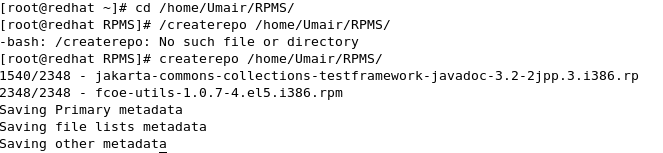
- I installed the script createrepo-0.4.11-i386.el5.noarch.rpm located
in Server directory of Installation Media.
Then it took some time to generate metadata. Total Packages 2348
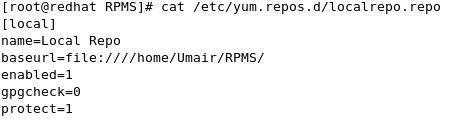
- Then I create the local repo file using vi
vi /etc/yum.repos.d/local.repo
These are the entries I added.
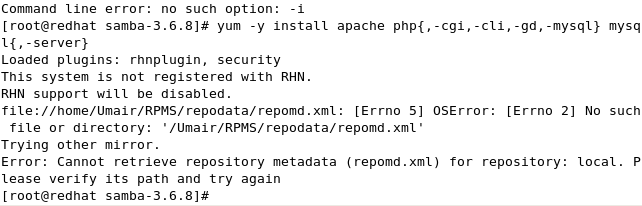
And finally i run this command
yum -y install apache php{,-cgi,-cli,-gd,-mysql} mysql{,-server}
and in reply bash slapped me with error
Answers:
Thank you for visiting the Q&A section on Magenaut. Please note that all the answers may not help you solve the issue immediately. So please treat them as advisements. If you found the post helpful (or not), leave a comment & I’ll get back to you as soon as possible.
Method 1
There’re plenty of documents out there, given a set of RPM packages, you could do something like this,
First install the createrepo script, by
rpm -ivh /path/to/mounted/cdrom/createrepo*.rpm (Depends where you mounted your RedHat DVD)
Now create a folder to hold all RPMS that you want to be in the repository, e.g RPMS, and put the needed “*.rpm” files inside,
Then do createrepo /path/to/RPMS to generate metadata.
When finished, add the repository to your yum config, e.g put the following to /etc/yum.repos.d/local.repo
[local]
name=Local Repository Demo
baseurl=file:///absolute/path/to/RPMS
enabled=1
gpgcheck=0
protect=1
Method 2
The first thing you need to do is:
Either (not both) of:
- Pay for a Red Hat subscription for the machine.
- Convert the system to CentOS.
Then you should find that you are able to access software and complete your task.
Method 3
-
Install create repo
# cd /media/(dvd-label)
# cd /Packages
# rpm -ivh createrepo*.rpm
-
Copy all contents from dvd or just the packges
- If whole dvd is copied, no need to run
createrepo. Because repository is inbuilt in dvd. (To check, see if there is a repodata directory) -
If package dir is only copied, run
# createrepo <dir where the packages are copied>
- If whole dvd is copied, no need to run
-
Create yum repo file:
vim dvd.repo
[packages]
name=packages
baseurl=file://<dir where the packages are copied>
enabled=1
gpgcheck=0
+++++++++++++++++++++++++++++++++++++++++
[packages] -- Give a name, any name
name=packages -- description for above
baseurl       -- location where rpms are available
enabled=1     -- to enable this repo
gpgcheck=0    -- not to check for GPG license file
All methods was sourced from stackoverflow.com or stackexchange.com, is licensed under cc by-sa 2.5, cc by-sa 3.0 and cc by-sa 4.0