I know that I could delete the last three chars with:
echo -ne 'bbb'
But how can I delete a full line? I mean I don’t want to use:
echo -ne 'bbbbbbbbbbbbbbbbbbbbbbbbbbbbbbbbbbbbbbbbbbbbbbbbbbbbbbbbbbbbbbbbbbbbbbbbbbbbbbbbbbbbbbbbbbbbbbbbbbbbbbbbbbbbbbbbbbbbbbbbbbbbbbbbbbbbbbbbbbbbbbbbbbbbbbbbbbbbbbbbbbbbbbbbbbbbbbbbbbbbbbbbbbbbbbbbbbbbbbbbbbbbbbbbbbbbbbbbbbbbbbbbbbbbbbbbbbbbbbbbbbbbbbbbbbbbbbbbbb'
…etc… to delete a long line.
Answers:
Thank you for visiting the Q&A section on Magenaut. Please note that all the answers may not help you solve the issue immediately. So please treat them as advisements. If you found the post helpful (or not), leave a comment & I’ll get back to you as soon as possible.
Method 1
You’re looking for terminal escapes. In particular, to clear from the cursor position to the beginning of the line:
echo -e "33[1K"
Or everything on the line, regardless of cursor position:
echo -e "33[2K"
And you can do all sorts of other neat tricks with terminal escapes too.
Method 2
You can use b or r to move the cursor back and then overwrite the printed character with a new character. Note that neither b nor r deletes the printed characters. It just moves the cursor back. b moves the cursor back one character and r moves the cursor to the beginning of the line.
Example: both
echo -e 'foooobbbbbbar'
and
echo -e 'foooorbar'
will print:
baroo
If you want the characters deleted then you have to use the following workaround:
echo -e 'fooooor rbar'
output:
bar
Excerpt from man echo:
   If -e is in effect, the following sequences are recognized:

   NNN  the character whose ASCII code is NNN (octal)

   \     backslash

   a     alert (BEL)

   b     backspace

   c     produce no further output

   f     form feed

   n     new line

   r     carriage return

   t     horizontal tab

   v     vertical tab

   NOTE: your shell may have its own version of echo, which usually super‐
   sedes the version described here.  Please refer to your  shell's  docu‐
   mentation for details about the options it supports.
Method 3
If you want to clear the line, then I suggest you use a combination of the carriage return people are mentioning and terminfo.
# terminfo clr_eol
ceol=$(tput el)
echo -ne "xyzzyxyzzyr${ceol}foobar"
This will write xyzzyxyzzy, then return to the beginning of the line and send the “clear to end of line” sequence to the terminal, then write foobar. The -n makes echo not add a newline after the foobar.
Method 4
Here’s an example using echo’s no newline -n and carriage return r options.
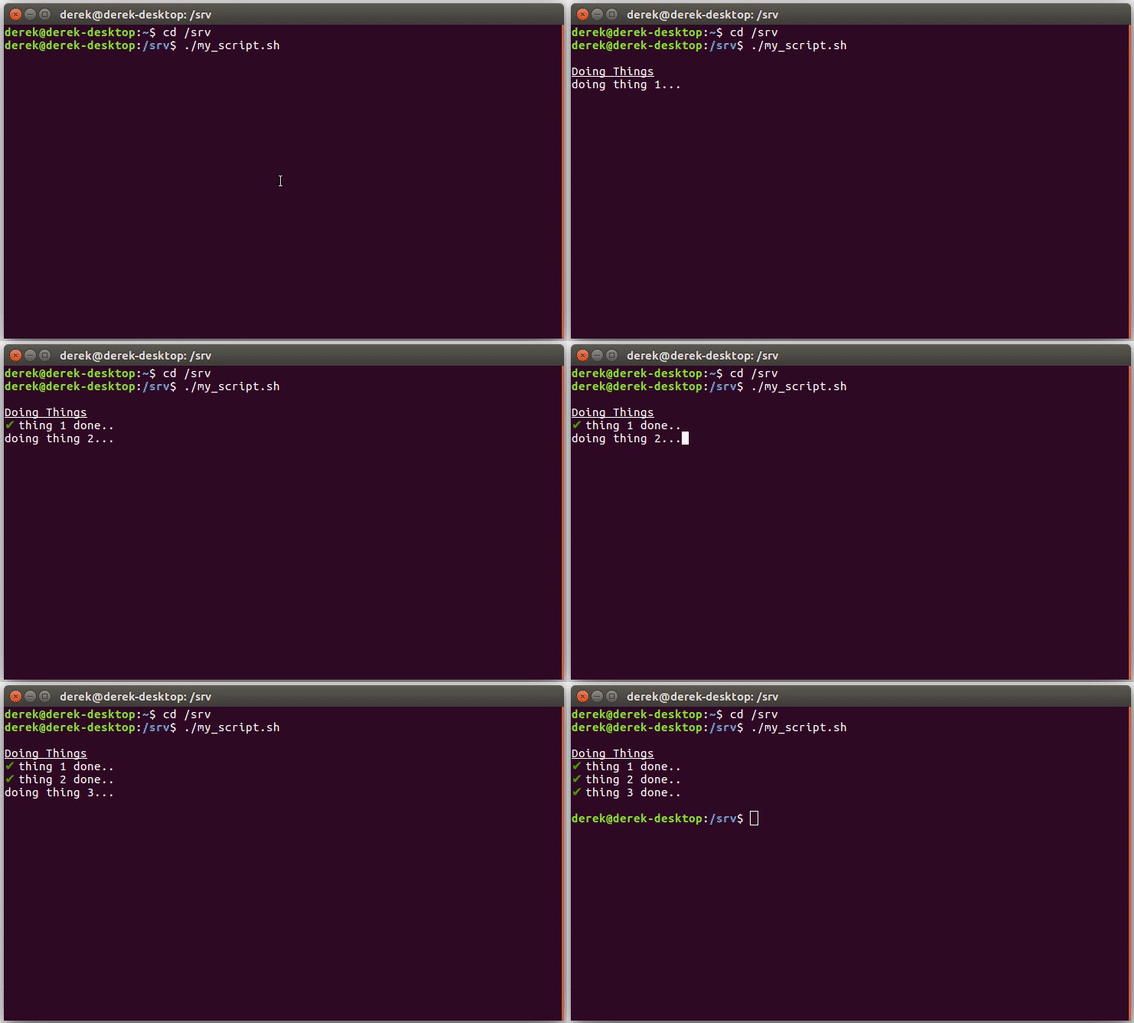
#!/bin/bash

CHECK_MARK="33[0;32mxE2x9Cx9433[0m"

echo -e "ne[4mDoing Thingse[0m"
echo -n "doing thing 1..."
sleep 1
echo -e "\r${CHECK_MARK} thing 1 done"
Method 5
You explicitly ask for echo, but this request pins you down. Here’s an approach that uses bash’s builtin printf command with brace expansion:
printf 'fooooooooo' # 10 characters
printf 'r'; printf ' %0.s' {0..9} # 10 expansions of the space character
Method 6
Instead of echo -en "r" you might also find the printf "r" command as useful. This way you can format the string. e.g.:
for sec in {1..100}; do printf "r %04d" ${sec}; sleep 0.1; done
I usually do that as well when operating with slow file parsing to display the filename currently in progress without creating a list
Method 7
As question is delete the full line
I have used below command with combination of echo and sed to delete line
After execution of command result will be empty.since while line will be replaced with none
command
echo "bbbbbbbbbbbbbbbbbbbbbbbbbbbbbbbbbbbbbbbbbbbbbbbbbbbbbbbbbbbbbbbbbbbbbbbbbbbbbbbbbbbbbbbbbbbbbbbbbbbbbbbbbbbbbbbbbbbbbbbbbbbbbbbbbbbbbbbbbbbbbbbbbbbbbbbbbbbbbbbbbbbbbbbbbbbbbbbbbbbbbbbbbbbbbbbbbbbbbbbbbbbbbbbbbbbbbbbbb" | sed -r "s/.*//g"
Method 8
Here is a countdown timer example I use:
i=10
while [ $i -gt 0 ];
do
  printf "$i seconds remaining       " && printf 'r33[1B'
  i=`expr $i - 1`
  sleep 1
  printf '33[1A'
done
All methods was sourced from stackoverflow.com or stackexchange.com, is licensed under cc by-sa 2.5, cc by-sa 3.0 and cc by-sa 4.0