Is there an equivalent of the Window’s Print Screen + Paste (or better yet the Mac OS Cmd+Shift+4, Space) in Gnome?
Answers:
Thank you for visiting the Q&A section on Magenaut. Please note that all the answers may not help you solve the issue immediately. So please treat them as advisements. If you found the post helpful (or not), leave a comment & I’ll get back to you as soon as possible.
Method 1
Shift+PrtScrn will do the job. A dialog appears on screen allowing you to select any part of it.
Method 2
Gnome should have screenshot abilities built already in.

However, the default trigger is the Print key, which your keyboard may lack. You can remap this shortcut with gnome-keybinding-properties.

Method 3
There are tons. I personally use import, from ImageMagick. It has the ability to capture the whole screen, a given window, or to let you select an area of the screen and just capture that
Specific area
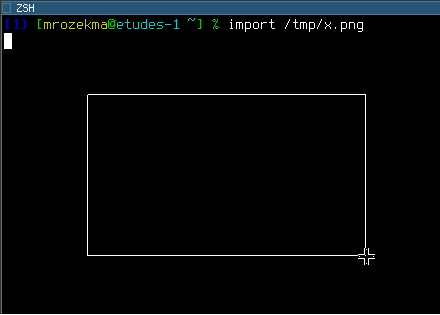
$ import /path/to/output.png
import will let you draw an area with the mouse to capture:
Individual window
First you need to find out the X window ID:
$ xdpyinfo | grep focus
focus:  window 0x3000006, revert to Parent
Then you can run import:
$ import -window 0x3000006 /path/to/output.png
You can also run import /path/to/output.png like when taking a screenshot of a specific area, and when it pauses to let you draw the area with your mouse, click on the target window.
Whole screen
Use root for the window ID:
$ import -window root /path/to/output.png
You can use xbindkeys to bind those commands to the Print Screen key; I use a script called screenshot, so my configuration looks like:
"screenshot root"
m:0x0 + c:107

"screenshot window"
m:0x8 + c:107
Method 4
Just wrote this small interface to xwd, to make it wait the provided number of seconds before it takes the dump. It seems to work.
dumptime () {
  (sleep $1; xwd -root | convert - `date +%I.%M.%S`.png) &
}
Also, there are scrot and gnome-screenshot.
The ImageMagick import solution in Mr. Mrozek’s answer has a famous “black box” bug on -window root – not everyone gets it, but I do.
According to this, gnome-screenshot is based on ImageMagick – but it is not a wrapper; I just browsed the code, and it is a big C application.
Method 5
Hit print screen and if gnome is setup correctly, a screenshot utility will pop up.
All methods was sourced from stackoverflow.com or stackexchange.com, is licensed under cc by-sa 2.5, cc by-sa 3.0 and cc by-sa 4.0