I wanted to have a go at creating my very own Linux Distribution. Could you suggest some nice and easy-to-follow tutorials (preferably text based and not videos).
I have heard something about Arch Linux but I don’t know how to go from there. What do I need?
Answers:
Thank you for visiting the Q&A section on Magenaut. Please note that all the answers may not help you solve the issue immediately. So please treat them as advisements. If you found the post helpful (or not), leave a comment & I’ll get back to you as soon as possible.
Method 1
Take a look on Linux From Scratch, LFS they have a tutorial which teaches you how to build your own Linux System, once you understood that you can select a package manager and a set of packages hence creating your own distro.
A thing to make the answer a bit more complete, ArchLinux is a Linux Distribuition which uses almost 100% vanilla packages. This means almost no patching is done by the distro mantainers. Also it does not have a default set of packages as *buntu distros do.
These characteristics make Arch a very customizable distro. It is your “own distro” in the sense that it is your own setup. But not as in LFS where it is your own kernel, modules, packages…
Method 2
The Yocto Project is a “distribution builder”.
There is extensive documentation and a graphical builder, called Hob.
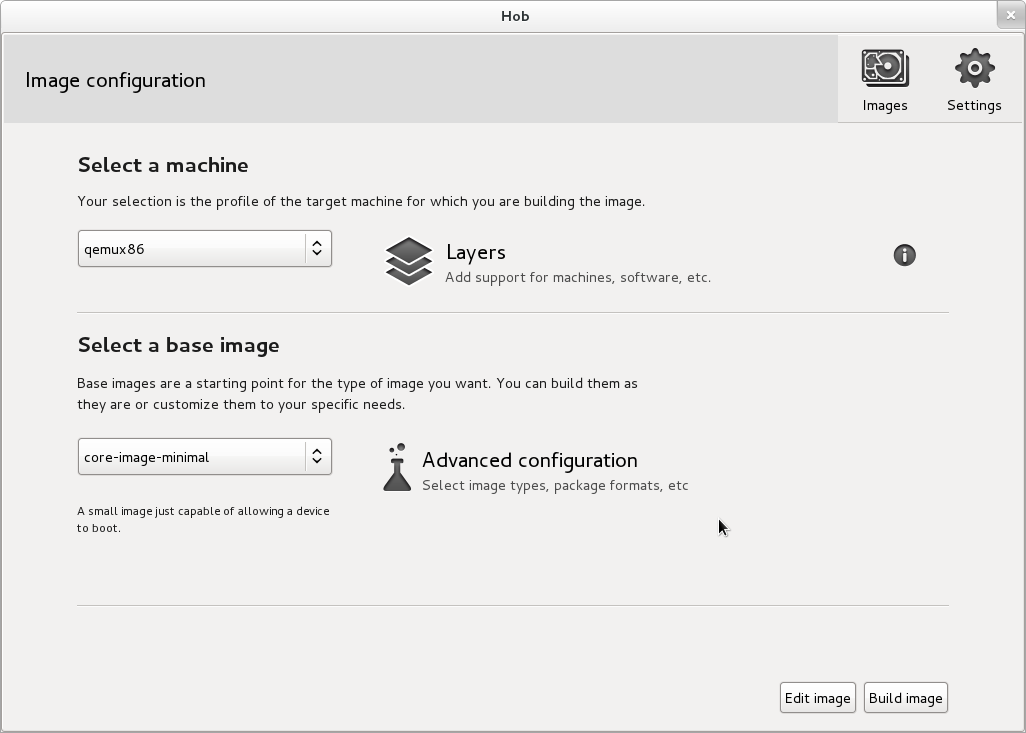
Update as of 2017
According to the Yocto website the Hob project is being deprecated and the replacement is called Toaster.
Method 3
Part of the answer depends on what you mean by your own distro. if you mean a version of Linux custom built to your own purposes for you to use on your own machines, or even in your own office, there are a couple of pretty cool tools that allow you to customize existing distributions that are known working.
http://www.centos.org/docs/5/html/Installation_Guide-en-US/ch-kickstart2.html covers kickstart installations of CentOS (also applies to Scientific, Fedora and RedHat.) There’s also http://susestudio.com/ which allows you to make a customized installation disk of SuSe Linux, meaning you can get the packages you want installed right off the bat. The advantage to this method, more so with the kickstart, is that you can choose individual packages and leave out whatever fluff you don’t want to bother with, but also get the advantages of knowing that updated packages will be available to you and work without a significant amount of testing and overhead on your part.
If you’re just looking to make it look the way you want to look, custom splash screens, logos, etc, there are a ton of guides available for making these kinds of changes.
Now, if you really just want to get nuts and bolts and really do up your own thing, then the suggestion by @vfbsilva to look at LFS is irreplaceable. You really do learn how things get put together and what the requirements are to make Linux … well, Linux. However, doing this a couple of times was just enough for me personally to realize I didn’t want to have to deal with rebuilding every package that had a security update released on a weekly basis. 🙂
Method 4
You can follow LFS (http://www.linuxfromscratch.org/) to create a new linux distro from scratch.
But I advice you create a new linux distro base on an exist linux distro.This will save you much time!
You can customize Debian or Ubuntu to create your linux distro.
The key of customize Debian or Ubuntu is preseed file.
Pleas take a look at:
https://help.ubuntu.com/community/LiveCDCustomization
https://help.ubuntu.com/lts/installation-guide/i386/appendix-preseed.html
https://wiki.debian.org/DebianInstaller/Preseed
Of course you can customize Fedora etc.But I am not good at customizing those linux distros.
Method 5
Need to knows:
- I am using TinyCoreLinux for this example.
Sorry if I’m replying to a really old thread, But there is a way to do this (and I prefer doing this too.) - Please put comments
- These Ubuntu-named packages are required:
qemu-system,qemu,qemu-efi,qemu-kvm,wget, andp7zip-full - Your Distro will be in a zipped file, not an ISO but you can deploy it to a Sd-Card or a Usb stick
Step-by-step instructions
-
Download TinyCoreLinux rootfs:
wget -O tinycore.gz http://tinycorelinux.net/9.x/x86_64/release/distribution_files/rootfs64.gz -
Extract rootfs using p7zip:
7z x tinycore.gz mkdir -p linux/tinycore 7z x tinycore -olinux/tinycore rm tinycore.gz tinycore -
Put Linux into image (
abcdoes not need to be replaced)dd if=/dev/zero of=MyLinux.img bs=1M count=384 status=progress mkfs.vfat MyLinux.img sudo mount MyLinux.img /mnt cd linux/tinycore sudo cp * /mnt -rv cd .. sudo umount /mnt -
Create Virtual Machine with snapshot (IMPORTANT!)
If you don’t create a virtual machine, it may be hard to delete the chroot. It sayspermission deniedand you needrecovery mode.
The Virtual Machine can be any Debian based distro. It can also be TinyCore. You just need an up-to-date kernel.qemu-img create -f qcow2 customizer.qc2 16G sudo qemu-system-x86_64 -cdrom /path/to/iso/for/building.iso -hda customizer.qc2 -boot menu=on -m 1536 --enable-kvm -hdb MyLinux.qc2
Now you need to run the commands in the Virtual Machine!
-
Chroot into system (
xyzdoes not need to be replaced)sudo mount /dev/sdb /mnt/xyz sudo chroot /mnt/xyz -
Install packages, customize filesystem
tce-load -wi packages.tcz to.tcz install.tcz -
Shut down virtual machine, now run commands on host
sudo poweroff -
Create zip file of OS
sudo mount MyLinux.img /mnt cd /mnt mkdir ~/linuximage sudo cp -r * -v ~/linuximage sudo chown $(whoami):$(whoami) ~/linuximage --recursive sudo chmod 777 ~/linuximage --recursive cd ~/linuximage zip -r ~/mylinuxdistro.zip . cd - Distribute and share!
Method 6
You may also be interested in taking a look at creating Fedora “spins”: http://fedoraproject.org/wiki/How_to_create_and_use_a_Live_CD
All methods was sourced from stackoverflow.com or stackexchange.com, is licensed under cc by-sa 2.5, cc by-sa 3.0 and cc by-sa 4.0