I have a program that dumps a lot of output, and I want some of that output to really stand out. One way could be to render important text with ascii art, like this web service does for example:
 #    #   ##   #####  #    # # #    #  ####
 #    #  #  #  #    # ##   # # ##   # #    #
 #    # #    # #    # # #  # # # #  # #
 # ## # ###### #####  #  # # # #  # # #  ###
 ##  ## #    # #   #  #   ## # #   ## #    #
 #    # #    # #    # #    # # #    #  ####
other solutions could be colored or bold output. So how to do this sort of stuff easily in Python?
Answers:
Thank you for visiting the Q&A section on Magenaut. Please note that all the answers may not help you solve the issue immediately. So please treat them as advisements. If you found the post helpful (or not), leave a comment & I’ll get back to you as soon as possible.
Method 1
-
pyfiglet – pure Python implementation of http://www.figlet.org
pip install pyfiglet
-
termcolor – helper functions for ANSI color formatting
pip install termcolor
-
colorama – multiplatform support (Windows)
pip install colorama
import sys

from colorama import init
init(strip=not sys.stdout.isatty()) # strip colors if stdout is redirected
from termcolor import cprint
from pyfiglet import figlet_format

cprint(figlet_format('missile!', font='starwars'),
       'yellow', 'on_red', attrs=['bold'])
Example
$ python print-warning.py
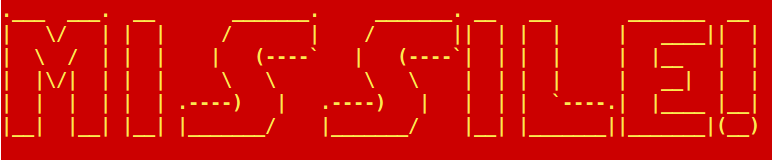
$ python print-warning.py | cat
.___  ___.  __       _______.     _______. __   __       _______  __
|   /   | |  |     /       |    /       ||  | |  |     |   ____||  |
|    /  | |  |    |   (----`   |   (----`|  | |  |     |  |__   |  |
|  |/|  | |  |                       |  | |  |     |   __|  |  |
|  |  |  | |  | .----)   |   .----)   |   |  | |  `----.|  |____ |__|
|__|  |__| |__| |_______/    |_______/    |__| |_______||_______|(__)
Method 2
PIL gives a cool way to do this very simple.
You can render the text onto a b/w image and convert that bitmap to a string stream replacing the black and white pixels to chars.
from PIL import Image, ImageFont, ImageDraw

ShowText = 'Python PIL'

font = ImageFont.truetype('arialbd.ttf', 15) #load the font
size = font.getsize(ShowText)  #calc the size of text in pixels
image = Image.new('1', size, 1)  #create a b/w image
draw = ImageDraw.Draw(image)
draw.text((0, 0), ShowText, font=font) #render the text to the bitmap
for rownum in range(size[1]):
#scan the bitmap:
# print ' ' for black pixel and
# print '#' for white one
    line = []
    for colnum in range(size[0]):
        if image.getpixel((colnum, rownum)): line.append(' '),
        else: line.append('#'),
    print ''.join(line)
It renders the next result:
 #######                 ##                              #######   ##  ##
 ##   ###           ##   ##                              ##   ###  ##  ##
 ##    ##           ##   ##                              ##    ##  ##  ##
 ##    ## ##    ## ####  ######     ####    ######       ##    ##  ##  ##
 ##    ##  ##  ###  ##   ###  ##   ##  ##   ###  ##      ##    ##  ##  ##
 ##   ##   ##  ##   ##   ##   ##  ##    ##  ##   ##      ##   ##   ##  ##
 ######    ##  ##   ##   ##   ##  ##    ##  ##   ##      ######    ##  ##
 ##         ## #    ##   ##   ##  ##    ##  ##   ##      ##        ##  ##
 ##         ####    ##   ##   ##  ##    ##  ##   ##      ##        ##  ##
 ##         ####    ##   ##   ##   ##  ##   ##   ##      ##        ##  ##
 ##          ##     ###  ##   ##    ####    ##   ##      ##        ##  ########
             ##
             ##
           ###
         ##
       ###
I made a little more comprehensive example with functional style.
import Image, ImageFont, ImageDraw

ShowText = 'Python PIL'


font = ImageFont.truetype('arialbd.ttf', 15) #load the font
size = font.getsize(ShowText)  #calc the size of text in pixels
image = Image.new('1', size, 1)  #create a b/w image
draw = ImageDraw.Draw(image)
draw.text((0, 0), ShowText, font=font) #render the text to the bitmap

def mapBitToChar(im, col, row):
    if im.getpixel((col, row)): return ' '
    else: return '#'

for r in range(size[1]):
    print ''.join([mapBitToChar(image, c, r) for c in range(size[0])])
Method 3
This is fun. I’ve figured out how to use PIL (the “Pillow” fork, of course) and Numpy to do this fully “vectorized”, i.e. without loops:
text = "Hi there"
from PIL import Image, ImageDraw, ImageFont
import numpy as np
myfont = ImageFont.truetype("verdanab.ttf", 12)
size = myfont.getsize(text)
img = Image.new("1",size,"black")
draw = ImageDraw.Draw(img)
draw.text((0, 0), text, "white", font=myfont)
pixels = np.array(img, dtype=np.uint8)
chars = np.array([' ','#'], dtype="U1")[pixels]
strings = chars.view('U' + str(chars.shape[1])).flatten()
print( "n".join(strings))
           ##           ##
 ##    ##  ##      ##   ##
 ##    ##          ##   ##
 ##    ##  ##     ##### #####    ####   ## ##  ####
 ##    ##  ##      ##   ##  ##  ##  ##  ##### ##  ##
 ########  ##      ##   ##  ##  ##  ##  ##    ##  ##
 ##    ##  ##      ##   ##  ##  ######  ##    ######
 ##    ##  ##      ##   ##  ##  ##      ##    ##
 ##    ##  ##      ##   ##  ##  ##   #  ##    ##   #
 ##    ##  ##       ### ##  ##   ####   ##     ####
All methods was sourced from stackoverflow.com or stackexchange.com, is licensed under cc by-sa 2.5, cc by-sa 3.0 and cc by-sa 4.0