I need to extend the LVM on one server. This is the output of df -h:
Filesystem            Size  Used Avail Use% Mounted on
/dev/cciss/c0d0p2      58G   26G   29G  48% /
/dev/mapper/VolGroup00-LogVol00
                      476G   86G  366G  19% /u001/app/oracle
/dev/cciss/c0d0p1     487M   17M  445M   4% /boot
tmpfs                  16G  730M   16G   5% /dev/shm
And I need to extend /dev/mapper/VolGroup00-LogVol00 from 475G to 700G. I have enough space to do this.
Any suggestions? Please mention all steps and prerequisites
Further Details
Before I go and apply this on actual server. I first plan to do this on a virtual machine. So I installed 5.6 on VirtualBox and assigned 25GB for installation.
df -h result:
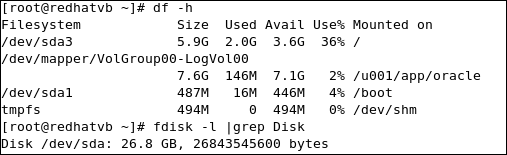
And when I used the command
lvextend -L +500M /dev/mapper/VolGroup00-LogVoll00
its reply was “insufficient space”.
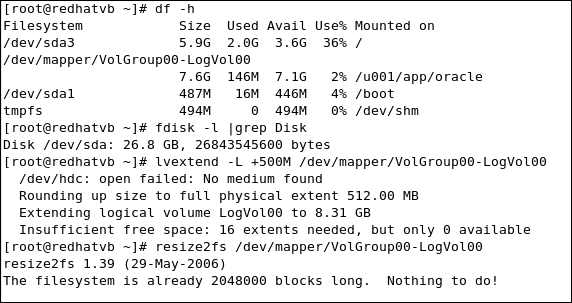
Although there is uninitialized space ready to be used.
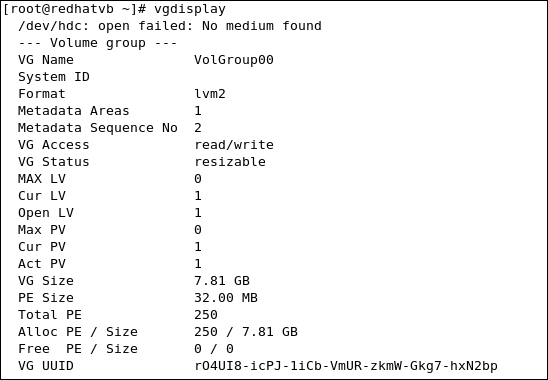
Seems it didn’t work. Please advice what’s wrong here.
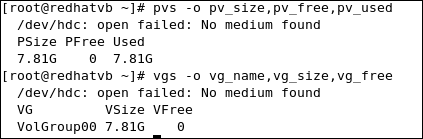
Output of vgs and pvs commands
Answers:
Thank you for visiting the Q&A section on Magenaut. Please note that all the answers may not help you solve the issue immediately. So please treat them as advisements. If you found the post helpful (or not), leave a comment & I’ll get back to you as soon as possible.
Method 1
First of all, check that you really have already space on your VG. In your example “Free PE” is 0, so you cannot extend any LV in it. If you do not have space on that VG, please add create new PEs with command pvcreate and add them to VG with command vgextend. Once you have enough space, just estend your LV with command lvextend and then resize your file system.
Method 2
first make sure required size available or not on your physical volume using :
$ vgs
then try below to extend:
$ lvextend –L +500M /dev/mapper/VolGroup00-LogVol00
$ resize2fs /dev/mapper/VolGroup00-LogVol00
All methods was sourced from stackoverflow.com or stackexchange.com, is licensed under cc by-sa 2.5, cc by-sa 3.0 and cc by-sa 4.0