I have always found it difficult to find information about the system itself in Unix, whether it be
- Which OS I am using (version number and all, to compare it with the latest available builds)?
- Which Desktop Environment am I using? If I am using KDE, most of the programs begin with a K and I can say I am using KDE, but there should be some way to query this, say from a script.
- Which kernel version am I using? (For example, I am using Fedora, and I want to know what Linux kernel version I am using)
Basically, what I miss is a single point/utility that can get all this information for me. Most of the times the solutions to the above would themselves be OS specific. Then, you are stuck.
Answers:
Thank you for visiting the Q&A section on Magenaut. Please note that all the answers may not help you solve the issue immediately. So please treat them as advisements. If you found the post helpful (or not), leave a comment & I’ll get back to you as soon as possible.
Method 1
In addition to uname -a, which gives you the kernel version, you can try:
lsb_release -idrc # distro, version, codename, long release name
Most Desktop Environments like GNOME or KDE have an “about” or “info” menu option that will tell you what you use currently, so no commandline needed there really.
Method 2
As @milk pointed out, you can use uname -a and that will tell you information on all the UNIXes I have access to. For example, on Linux:
Linux localhost 2.6.33.6-147.2.4.fc13.x86_64 #1 SMP Fri Jul 23 17:14:44 UTC 2010 x86_64 x86_64 x86_64 GNU/Linux
On FreeBSD:
FreeBSD localhost 6.3-RELEASE-p3-jc1 FreeBSD 6.3-RELEASE-p3-jc1 #2: Thu Aug 7 14:36:29 PDT 2008 <a href="https://getridbug.com/cdn-cgi/l/email-protection" class="__cf_email__" data-cfemail="592c2a3c2b19333830356e77333631373a3634293837303c2a773a3634">[email protected]</a>:/usr/obj/usr/src/sys/jail7 i386
On OpenSolaris:
SunOS localhost 5.11 snv_134 i86pc i386 i86pc
As far as the desktop environment question goes, you should be able to echo $DESKTOP_SESSION in KDE or GNOME and get back the right answer.
If you want to find out what distro you’re running, a cheater’s shortcut is to cat /etc/*-version /etc/*-release.
Method 3
To collect an information about a your system in Unix (GNU/Linux) you need known several useful commands.
Information about an operation system
$ lsb_release -idrc
Distributor ID: Debian
Description:    Debian GNU/Linux 8.6 (jessie)
Release:    8.6
Codename:   jessie
Information about a CPU architecture such as number of CPU’s, cores, CPU family model, CPU caches, threads, processor
$ lscpu
Architecture:          x86_64
CPU op-mode(s):        32-bit, 64-bit
Byte Order:            Little Endian
CPU(s):                2
On-line CPU(s) list:   0,1
Thread(s) per core:    1
Core(s) per socket:    2
Socket(s):             1
NUMA node(s):          1
Vendor ID:             GenuineIntel
CPU family:            6
Model:                 42
Model name:            Intel(R) Pentium(R) CPU B960 @ 2.20GHz
Stepping:              7
CPU MHz:               1416.335
CPU max MHz:           2200.0000
CPU min MHz:           800.0000
BogoMIPS:              4390.07
L1d cache:             32K
L1i cache:             32K
L2 cache:              256K
L3 cache:              2048K
NUMA node0 CPU(s):     0,1
Information about a kernel, a machine hardware name and an operating system
$ uname -a
Linux localhost 3.16.0-4-amd64 #1 SMP Debian 3.16.36-1+deb8u2 (2016-10-19) x86_64 GNU/Linux
Host name
$ hostname
localhost
Private IP address (ipv4 version) (I hidden last digits own IP as XX)
$ hostname -I
192.168.1.XX
Public IP address (ipv4 version) (need connected to the Internet)
$ dig +short myip.opendns.com @resolver1.opendns.com
91.202.144.118
Information about an system (hardware) (pared down)
$ sudo dmidecode -t system

System Information
    Manufacturer: Acer
    Product Name: Aspire E1-531G
    Version: V2.11
    Serial Number: NXM7BEU0013010B0EF1601
    UUID: 332A4CE1-CB4B-E211-87F5-20898452C545
    Wake-up Type: Power Switch
    SKU Number: Aspire E1-531G_064A_V2.11
    Family: Type1Family
Information about an processor (pared down)
$sudo dmidecode -t processor

Processor Information
    Socket Designation: U3E1
    Type: Central Processor
    Family: Pentium
    Manufacturer: Intel(R) Corporation
    ID: A7 06 02 00 FF FB EB BF
    Signature: Type 0, Family 6, Model 42, Stepping 7
    Flags:
        FPU (Floating-point unit on-chip)

        ********

        VME (Virtual mode extension)
    Version: Intel(R) Pentium(R) CPU B960 @ 2.20GHz
    Voltage: 1.1 V
    External Clock: 100 MHz
    Max Speed: 4000 MHz
    Current Speed: 2200 MHz
    Status: Populated, Enabled
    Upgrade: Socket rPGA988B
    L1 Cache Handle: 0x000B
    L2 Cache Handle: 0x000C
    L3 Cache Handle: 0x000D
    Serial Number: To Be Filled By O.E.M.
    Asset Tag: To Be Filled By O.E.M.
    Part Number: To Be Filled By O.E.M.
    Core Count: 2
    Core Enabled: 2
    Thread Count: 2
    Characteristics:
        64-bit capable
        Multi-Core
        Execute Protection
        Power/Performance Control
Desktop environment
A name of desktop environment keeping in the environment variable “DESKTOP_SESSION”. But if the environment variable “DESKTOP_SESSION” is “default” (as in my case), try getting a value from the environment variable “XDG_CURRENT_DESKTOP”.
$ echo $DESKTOP_SESSION
default
$ echo $XDG_CURRENT_DESKTOP
GNOME
For detect a version of desktop environment you need more efforts, because there has not built-in utilities. This command tested only my computer with the Gnome shell, but must work with other popular graphical desktop environment: KDE, Mate, Cinnamon, LXDE, Xfce.
$ pgrep -l "gnome|kde|mate|cinnamon|lxde|xfce" | egrep "-shell$" | awk '{print $2}' | xargs apt-cache show
Package: gnome-shell
Version: 3.14.4-1~deb8u1
Installed-Size: 6910
Maintainer: Debian GNOME Maintainers <<a href="https://getridbug.com/cdn-cgi/l/email-protection" class="__cf_email__" data-cfemail="56263d317b3138393b337b3b373f3822373f38332425163a3f25222578373a3f39223e783233343f373878392431">[email protected]</a>>
Architecture: amd64
Depends: gir1.2-clutter-1.0 (>= 1.17), gir1.2-glib-2.0 (>= 1.39.90-4~), gir1.2-gtk-3.0 (>= 3.8), gir1.2-mutter-3.0 (>= 3.14.4), gir1.2-networkmanager-1.0, gir1.2-soup-5
Recommends: gkbd-capplet, gnome-contacts, gnome-control-center, gnome-user-guide, unzip, gdm3 (>= 3.10.0.1-3~)
Conflicts: gnome-screensaver (<< 3.6)
Breaks: fglrx-driver (<< 1:11-10), gdm3 (<< 3.10.0.1-3~), gnome-control-center (<< 1:3.0), gnome-session (<< 3.0), gnome-tweak-tool (<< 3.5)
Description-en: graphical shell for the GNOME desktop
 The GNOME Shell provides core interface functions like switching
 windows, launching applications or see your notifications. It takes
 advantage of the capabilities of modern graphics hardware and
 introduces innovative user interface concepts to provide a
 delightful and easy to use experience. GNOME Shell is the defining
 technology of the GNOME 3 user experience.
Description-md5: 51a5a94e6b632e350489b7b8d27ab9fc
Homepage: http://live.gnome.org/GnomeShell
Tag: implemented-in::c, implemented-in::ecmascript, interface::x11,
 role::program, uitoolkit::gtk
Section: gnome
Priority: optional
Filename: pool/main/g/gnome-shell/gnome-shell_3.14.4-1~deb8u1_amd64.deb
Size: 637652
MD5sum: 183a6bdcd8b34c6a56c09add66301d4a
SHA1: a11964152940a4a70e3d9ce93a6f21bb0a661379
SHA256: ff2ce3aa442012971ba5526f488568bbde6d53a8dbb71b95a587792e903033e3
Information about a screen
$ xrandr --current
Screen 0: minimum 320 x 200, current 1366 x 768, maximum 8192 x 8192
LVDS1 connected primary 1366x768+0+0 (normal left inverted right x axis y axis) 344mm x 194mm
   1366x768      60.00*+
   1360x768      59.80    59.96
   1024x768      60.00
   800x600       60.32    56.25
   640x480       59.94
VGA1 disconnected (normal left inverted right x axis y axis)
HDMI1 disconnected (normal left inverted right x axis y axis)
DP1 disconnected (normal left inverted right x axis y axis)
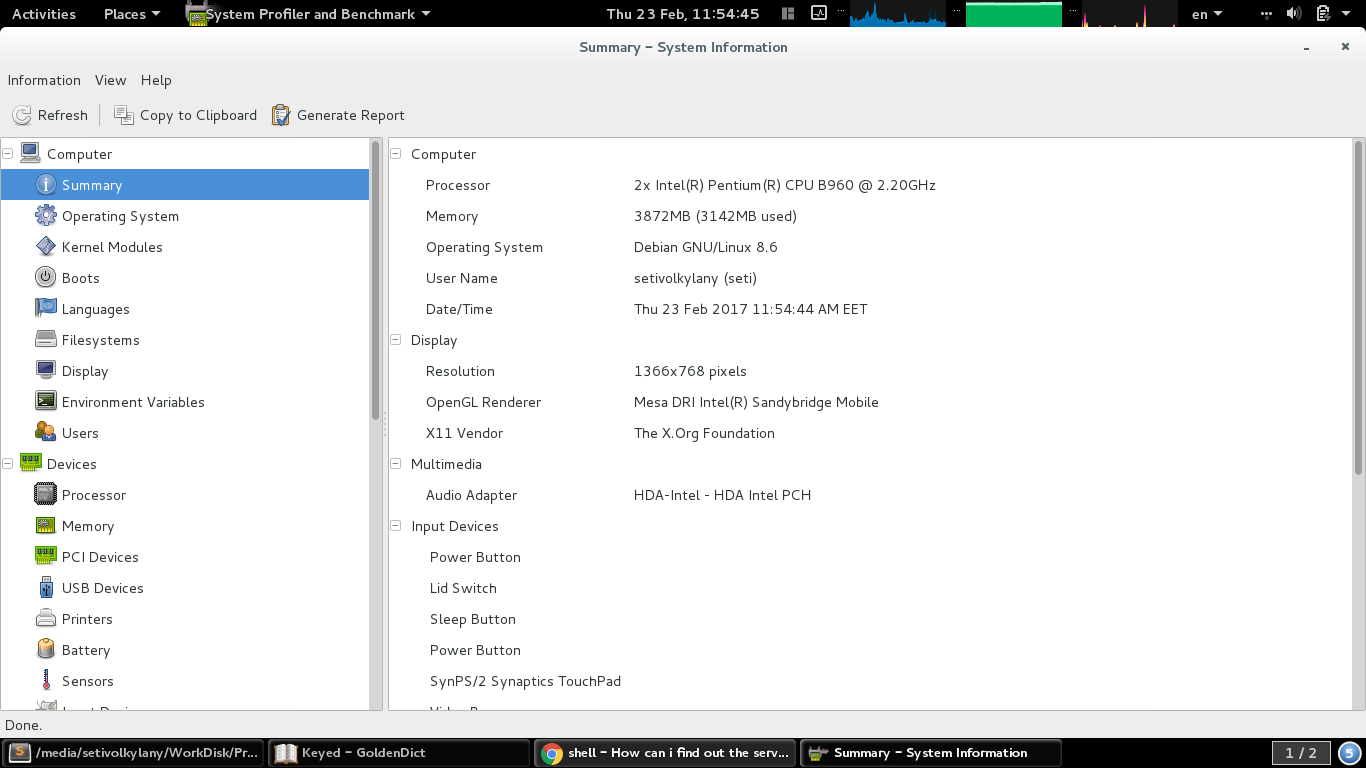
If you need a good tool for similar tasks and more features, I recommend the “HardInfo” – https://github.com/lpereira/hardinfo. It easy to install in Debian-based systems.
System profiler and benchmark tool for Linux systems
Based on
- http://www.tecmint.com/commands-to-collect-system-and-hardware-information-in-linux/
- https://en.wikibooks.org/wiki/Guide_to_Unix/Commands/System_Information
- https://www.cyberciti.biz/faq/how-to-find-my-public-ip-address-from-command-line-on-a-linux/
- Is there a way to retrieve the name of the Desktop Environment?
- https://askubuntu.com/questions/125062/how-can-i-find-which-desktop-enviroment-i-am-using
- https://unix.stackexchange.com/a/2673/202463
Method 4
Maybe you can use
uname -a
to get information about the kernel version and which OS you are using.
Method 5
Run gnome-system-monitor (package is the same name in Debian, Ubuntu, and Fedora), and click on the System tab:
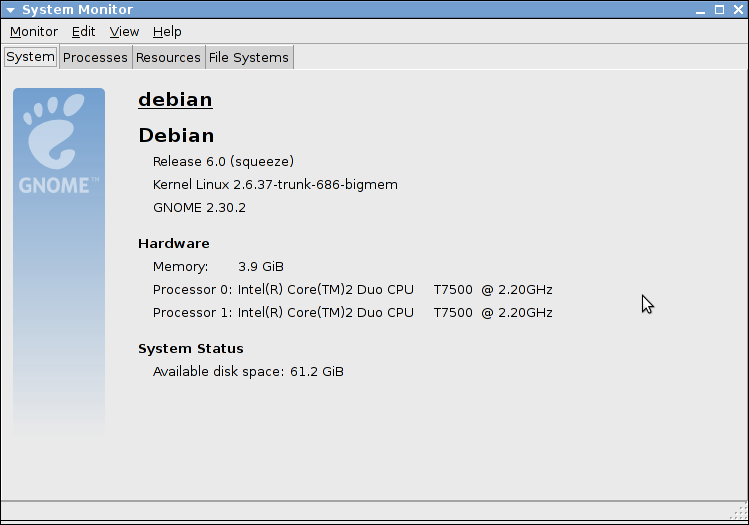
The desktop thing is a little hard because you can have multiple ones installed, and can run one package belonging to one desktop on a different desktop. Also, running printenv DESKTOP_SESSION on my Debian system just outputs default (but it works well on Ubuntu and Fedora).
Method 6
Not totally foolproof, but halfway there:
xwininfo -root -children|grep kwin
xwininfo -root -children|grep gnome-panel
(I can’t help it if you feel like using gnome-panel under kwin, though 😉
Also, I find this very useful under Linux:
cat /etc/issue
Method 7
Building on everyones post above, maybe run a simple script
#!/bin/bash
lsb_release -idrc ; printenv DESKTOP_SESSION ; uname -a
running that gives me
Distributor ID: LinuxMint
Description:    Linux Mint 9 Isadora
Release:    9 Codename: isadora
gnome
Linux judas327 2.6.32-24-generic-pae #39-Ubuntu SMP Wed Jul 28 07:39:26 UTC 2010 i686 GNU/Linux
All methods was sourced from stackoverflow.com or stackexchange.com, is licensed under cc by-sa 2.5, cc by-sa 3.0 and cc by-sa 4.0