I’m trying to follow PEP 328, with the following directory structure:
pkg/
  __init__.py
  components/
    core.py
    __init__.py
  tests/
    core_test.py
    __init__.py
In core_test.py I have the following import statement
from ..components.core import GameLoopEvents
However, when I run, I get the following error:
tests$ python core_test.py
Traceback (most recent call last):
  File "core_test.py", line 3, in <module>
    from ..components.core import GameLoopEvents
ValueError: Attempted relative import in non-package
Searching around I found “relative path not working even with __init__.py” and “Import a module from a relative path” but they didn’t help.
Is there anything I’m missing here?
Answers:
Thank you for visiting the Q&A section on Magenaut. Please note that all the answers may not help you solve the issue immediately. So please treat them as advisements. If you found the post helpful (or not), leave a comment & I’ll get back to you as soon as possible.
Method 1
To elaborate on Ignacio Vazquez-Abrams’s answer:
The Python import mechanism works relative to the __name__ of the current file. When you execute a file directly, it doesn’t have its usual name, but has "__main__" as its name instead. So relative imports don’t work.
You can, as Igancio suggested, execute it using the -m option. If you have a part of your package that is meant to be run as a script, you can also use the __package__ attribute to tell that file what name it’s supposed to have in the package hierarchy.
See http://www.python.org/dev/peps/pep-0366/ for details.
Method 2
Yes. You’re not using it as a package.
python -m pkg.tests.core_test
Method 3
It depends on how you want to launch your script.
If you want to launch your UnitTest from the command line in a classic way, that is:
python tests/core_test.py
Then, since in this case ‘components’ and ‘tests’ are siblings folders, you can import the relative module either using the insert or the append method of the sys.path module.
Something like:
import sys
from os import path
sys.path.append( path.dirname( path.dirname( path.abspath(__file__) ) ) )
from components.core import GameLoopEvents
Otherwise, you can launch your script with the ‘-m’ argument (note that in this case, we are talking about a package, and thus you must not give the ‘.py’ extension), that is:
python -m pkg.tests.core_test
In such a case, you can simply use the relative import as you were doing:
from ..components.core import GameLoopEvents
You can finally mix the two approaches, so that your script will work no matter how it is called.
For example:
if __name__ == '__main__':
    if __package__ is None:
        import sys
        from os import path
        sys.path.append( path.dirname( path.dirname( path.abspath(__file__) ) ) )
        from components.core import GameLoopEvents
    else:
        from ..components.core import GameLoopEvents
Method 4
You can use import components.core directly if you append the current directory to sys.path:
if __name__ == '__main__' and __package__ is None:
    from os import sys, path
    sys.path.append(path.dirname(path.dirname(path.abspath(__file__))))
Method 5
In core_test.py, do the following:
import sys
sys.path.append('../components')
from core import GameLoopEvents
Method 6
If your use case is for running tests, and it seams that it is, then you can do the following. Instead of running your test script as python core_test.py use a testing framework such as pytest. Then on the command line you can enter
$$ py.test
That will run the tests in your directory. This gets around the issue of __name__ being __main__ that was pointed out by @BrenBarn. Next, put an empty __init__.py file into your test directory, this will make the test directory part of your package. Then you will be able to do
from ..components.core import GameLoopEvents
However, if you run your test script as a main program then things will fail once again. So just use the test runner. Maybe this also works with other test runners such as nosetests but i haven’t checked it. Hope this helps.
Method 7
My quick-fix is to add the directory to the path:
import sys
sys.path.insert(0, '../components/')
Method 8
Issue is with your testing method,
you tried python core_test.py
then you will get this error
ValueError: Attempted relative import in non-package
Reason: you are testing your packaging from non-package source.
so test your module from package source.
if this is your project structure,
pkg/
  __init__.py
  components/
    core.py
    __init__.py
  tests/
    core_test.py
    __init__.py
cd pkg
python -m tests.core_test # dont use .py
or from outside pkg/
python -m pkg.tests.core_test
single . if you want to import from folder in same directory .
for each step back add one more.
hi/
  hello.py
how.py
in how.py
from .hi import hello
incase if you want to import how from hello.py
from .. import how
Method 9
As Paolo said, we have 2 invocation methods:
1) python -m tests.core_test
2) python tests/core_test.py
One difference between them is sys.path[0] string. Since the interpret will search sys.path when doing import, we can do with tests/core_test.py:
if __name__ == '__main__':
    import sys
    from pathlib import Path
    sys.path.insert(0, str(Path(__file__).resolve().parent.parent))
    from components import core
    <other stuff>
And more after this, we can run core_test.py with other methods:
cd tests
python core_test.py
python -m core_test
...
Note, py36 tested only.
Method 10
Old thread. I found out that adding an __all__= ['submodule', ...] to the
__init__.py file and then using the from <CURRENT_MODULE> import * in the target works fine.
Method 11
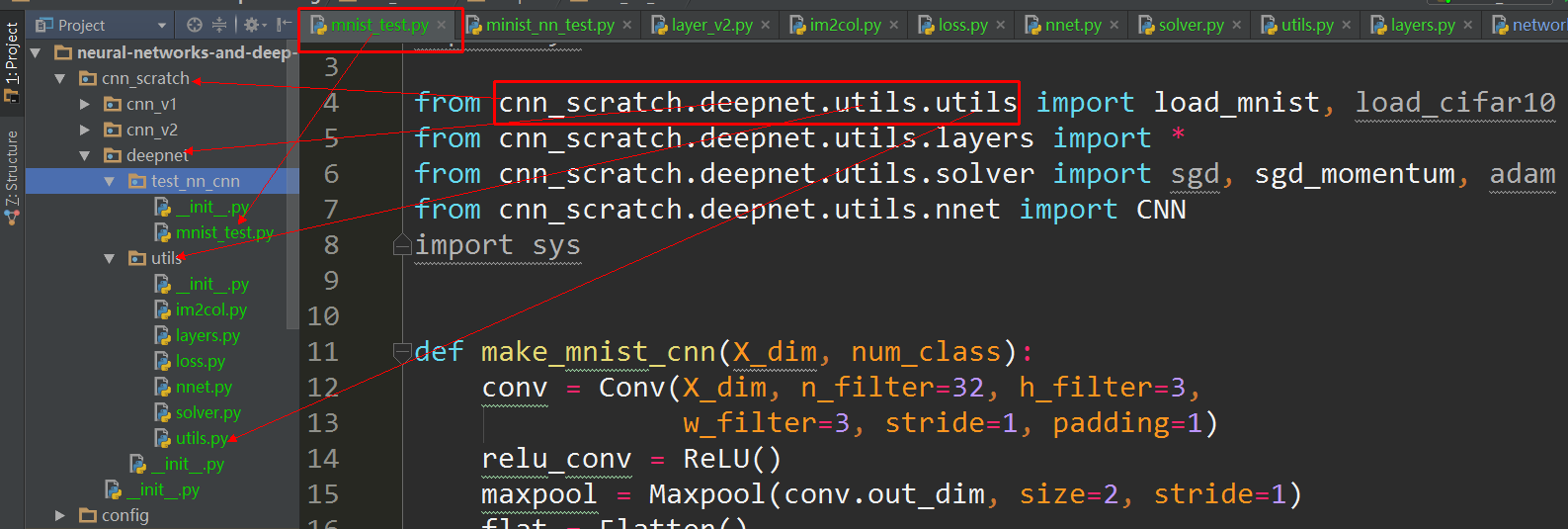
You can use from pkg.components.core import GameLoopEvents, for example I use pycharm, the below is my project structure image, I just import from the root package, then it works:
Method 12
This approach worked for me and is less cluttered than some solutions:
try:
  from ..components.core import GameLoopEvents
except ValueError:
  from components.core import GameLoopEvents
The parent directory is in my PYTHONPATH, and there are __init__.py files in the parent directory and this directory.
The above always worked in python 2, but python 3 sometimes hit an ImportError or ModuleNotFoundError (the latter is new in python 3.6 and a subclass of ImportError), so the following tweak works for me in both python 2 and 3:
try:
  from ..components.core import GameLoopEvents
except ( ValueError, ImportError):
  from components.core import GameLoopEvents
Method 13
Try this
import components
from components import *
Method 14
As you have already marked everything as a module, there’s no need to use the relative reference if you launch as python module.
Instead of
from ..components.core import GameLoopEvents
simply
from pkg.components.core import GameLoopEvents
When you run from the parent of pkg, use the following
python -m pkg.tests.core_test
Method 15
If someone is looking for a workaround, I stumbled upon one. Here’s a bit of context. I wanted to test out one of the methods I’ve in a file. When I run it from within
if __name__ == "__main__":
it always complained of the relative imports. I tried to apply the above solutions, but failed to work, since there were many nested files, each with multiple imports.
Here’s what I did. I just created a launcher, an external program that would import necessary methods and call them. Though, not a great solution, it works.
Method 16
Here’s one way which will piss off everyone but work pretty well. In tests run:
ln -s ../components components
Then just import components like you normally would.
Method 17
For me only this worked: I had to explicitly set the value of package to the parent directory, and add the parent directory to sys.path
from os import path
import sys
if __package__ is None:
    sys.path.append( path.dirname( path.dirname( path.abspath(__file__) ) ) )
    __package__= "myparent"

from .subdir import something # the . can now be resolved
I can now directly run my script with python myscript.py.
Method 18
python <main module>.py does not work with relative import
The problem is relative import does not work when you run a __main__ module from the command line
python <main_module>.py
It is clearly stated in PEP 338.
The release of 2.5b1 showed a surprising (although obvious in retrospect) interaction between this PEP and PEP 328 – explicit relative imports don’t work from a main module. This is due to the fact that relative imports rely on
__name__to determine the current module’s position in the package hierarchy. In a main module, the value of__name__is always'__main__', so explicit relative imports will always fail (as they only work for a module inside a package).
Cause
The issue isn’t actually unique to the -m switch. The problem is that relative imports are based on
__name__, and in the main module,__name__always has the value__main__. Hence, relative imports currently can’t work properly from the main module of an application, because the main module doesn’t know where it really fits in the Python module namespace (this is at least fixable in theory for the main modules executed through the -m switch, but directly executed files and the interactive interpreter are completely out of luck).
To understand further, see Relative imports in Python 3 for the detailed explanation and how to get it over.
Method 19
This is very confusing, and if you are using IDE like pycharm, it’s little more confusing.
What worked for me:
1. Make pycharm project settings (if you are running python from a VE or from python directory)
2. There is no wrong the way you defined. sometime it works with
from folder1.file1 import class
if it does not work, use
import folder1.file1
3. Your environment variable should be correctly mentioned in system or provide it in your command line argument.
Method 20
Because your code contains if __name__ == "__main__", which doesn’t be imported as a package, you’d better use sys.path.append() to solve the problem.
All methods was sourced from stackoverflow.com or stackexchange.com, is licensed under cc by-sa 2.5, cc by-sa 3.0 and cc by-sa 4.0