I just installed Visual Studio 2017. When I open an existing website, I get all sorts of warning messages such as this one:
IDE1006 Naming rule violation: These words must begin with upper case
characters: swe_calc
In the code it is defined as:
[System.Runtime.InteropServices.DllImport("swedll32.dll")]
public static extern Int32 swe_calc(double tjd, int ipl, Int32 iflag, IntPtr xx, IntPtr serr);
This also occurs with my ASP.Net controls. As an example of a DropDownList:
IDE1006 Naming rule violation: These words must begin with upper case
characters: ddlMonth_SelectedIndexChanged
How can I eliminate these type of warnings under Visual Studio?
Answers:
Thank you for visiting the Q&A section on Magenaut. Please note that all the answers may not help you solve the issue immediately. So please treat them as advisements. If you found the post helpful (or not), leave a comment & I’ll get back to you as soon as possible.
Method 1
Its a new configurable feature, if you go to
Tools → Options → Text Editor → Your language (I did C#) → Code Style → Naming
In there I went to Manage Styles add camel Case (its in there but you need to add it to your selectable): go to the “+” sign, then add your rule accordingly.
Important: Close your solution and re-open it for changes to take effect.
For example, I only use camel Case for private methods. So I choose Private Method and required Style the new one I created “camel Case” and set it to Severity Suggestion (I also promoted it to the top).
The built in are all “Suggestions” too so you can also just turn off Messages.
Method 2
If you want to suppress it only in some files or areas you can use the following:
#pragma warning disable IDE1006

// the code with the warning

#pragma warning restore IDE1006
Method 3
If you need to get rid of these messages you could also just suppress them.
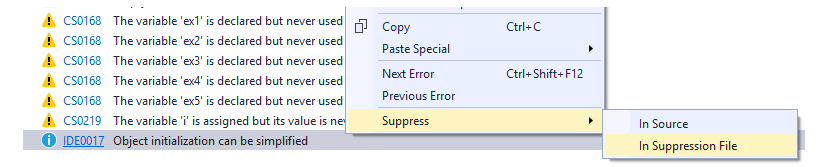
Method 4
You could rename the method and add the name to the attribute with the EntryPoint property.
[System.Runtime.InteropServices.DllImport("swedll32.dll", EntryPoint = "swe_calc")]
public static extern Int32 SweCalc(double tjd, int ipl, Int32 iflag, IntPtr xx, IntPtr serr);
Method 5
If you want to omit or void the warning message in a method, you can use the SuppressMessage from the namespace System.Diagnostics.CodeAnalysis:
[SuppressMessage("Microsoft.Design", "IDE1006", Justification = "Rule violation aceppted due blah blah..")]
The Justification property is optional, but it’s worth spending a moment writing a reason, to let your team know that the code is revised and is ok.
Method 6
This can be done using normal VS2017 & VS2019 using the .editorconfig settings file, using the naming rules: https://docs.microsoft.com/en-us/visualstudio/ide/editorconfig-code-style-settings-reference
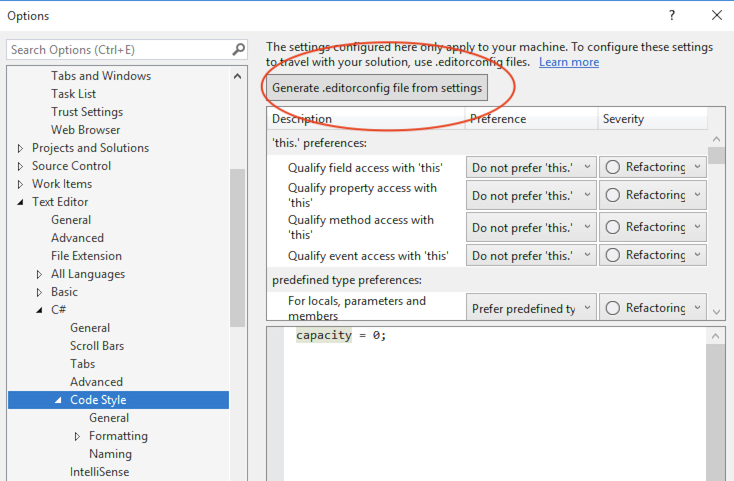
The file can be created by hand, or in VS2019 you can get Visual Studio to create it for your from your preferences (i.e. after following configuring your prefs as in https://stackoverflow.com/a/41131563/131701 ), by hitting the generate editor config file from settings button.
For example, the following sets of rules will enable camelCase for all non public methods, and keep the other default naming rules that comes with VS.
#### Naming styles ####

# Naming rules

dotnet_naming_rule.interface_should_be_begins_with_i.severity = suggestion
dotnet_naming_rule.interface_should_be_begins_with_i.symbols = interface
dotnet_naming_rule.interface_should_be_begins_with_i.style = begins_with_i

dotnet_naming_rule.types_should_be_pascal_case.severity = suggestion
dotnet_naming_rule.types_should_be_pascal_case.symbols = types
dotnet_naming_rule.types_should_be_pascal_case.style = pascal_case

dotnet_naming_rule.private_method_should_be_camelcasestyle.severity = suggestion
dotnet_naming_rule.private_method_should_be_camelcasestyle.symbols = private_method
dotnet_naming_rule.private_method_should_be_camelcasestyle.style = camelcasestyle

dotnet_naming_rule.non_field_members_should_be_pascal_case.severity = suggestion
dotnet_naming_rule.non_field_members_should_be_pascal_case.symbols = non_field_members
dotnet_naming_rule.non_field_members_should_be_pascal_case.style = pascal_case

# Symbol specifications

dotnet_naming_symbols.interface.applicable_kinds = interface
dotnet_naming_symbols.interface.applicable_accessibilities = public, internal, private, protected, protected_internal
dotnet_naming_symbols.interface.required_modifiers =

dotnet_naming_symbols.private_method.applicable_kinds = method
dotnet_naming_symbols.private_method.applicable_accessibilities = private, protected, internal, protected_internal
dotnet_naming_symbols.private_method.required_modifiers =

dotnet_naming_symbols.types.applicable_kinds = class, struct, interface, enum
dotnet_naming_symbols.types.applicable_accessibilities = public, internal, private, protected, protected_internal
dotnet_naming_symbols.types.required_modifiers =

dotnet_naming_symbols.non_field_members.applicable_kinds = property, event, method
dotnet_naming_symbols.non_field_members.applicable_accessibilities = public, internal, private, protected, protected_internal
dotnet_naming_symbols.non_field_members.required_modifiers =

# Naming styles

dotnet_naming_style.pascal_case.required_prefix =
dotnet_naming_style.pascal_case.required_suffix =
dotnet_naming_style.pascal_case.word_separator =
dotnet_naming_style.pascal_case.capitalization = pascal_case

dotnet_naming_style.begins_with_i.required_prefix = I
dotnet_naming_style.begins_with_i.required_suffix =
dotnet_naming_style.begins_with_i.word_separator =
dotnet_naming_style.begins_with_i.capitalization = pascal_case

dotnet_naming_style.camelcasestyle.required_prefix =
dotnet_naming_style.camelcasestyle.required_suffix =
dotnet_naming_style.camelcasestyle.word_separator =
dotnet_naming_style.camelcasestyle.capitalization = camel_case
Method 7
If you hover over the naming rule violation, you can use Alt + Enter to bring up the naming styles for that language. You can also use Tools -> Options -> Text Editor -> {language} -> Code Style -> Naming.
For camelCase rules on Methods, you can add a new rule and set that to Camel Case. When you close the code file and open it up again, you shouldn’t see that warning anymore. Not sure why this isn’t a default option, but it wasn’t in my case (using Visual Code 15.8). I had to edit styles to match our company standards.
Sample C# Naming Styles Settings
Method 8
disable the rule.
rightclick error message and select severity to none
Method 9
What this rule asserts is that fields must be private.
You can convert it to a Property by adding the {get;set;} after the field.
This removed the error for me.
All methods was sourced from stackoverflow.com or stackexchange.com, is licensed under cc by-sa 2.5, cc by-sa 3.0 and cc by-sa 4.0