I’ve just started coding in python, and my general coding skills are fairly rusty 🙁 so please be a bit patient
I have a pandas dataframe:
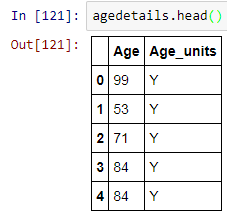
It has around 3m rows. There are 3 kinds of age_units: Y, D, W for years, Days & Weeks. Any individual over 1 year old has an age unit of Y and my first grouping I want is <2y old so all I have to test for in Age Units is Y…
I want to create a new column AgeRange and populate with the following ranges:
- <2
- 2 – 18
- 18 – 35
- 35 – 65
- 65+
so I wrote a function
def agerange(values):
    for i in values:
        if complete.Age_units == 'Y':
            if complete.Age > 1 AND < 18 return '2-18'
            elif complete.Age > 17 AND < 35 return '18-35'
            elif complete.Age > 34 AND < 65 return '35-65'
            elif complete.Age > 64 return '65+'
        else return '< 2'
I thought if I passed in the dataframe as a whole I would get back what I needed and then could create the column I wanted something like this:
agedetails['age_range'] = ageRange(agedetails)
BUT when I try to run the first code to create the function I get:
  File "<ipython-input-124-cf39c7ce66d9>", line 4
    if complete.Age > 1 AND complete.Age < 18 return '2-18'
                          ^
SyntaxError: invalid syntax
Clearly it is not accepting the AND – but I thought I heard in class I could use AND like this? I must be mistaken but then what would be the right way to do this?
So after getting that error, I’m not even sure the method of passing in a dataframe will throw an error either. I am guessing probably yes. In which case – how would I make that work as well?
I am looking to learn the best method, but part of the best method for me is keeping it simple even if that means doing things in a couple of steps…
Answers:
Thank you for visiting the Q&A section on Magenaut. Please note that all the answers may not help you solve the issue immediately. So please treat them as advisements. If you found the post helpful (or not), leave a comment & I’ll get back to you as soon as possible.
Method 1
With Pandas, you should avoid row-wise operations, as these usually involve an inefficient Python-level loop. Here are a couple of alternatives.
Pandas: pd.cut
As @JonClements suggests, you can use pd.cut for this, the benefit here being that your new column becomes a Categorical.
You only need to define your boundaries (including np.inf) and category names, then apply pd.cut to the desired numeric column.
bins = [0, 2, 18, 35, 65, np.inf]
names = ['<2', '2-18', '18-35', '35-65', '65+']

df['AgeRange'] = pd.cut(df['Age'], bins, labels=names)

print(df.dtypes)

# Age             int64
# Age_units      object
# AgeRange     category
# dtype: object
NumPy: np.digitize
np.digitize provides another clean solution. The idea is to define your boundaries and names, create a dictionary, then apply np.digitize to your Age column. Finally, use your dictionary to map your category names.
Note that for boundary cases the lower bound is used for mapping to a bin.
import pandas as pd, numpy as np

df = pd.DataFrame({'Age': [99, 53, 71, 84, 84],
                   'Age_units': ['Y', 'Y', 'Y', 'Y', 'Y']})

bins = [0, 2, 18, 35, 65]
names = ['<2', '2-18', '18-35', '35-65', '65+']

d = dict(enumerate(names, 1))

df['AgeRange'] = np.vectorize(d.get)(np.digitize(df['Age'], bins))
Result
   Age Age_units AgeRange
0   99         Y      65+
1   53         Y    35-65
2   71         Y      65+
3   84         Y      65+
4   84         Y      65+
All methods was sourced from stackoverflow.com or stackexchange.com, is licensed under cc by-sa 2.5, cc by-sa 3.0 and cc by-sa 4.0