I have tried adding the pdf.js viewer files in my project and it works in browsers like Chrome, Mozilla, Safari, etc, but it’s not loading some pages in node-webkit and PyQt webkit.
I am trying to load the file using an iframe, like this:
<iframe src="/test/?file=/assets/pdf/example.pdf#page=3"> </iframe>
Answers:
Thank you for visiting the Q&A section on Magenaut. Please note that all the answers may not help you solve the issue immediately. So please treat them as advisements. If you found the post helpful (or not), leave a comment & I’ll get back to you as soon as possible.
Method 1
I’ve found this thread over at the Qt Forums, where thebeast44 posted a snippet of Qt code answering your question. My translation to python is below.
You’ll also need to unpack the res folder from the author’s original code, I think he just modified the viewer… I’ve also attached said code here.
from PyQt4 import QtCore
from PyQt4 import QtGui
from PyQt4 import QtNetwork
from PyQt4 import QtWebKit


class PDFViewer(QtWebKit.QWebView):
    pdf_viewer_page = 'res/pdf-viewer.html'

    def __init__(self, parent=None):
        super().__init__(parent)
        self.settings = QtWebKit.QWebSettings.globalSettings()
        self.settings.setAttribute(QtWebKit.QWebSettings.LocalContentCanAccessFileUrls, True )
        self.settings.setAttribute(QtWebKit.QWebSettings.LocalContentCanAccessRemoteUrls, True )
        self.settings.setAttribute(QtWebKit.QWebSettings.DeveloperExtrasEnabled, True )
        nam = QtNetwork.QNetworkAccessManager()
        page = QtWebKit.QWebPage(self)
        page.setNetworkAccessManager(nam)
        self.setPage(page)
        self.loadFinished.connect(self.onLoadFinish)
        self.setUrl(QtCore.QUrl(self.pdf_viewer_page))

    def onLoadFinish(self, success):
        if success:
            self.page().mainFrame().evaluateJavaScript("init();")


if __name__ == '__main__':
    import sys
    app = QtGui.QApplication(sys.argv)
    viewer = PDFViewer(parent=None)
    viewer.show()
    sys.exit(app.exec_())
Method 2
Below are some more up-to-date demo scripts for using pdf.js with PyQt4/QtWebKit or PyQt5/QtWebEngine. To try these, first download the latest stable version of pdf.js and unpack the zip file into a suitable location. (NB: if you’re on Linux your distro may already have a pdf.js package, so that could be installed instead).
UPDATE:
As of Qt-5.13.0, it is also possible to use the built-in Chromium PDF Viewer with QWebEngineView:
import sys
from PyQt5 import QtCore, QtWidgets, QtWebEngineWidgets

PDF = 'file://path/to/my/sample.pdf'

class Window(QtWebEngineWidgets.QWebEngineView):
    def __init__(self):
        super(Window, self).__init__()
        self.settings().setAttribute(
            QtWebEngineWidgets.QWebEngineSettings.PluginsEnabled, True)
        self.settings().setAttribute(
            QtWebEngineWidgets.QWebEngineSettings.PdfViewerEnabled, True)
        self.load(QtCore.QUrl.fromUserInput(PDF))

if __name__ == '__main__':

    app = QtWidgets.QApplication(sys.argv)
    window = Window()
    window.setGeometry(600, 50, 800, 600)
    window.show()
    sys.exit(app.exec_())
PyQt5/QtWebEngine pdfjs script:
import sys
from PyQt5 import QtCore, QtWidgets, QtWebEngineWidgets

PDFJS = 'file:///path/to/pdfjs-1.9.426-dist/web/viewer.html'
# PDFJS = 'file:///usr/share/pdf.js/web/viewer.html'
PDF = 'file:///path/to/my/sample.pdf'

class Window(QtWebEngineWidgets.QWebEngineView):
    def __init__(self):
        super(Window, self).__init__()
        self.load(QtCore.QUrl.fromUserInput('%s?file=%s' % (PDFJS, PDF)))

if __name__ == '__main__':

    app = QtWidgets.QApplication(sys.argv)
    window = Window()
    window.setGeometry(600, 50, 800, 600)
    window.show()
    sys.exit(app.exec_())
PyQt4/QtWebKit pdfjs script:
import sys
from PyQt4 import QtCore, QtGui, QtWebKit

PDFJS = 'file:///path/to/pdfjs-1.9.426-dist/web/viewer.html'
# PDFJS = 'file:///usr/share/pdf.js/web/viewer.html'
PDF = 'file:///path/to/my/sample.pdf'

class Window(QtWebKit.QWebView):
    def __init__(self):
        super(Window, self).__init__()
        self.load(QtCore.QUrl.fromUserInput('%s?file=%s' % (PDFJS, PDF)))

if __name__ == '__main__':

    app = QtGui.QApplication(sys.argv)
    window = Window()
    window.setGeometry(600, 50, 800, 600)
    window.show()
    sys.exit(app.exec_())
Method 3
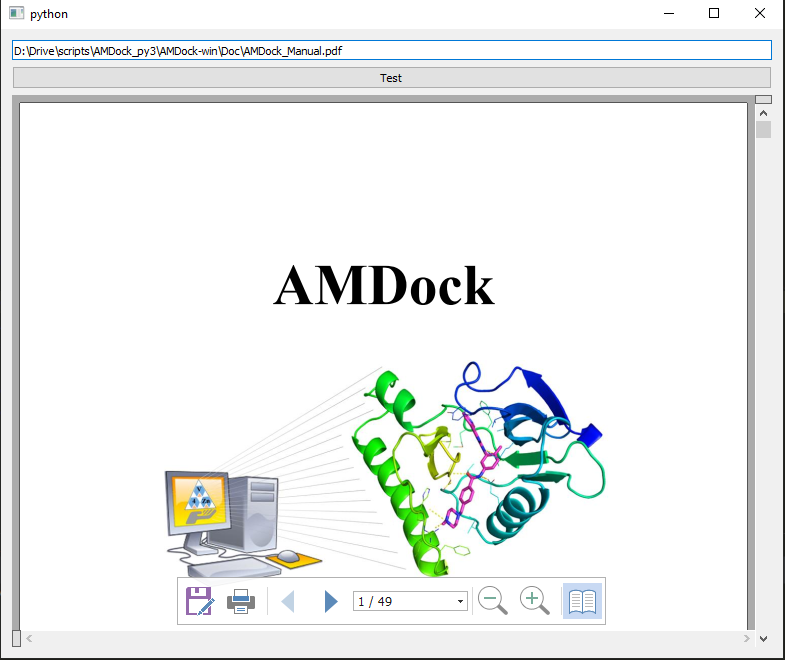
From PyQt5 v5.13 you can load PDF files with the chromium API. According to the documentation https://doc.qt.io/qt-5/qtwebengine-features.html#pdf-file-viewing this option is by default enabled.
This minimal example is adapted from Simple Browser
import sys
from pathlib import Path

from PyQt5 import QAxContainer
from PyQt5.QtCore import Qt
from PyQt5.QtWidgets import QWidget, QVBoxLayout, QPushButton, QLineEdit, QApplication


class Main(QWidget):
    def __init__(self, parent=None):
        super(Main, self).__init__(parent)
        self.main_layout = QVBoxLayout(self)

        self.qlineedit = QLineEdit()
        self.qlineedit.returnPressed.connect(self.go_action)
        self.main_layout.addWidget(self.qlineedit)
        self.read_btn = QPushButton('Test')
        self.read_btn.clicked.connect(self.go_action)
        self.main_layout.addWidget(self.read_btn)

        self.WebBrowser = QAxContainer.QAxWidget(self)
        self.WebBrowser.setFocusPolicy(Qt.StrongFocus)
        self.WebBrowser.setControl("{8856F961-340A-11D0-A96B-00C04FD705A2}")
        self.main_layout.addWidget(self.WebBrowser)

    def go_action(self):
        # convert system path to web path
        f = Path(self.qlineedit.text()).as_uri()
        # load object
        self.WebBrowser.dynamicCall('Navigate(const QString&)', f)


if __name__ == "__main__":
    a = QApplication(sys.argv)
    w = Main()
    w.show()
    sys.exit(a.exec_())
This example:
All methods was sourced from stackoverflow.com or stackexchange.com, is licensed under cc by-sa 2.5, cc by-sa 3.0 and cc by-sa 4.0