First I added custom meta term called Color for Category taxonomy, see the code below
Add new colorpicker field to “Add new Category” screen
function colorpicker_field_add_new_category( $taxonomy ) {

  ?>

    <div class="form-field term-colorpicker-wrap">
        <label for="term-colorpicker">Category Color</label>
        <input name="_category_color" value="#ffffff" class="colorpicker" id="term-colorpicker" />
        <p>This is the field description where you can tell the user how the color is used in the theme.</p>
    </div>

  <?php

}
add_action( 'category_add_form_fields', 'colorpicker_field_add_new_category' );
Add new colopicker field to “Edit Category” screen
function colorpicker_field_edit_category( $term ) {

    $color = get_term_meta( $term->term_id, '_category_color', true );
    $color = ( ! empty( $color ) ) ? "#{$color}" : '#ffffff';

  ?>

    <tr class="form-field term-colorpicker-wrap">
        <th scope="row"><label for="term-colorpicker">Severity Color</label></th>
        <td>
            <input name="_category_color" value="<?php echo $color; ?>" class="colorpicker" id="term-colorpicker" />
            <p class="description">This is the field description where you can tell the user how the color is used in the theme.</p>
        </td>
    </tr>

  <?php


}
add_action( 'category_edit_form_fields', 'colorpicker_field_edit_category' );
Term Metadata – Save Created and Edited Term Metadata
function save_termmeta( $term_id ) {

    // Save term color if possible
    if( isset( $_POST['_category_color'] ) && ! empty( $_POST['_category_color'] ) ) {
        update_term_meta( $term_id, '_category_color', sanitize_hex_color_no_hash( $_POST['_category_color'] ) );
    } else {
        delete_term_meta( $term_id, '_category_color' );
    }

}
add_action( 'created_category', 'save_termmeta' );  // Variable Hook Name
add_action( 'edited_category',  'save_termmeta' );  // Variable Hook Name
Enqueue colorpicker styles and scripts.
function category_colorpicker_enqueue( $taxonomy ) {

    if( null !== ( $screen = get_current_screen() ) && 'edit-category' !== $screen->id ) {
        return;
    }

    // Colorpicker Scripts
    wp_enqueue_script( 'wp-color-picker' );

    // Colorpicker Styles
    wp_enqueue_style( 'wp-color-picker' );

}
add_action( 'admin_enqueue_scripts', 'category_colorpicker_enqueue' );
Print javascript to initialize the colorpicker
function colorpicker_init_inline() {
    if( null !== ( $screen = get_current_screen() ) && 'edit-category' !== $screen->id ) {
        return;
    }
  ?>
    <script>
        jQuery( document ).ready( function( $ ) {
            $( '.colorpicker' ).wpColorPicker();
        } ); // End Document Ready JQuery
    </script>
  <?php
}
add_action( 'admin_print_scripts', 'colorpicker_init_inline', 20 );
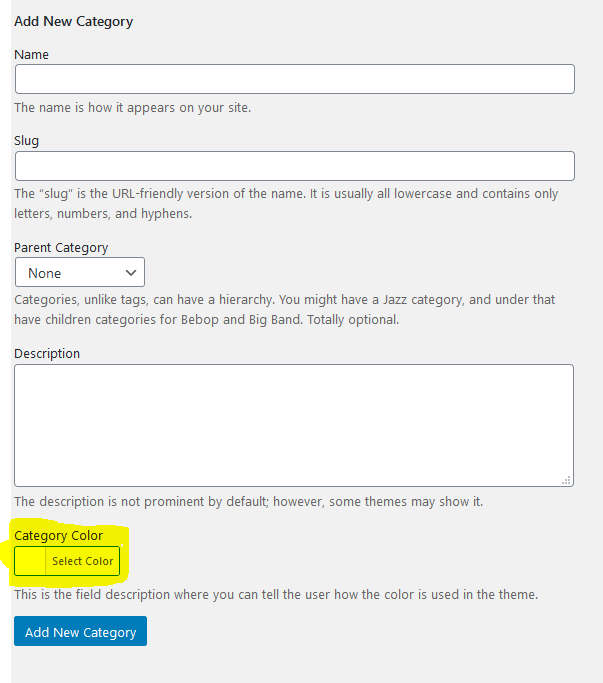
Everything works great, here is the result
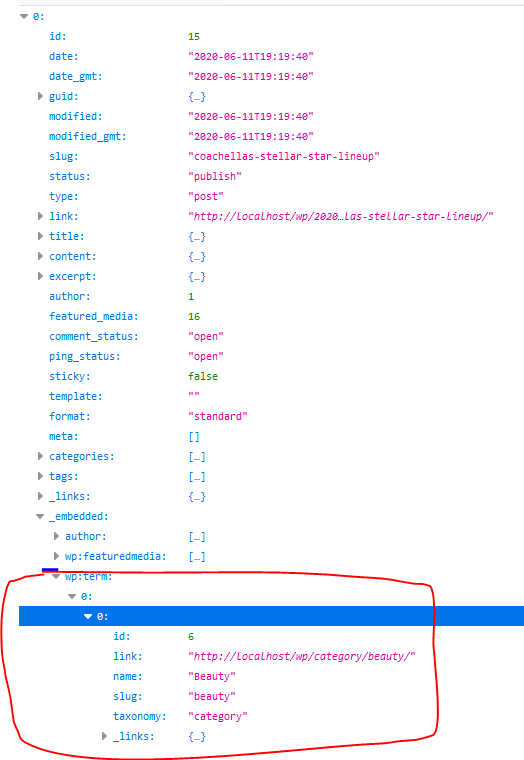
Now, when I visit http://localhost/wp/wp-json/wp/v2/posts?_embed I can’t see the new meta term listed, see the image below:
So, my question how can I retrieve the new meta term ? Do I miss something ?
Answers:
Thank you for visiting the Q&A section on Magenaut. Please note that all the answers may not help you solve the issue immediately. So please treat them as advisements. If you found the post helpful (or not), leave a comment & I’ll get back to you as soon as possible.
Method 1
First you need to tell WordPress to show this custom field in the API response:
register_term_meta('category', '_category_color', ['show_in_rest' => true]);
Then you can filter the category term API endpoint like so:
add_filter( 'rest_prepare_category',function($response, $item, $request){
    $color = get_term_meta( $item->term_id, '_category_color', true );
    $response->data['color'] = $color ?: '';
    return $response;
}, 10, 3);
All methods was sourced from stackoverflow.com or stackexchange.com, is licensed under cc by-sa 2.5, cc by-sa 3.0 and cc by-sa 4.0