I have script I’d always like to run ‘x’ instances in parallel.
The code looks a like that:
for A in
do
  for B in
  do
    (script1.sh $A $B;script2.sh $A $B) &
  done #B
done #A
The scripts itself run DB queries, so it would benefit from parallel running. Problem is
1) ‘wait’ doesn’t work (because it finished all background jobs and starts new ones (even if I include a threadcounter), that wastes lots of time.
2) I couldn’t figure out how to get parallel to do that. I only found examples where the same script gets run multiple times, but not with different parameters.
3) the alternative solution would be:
for A in
do
  for B in
  do
    while threadcount>X
    do
      sleep 60
    done
    (script1.sh $A $B;script2.sh $A $B) &
  done #B
done #A
But I didn’t really figure out how to get the thread count reliable.
Some hints into the right direction are very much welcomed.
I’d love to use parallel, but the thing just doesn’t work as the documentation tells me.
I do
parallel echo ::: A B C ::: D E F
(from the doc) and it tells me
parallel: Input is read from the terminal. Only experts do this on purpose. Press CTRL-D to exit.
and that is just the simplest example of the man pages.
Answers:
Thank you for visiting the Q&A section on Magenaut. Please note that all the answers may not help you solve the issue immediately. So please treat them as advisements. If you found the post helpful (or not), leave a comment & I’ll get back to you as soon as possible.
Method 1
Using GNU Parallel it looks like this:
parallel script1.sh {}';' script2.sh {} ::: a b c ::: d e f
It will spawn one job per CPU.
GNU Parallel is a general parallelizer and makes is easy to run jobs in parallel on the same machine or on multiple machines you have ssh access to. It can often replace a for loop.
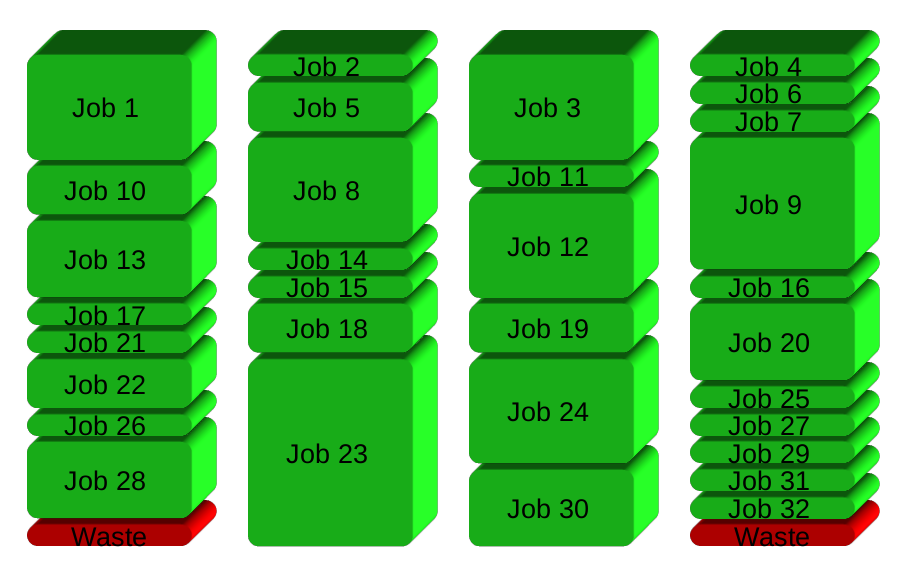
If you have 32 different jobs you want to run on 4 CPUs, a straight forward way to parallelize is to run 8 jobs on each CPU:
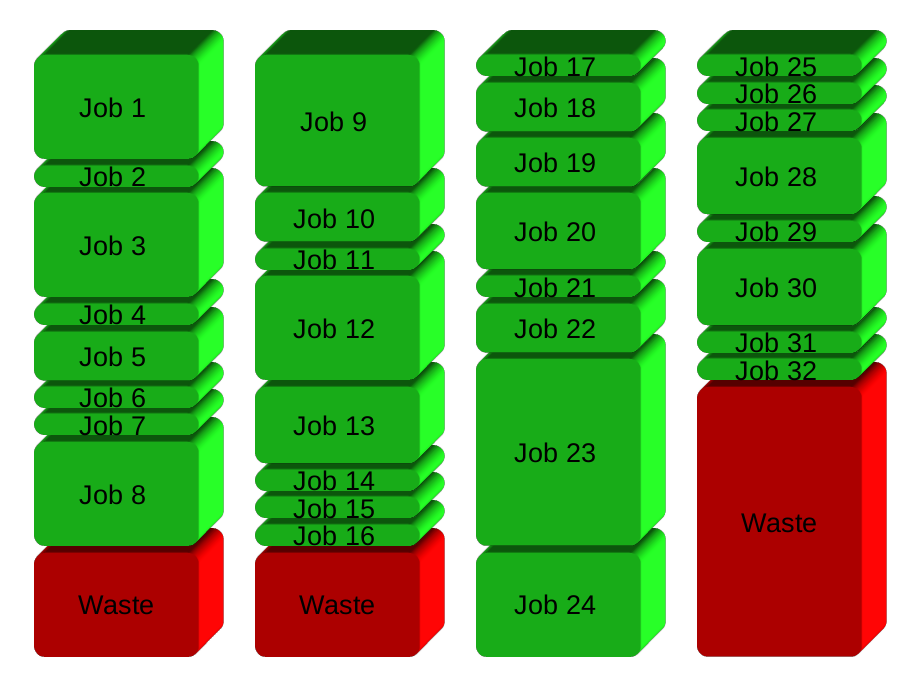
GNU Parallel instead spawns a new process when one finishes – keeping the CPUs active and thus saving time:
Installation
If GNU Parallel is not packaged for your distribution, you can do a personal installation, which does not require root access. It can be done in 10 seconds by doing this:
(wget -O - pi.dk/3 || curl pi.dk/3/ || fetch -o - http://pi.dk/3) | bash
For other installation options see http://git.savannah.gnu.org/cgit/parallel.git/tree/README
Learn more
See more examples: http://www.gnu.org/software/parallel/man.html
Watch the intro videos: https://www.youtube.com/playlist?list=PL284C9FF2488BC6D1
Walk through the tutorial: http://www.gnu.org/software/parallel/parallel_tutorial.html
Sign up for the email list to get support: https://lists.gnu.org/mailman/listinfo/parallel
Method 2
I think you can do this with xargs:
for A in a b c
do
  for B in d e f
  do
    echo $A $B; done; done | xargs -I {} -P4 bash -c "script1.sh {}; script2.sh {}"
Where -P4 says to run 4 instances in parallel; you’ll have to specify some value for that.
All methods was sourced from stackoverflow.com or stackexchange.com, is licensed under cc by-sa 2.5, cc by-sa 3.0 and cc by-sa 4.0