Hello I can’t find the option to reassign shortcuts in xfce4-terminal 0.6.3. I’d like to reassign ctrl+c to copy, ctrl+v to paste and ctrl+shift+c to kill process. I know I can do that easily under gnome-terminal but since I’m using xfce I would like to avoid installing all the dependencies for gnome-terminal. Any idea on how to achieve that ?
Answers:
Thank you for visiting the Q&A section on Magenaut. Please note that all the answers may not help you solve the issue immediately. So please treat them as advisements. If you found the post helpful (or not), leave a comment & I’ll get back to you as soon as possible.
Method 1
The accepted answer doesn’t work anymore (for example with xfce4-terminal 0.8.7.4 on Lubuntu 18.04.2) because of a GTK3 change, as described on How to change key bindings for xfce-terminal?. It seems that the only way to change the keyboard shortcuts is by modifying the configuration file, ~/.config/xfce4/terminal/accels.scm.
Open the file, search for “copy”, and replace ; (gtk_accel_path "<Actions>/terminal-window/copy" "<Primary><Shift>c") with (gtk_accel_path "<Actions>/terminal-window/copy" "<Primary>c").
That is: change the shortcut, but also remove the semicolon at the beginning of the beginning of the line. (It’s a comment delimiter.)
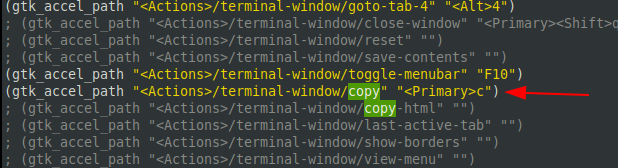
The same for “paste”: replace ; (gtk_accel_path "<Actions>/terminal-window/paste" "<Primary><Shift>v") with (gtk_accel_path "<Actions>/terminal-window/paste" "<Primary>v").

Restart the terminal.
Method 2
In xfce terminal go to Edit, hover your mouse over Copyand press ctrl+c.
Same goes for paste.
Kill process gets automatically reassigned to ctrl+c+shift.
All methods was sourced from stackoverflow.com or stackexchange.com, is licensed under cc by-sa 2.5, cc by-sa 3.0 and cc by-sa 4.0