I am using GNOME 3.18.1 on Arch Linux 4.2.5-1-ARCH x86_64 on a Dell E6530 laptop. Since I installed this OS years ago, the power button on my laptop has always led my OS to completely power down.
However, in the last few weeks this behaviour has changed, so that pressing the power button now puts my laptop into energy savings mode. I did not change my power settings. I always keep my system up to date using pacman -Syyu, however, so I suspect that an update changed this functionality.
In the power settings there is no option for this.
How can I restore the initial behaviour, so that pressing that button powers the system off?
Answers:
Thank you for visiting the Q&A section on Magenaut. Please note that all the answers may not help you solve the issue immediately. So please treat them as advisements. If you found the post helpful (or not), leave a comment & I’ll get back to you as soon as possible.
Method 1
That’s caused by the latest gnome-settings-daemon updates…
There is no such option in power settings because it was removed by the GNOME devs (the shutdown/power off action is considered “too destructive”).
Bottom line: you can no longer power off your laptop by pressing the power off button.
You could however add a new dconf/gsettings option (i.e.shutdown) to the settings daemon power plugin if you’re willing to patch and rebuild gnome-settings-daemon:
--- gnome-settings-daemon-3.18.2/data/gsd-enums.h   2015-11-10 09:07:12.000000000 -0500
+++ gnome-settings-daemon-3.18.2/data/gsd-enums.h   2015-11-11 18:43:43.240794875 -0500
@@ -114,7 +114,8 @@
 {
   GSD_POWER_BUTTON_ACTION_NOTHING,
   GSD_POWER_BUTTON_ACTION_SUSPEND,
-  GSD_POWER_BUTTON_ACTION_HIBERNATE
+  GSD_POWER_BUTTON_ACTION_HIBERNATE,
+  GSD_POWER_BUTTON_ACTION_SHUTDOWN
 } GsdPowerButtonActionType;

 typedef enum
--- gnome-settings-daemon-3.18.2/plugins/media-keys/gsd-media-keys-manager.c    2015-11-10 09:07:12.000000000 -0500
+++ gnome-settings-daemon-3.18.2/plugins/media-keys/gsd-media-keys-manager.c    2015-11-11 18:47:52.388602012 -0500
@@ -1849,6 +1849,9 @@

         action_type = g_settings_get_enum (manager->priv->power_settings, "power-button-action");
         switch (action_type) {
+        case GSD_POWER_BUTTON_ACTION_SHUTDOWN:
+                do_config_power_action (manager, GSD_POWER_ACTION_SHUTDOWN, in_lock_screen);
+                break;
         case GSD_POWER_BUTTON_ACTION_SUSPEND:
                 do_config_power_action (manager, GSD_POWER_ACTION_SUSPEND, in_lock_screen);
                 break;
Once you install the patched version, a new shutdown option will be available in dconf-editor under org > gnome > settings-daemon > plugins > power > power-button-action:
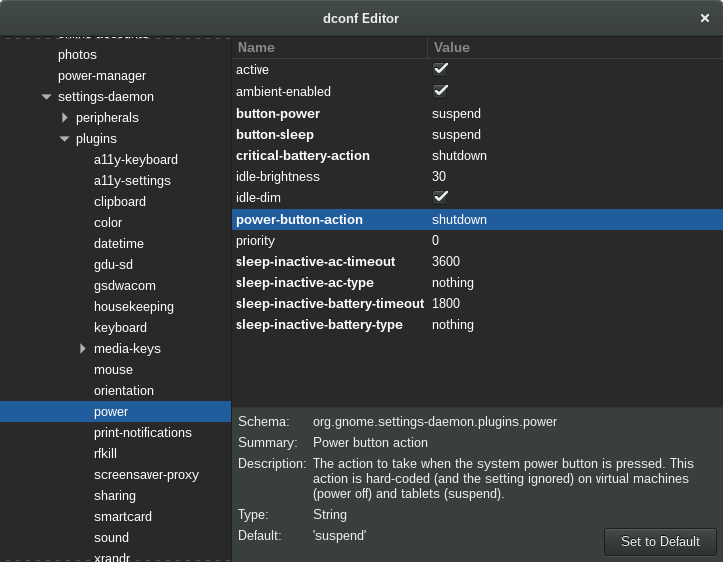
so select that to shutdown via power button or, if you prefer CLI, run in terminal:
gsettings set org.gnome.settings-daemon.plugins.power power-button-action shutdown
Sure, for the above to work you also need the right settings in /etc/systemd/logind.conf:
HandlePowerKey=poweroff
PowerKeyIgnoreInhibited=yes
Keep in mind that pressing the power button will shutdown your system without any warning.
Method 2
In Ubuntu 18.04 or any similar Linux variants with acpi (if not you can probably install),
make a file called /etc/acpi/events/power with
sudo nano /etc/acpi/events/power
and put
event=button/power
action=/sbin/poweroff
inside the file, close it, then
sudo service acpid restart
This is probably the simplest solution that definitely works.
Method 3
As @don_crissti explained, the situation is silly because it really isn’t possible to just shutdown without confirmation using the normal settings.
However, there’s a workaround: if the chassis type of the machine is set to “vm” (virtual machine), the old immediate shutdown behavior will take over any settings. Simply enter as root:
hostnamectl set-chassis vm
and reboot once. I don’t know of any side effects of this settings.
Method 4
As an alternative, you can open up the keyboard settings window and assign a custom keyboard shortcut to the command gnome-session-quit --power-off, which will bring up the shutdown menu. I have it set to trigger by Super+q.
Method 5
As a first step, you should make sure that Settings | Power (assuming Gnome v3) “Suspend & Power Off” / “Automatic Suspend” is set to off. Basically, disable GNOME power setting features and just let the system take over.
Method 6
The custom keyboard shortcut works, I set it to gnome-session-quit --power-off --force by pressing only the power button, which is all that I wanted.
Method 7
I found another option to accomplish this on Debian Stretch. I installed the package acpi-support-base and edited the file /etc/acpi/powerbtn-acpi-support.sh adding the following lines following the header comment and before any code.
## Bypass logic to force shutdown on power button
/sbin/shutdown -h -P now "Power button pressed"
exit 0
This is a bit of a blunt instrument but works for me on a desktop and should work on a laptop. It also bypasses the Gnome3 settings but is easier than patching Gnome and recompiling.
According to the Arch Wiki page on acpid this can probably be implemented by modifying /etc/acpi/handler.sh on Arch.
Method 8
I worked around this problem on a server of mine by monitoring the log output of systemd-logind basically refining the solutions presented in other answers.
This workaround requires two files. The script that triggers the actual shutdown event
$ cat /usr/local/bin/shutdown_button_monitor.sh
#!/bin/sh

# ansible managed

# systemd-logind prints a line of the form
# Dez 21 11:12:10 box03.yeepa.de systemd-logind[748]: Power key pressed.
# on key press, but doesn't handle the button because gnome3 blocks systemd from doing so.
# See `systemd-inhibit` for that.

# first sleep a minute so we have chance to disable this scritp if it runs amok
sleep 1m

# so we workaround gnome a bit here.
journalctl -u systemd-logind --follow --lines=0 |
while read line ; do
    if echo "$line" | grep --quiet 'Power key pressed'
    then
        systemctl poweroff
    fi
done
and the service file that starts / restarts it
$ cat /etc/systemd/system/shutdown_button_monitor.service
# ansible managed

[Unit]
Description=Power off the machine if the power button is pressed
# Workaround for gnomes block of the shutdown button
# https://unix.stackexchange.com/questions/242129/gnome-3-how-to-set-power-button-to-shutdown-instead-of-suspend#242452
# Monitor these blocks yourself with `systemd-inhibit`

[Service]
User=root
ExecStart=/usr/local/bin/shutdown_button_monitor.sh
Restart=always
RestartSec=5

[Install]
WantedBy=multi-user.target
Method 9
Some while ago I created this handy script: https://github.com/stackcoder/doublepress
It can prevent accidental shutdowns by requiring double pressing the power button. It also allows switching between standby and poweroff, or triggers your custom action.
All methods was sourced from stackoverflow.com or stackexchange.com, is licensed under cc by-sa 2.5, cc by-sa 3.0 and cc by-sa 4.0