If I have a plain text file, how can I convert it to an image file through the command line? (and preserve the layout of the ASCII art in it)
Answers:
Thank you for visiting the Q&A section on Magenaut. Please note that all the answers may not help you solve the issue immediately. So please treat them as advisements. If you found the post helpful (or not), leave a comment & I’ll get back to you as soon as possible.
Method 1
imagemagick is your friend here. Something similar to the following may help you:-
convert -size 360x360 xc:white -font "FreeMono" -pointsize 12 -fill black -draw @ascii.txt image.png
where ascii.txt is your ascii-art file:-
text 15,15 "                 .88888888:.
                88888888.88888.
              .8888888888888888.
              888888888888888888
              88' _`88'_  `88888
              88 88 88 88  88888
              88_88_::_88_:88888
              88:::,::,:::::8888
              88`:::::::::'`8888
             .88  `::::'    8:88.
            8888            `8:888.
          .8888'             `888888.
          .8888:..  .::.  ...:'8888888:.
        .8888.'     :'     `'::`88:88888
       .8888        '         `.888:8888.
      888:8         .           888:88888
    .888:88        .:           888:88888:
    8888888.       ::           88:888888
    `.::.888.      ::          .88888888
   .::::::.888.    ::         :::`8888'.:.
  ::::::::::.888   '         .::::::::::::
  ::::::::::::.8    '      .:8::::::::::::.
 .::::::::::::::.        .:888:::::::::::::
 :::::::::::::::88:.__..:88888:::::::::::'
  `'.:::::::::::88888888888.88:::::::::'
        `':::_:' -- '' -'-' `':_::::'`
    "
with text 15,15 added as the first line of text (the 15,15 is a positional offset). Also, make sure that the actual text to be converted is enclosed in quotes. Single or double quotes will do, but make sure they’re not used as part of your ascii-art as it will confuse matters.
The font you choose should be a monospaced font, otherwise the text won’t align.
This produces:-
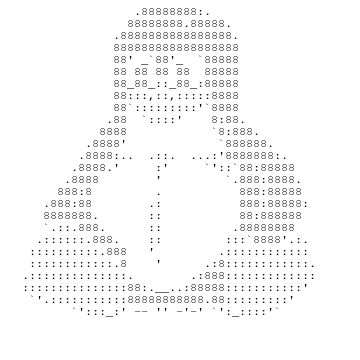
Method 2
I find ImageMagick’s -annotate operator to be a bit more convenient than the -draw method garethTheRed suggested, for the simple reason that it doesn’t require modification of the input file. It’s not as powerful as -draw, but for wholesale dumping of a text file’s contents into an image it serves just fine.
convert -size 360x360 xc:white -font "FreeMono" -pointsize 12 -fill black
-annotate +15+15 "@ascii.txt" image.png
will output a rendered version of the given file contents, but without having to modify your “ascii.txt” file to contain the text 15x15 part of the -draw primitive.
Specifying Arguments
The argument to -font can be any supported font name, if FreeMono isn’t available (or simply isn’t desired). A list of the fonts available to any ImageMagick command can be obtained using the -list operator, so convert -list font will display all of the possible arguments to -font.
The arguments to -annotate (how far to shift the rendered text from the edge of the canvas) consist of horizontal and vertical pixel offsets (respectively). The first offset (horizontal x-shift) can be any positive integer, but needn’t be greater than a few pixels. The second offset (vertical y-shift) must be at least equal to the point size of the font chosen (the argument to -pointsize), because ImageMagick will place the baseline of the font at the given offset. So if you don’t shift the font down at least pointsize pixels, the top of the first line will be cut off.
I recommend going over by several pixels at least, so if you’re using -pointsize 64 then you should pair that with something like -annotate +15+80. (There’s no reason to increase the horizontal offset with larger font sizes, it has no relationship to the text dimensions.)
Needing to guess the necessary dimensions of the output image can also be tedious. I usually just pick excessive values, then take advantage of ImageMagick’s -trim and -border to autocrop the result. The following command:
convert -size 1000x2000 xc:white -font "FreeMono" -pointsize 12 -fill black
-annotate +15+15 "@ascii.txt" -trim -bordercolor "#FFF" -border 10 +repage image.png
will render into a 1000×2000 box, then trim off the excess white space except for a 10-pixel border all the way around the text. The +repage at the very end prevents the output PNG being created with an image offset, which would otherwise cause GIMP to pop up a dialog on load asking whether it should apply the offset.
(Obviously, 1000×2000 is excessive for small text files, and for longer ones at least the vertical dimension may need to be increased. It’s simpler to overestimate, though, as the only cost is convert consuming slightly more CPU and memory while processing.)
Preprocessing Input
If your text file isn’t already formatted the way you need in order to render it (say, if it uses very long lines) then you may have to reformat it before handing it to convert. ImageMagick won’t wrap the text, so each line of text will extend its full length horizontally. Fortunately, it’s possible to run the file through any command-line formatters you’d like, then pipe the processed text into convert instead of reading directly from the file:
fmt < ascii.txt | convert -size 1000x2000 xc:white -font "DejaVu-Sans-Condensed"
-pointsize 24 -fill black -annotate +15+30 "@-" -trim -bordercolor "#FFF"
-border 10 +repage image.png
That’ll render the contents of ascii.txt in 24-point DejaVu Sans Condensed, after it’s been processed by the fmt command, which in its default mode of operation will reformat its input by word-wrapping to a width of 75 columns. (Unless there are long continuous strings longer than 75 characters, like URLs, in which case they’ll extend over.)
Once fmt has reformatted the text, it’ll be passed to convert which will then render the piped fmt output, same as if it was reading the file directly. (Specifying a filename of - is a fairly common UNIX shell shorthand for “read from standard input, instead of any named disk file”, and ImageMagick’s tools follow that convention.)
Method 3
You could use openoffice (libreoffice) to do it.
soffice --convert-to jpg "Textfile.doc"
it works with text files too.
Method 4
A simple solution is to use pango-view provided by Pango, a text rendering library used in GTK you likely already have installed:
pango-view --font=mono -qo image.png file
You can create SVGs too!
pango-view --font=mono -qo image.svg file
pango-view has many customization and layout option, consult its man page.
All methods was sourced from stackoverflow.com or stackexchange.com, is licensed under cc by-sa 2.5, cc by-sa 3.0 and cc by-sa 4.0