I’d like to set the terminal title to [email protected] so I can easily tell which machine I’m connected to from the window title. Is there a way to do this from SSH or from GNOME Terminal?
Answers:
Thank you for visiting the Q&A section on Magenaut. Please note that all the answers may not help you solve the issue immediately. So please treat them as advisements. If you found the post helpful (or not), leave a comment & I’ll get back to you as soon as possible.
Method 1
Yes. Here’s an example for bash using PS1 that should be distro-agnostic:
Specifically, the escape sequence [e]0; __SOME_STUFF_HERE__ a] is of interest. I’ve edited this to be set in a separate variable for more clarity.
# uncomment for a colored prompt, if the terminal has the capability; turned
# off by default to not distract the user: the focus in a terminal window
# should be on the output of commands, not on the prompt
force_color_prompt=yes

if [ -n "$force_color_prompt" ]; then
    if [ -x /usr/bin/tput ] && tput setaf 1 >&/dev/null; then
        # We have color support; assume it's compliant with Ecma-48
        # (ISO/IEC-6429). (Lack of such support is extremely rare, and such
        # a case would tend to support setf rather than setaf.)
        color_prompt=yes
    else
        color_prompt=
    fi
fi

TITLEBAR='[e]0;<a href="https://getridbug.com/cdn-cgi/l/email-protection" class="__cf_email__" data-cfemail="394c79">[email protected]</a>ha]'
# Same thing.. but with octal ASCII escape chars
#TITLEBAR='[33]2;<a href="https://getridbug.com/cdn-cgi/l/email-protection" class="__cf_email__" data-cfemail="84f1c4">[email protected]</a>h07]'

if [ "$color_prompt" = yes ]; then
    PS1="${TITLEBAR}[33[01;32m]<a href="https://getridbug.com/cdn-cgi/l/email-protection" class="__cf_email__" data-cfemail="295c69">[email protected]</a>h[33[00m]:[33[01;34m]W[33[00m]$ "
else
    PS1="${TITLEBAR}<a href="https://getridbug.com/cdn-cgi/l/email-protection" class="__cf_email__" data-cfemail="bdc8fd">[email protected]</a>h:W$ "
fi
unset color_prompt force_color_prompt
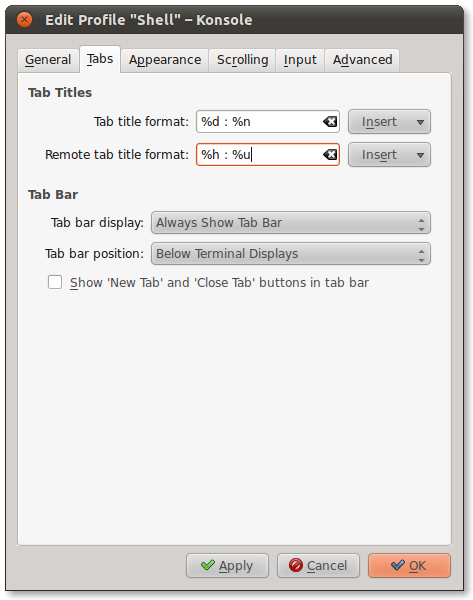
Also note that there can be many ways of setting an xterm’s title, depending on which terminal program you are using, and which shell. For example, if you’re using KDE’s Konsole, you can override the title setting by going to Settings->Configure Profiles->Edit Profile->Tabs and setting the Tab title format and Remote tab title format settings.
Additionally, you may want to check out:
- this “How to change the title of an xterm” FAQ for other shells
- this “Prompt Magic” tip for a good reference of the escape sequences that work in bash.
- this Bash Prompt HOWTO for a reference on ANSI Color escape sequences.
Method 2
Here’s a version of the SSH bash script that I use which sets the remote server’s title and command prompt without making any changes to the remote server.
my_ssh.sh:

#!/bin/bash
SETTP='MY_PROMPT="$HOSTNAME:$PWD$ "'
SETTP="$SETTP;"'MY_TITLE="[e]0;$HOSTNAME:$PWDa]"'
SETTP="$SETTP;"'PS1="$MY_TITLE$MY_PROMPT"'
ssh -t <a href="https://getridbug.com/cdn-cgi/l/email-protection" class="__cf_email__" data-cfemail="45617405">[email protected]</a>$2 "export PROMPT_COMMAND='eval '\''$SETTP'\'; bash --login"
You can invoke it by calling ./my_ssh.sh username hostname
Method 3
The following works for me (probably only on gnome-terminal):
<a href="https://getridbug.com/cdn-cgi/l/email-protection" class="__cf_email__" data-cfemail="afccc0c2dfefc7c0c2ca">[email protected]</a>$ cat /usr/bin/ssh
#!/bin/bash
echo -ne "33]0;${1}07"
ssh_bkup "<a href="https://getridbug.com/cdn-cgi/l/email-protection" class="__cf_email__" data-cfemail="b094f0">[email protected]</a>"
Where ssh_bkup command is just basic ‘ssh’ with a changed name, which is called right after the echo command changes the current terminal’s title.
Method 4
this is alias version
SETTP='MY_PROMPT="$HOSTNAME:$PWD$ "'
SETTP="$SETTP;"'MY_TITLE="[e]0;$HOSTNAME:$PWDa]"'
SETTP="$SETTP;"'PS1="$MY_TITLE$MY_PROMPT"'
SETPC="export PROMPT_COMMAND='eval '\''$SETTP'\'; bash --login"

alias myssh='function _myssh(){ ssh -t <a href="https://getridbug.com/cdn-cgi/l/email-protection" class="__cf_email__" data-cfemail="54706514">[email protected]</a>$2 $SETPC; };_myssh'
Method 5
If you are using zsh, add following into .zshrc file:
export DISABLE_AUTO_TITLE="true"

precmd() {
    printf "33];$(whoami)@$(hostname):${PWD/#$HOME/~}07";
}
All methods was sourced from stackoverflow.com or stackexchange.com, is licensed under cc by-sa 2.5, cc by-sa 3.0 and cc by-sa 4.0