Is there a Linux graphics program that displays man commands in a browser?
I need a program that allows me to display all man commands in a browser, or in some graphics program, so that they can be up all the time, rather than having to view them through terminal windows.
Answers:
Thank you for visiting the Q&A section on Magenaut. Please note that all the answers may not help you solve the issue immediately. So please treat them as advisements. If you found the post helpful (or not), leave a comment & I’ll get back to you as soon as possible.
Method 1
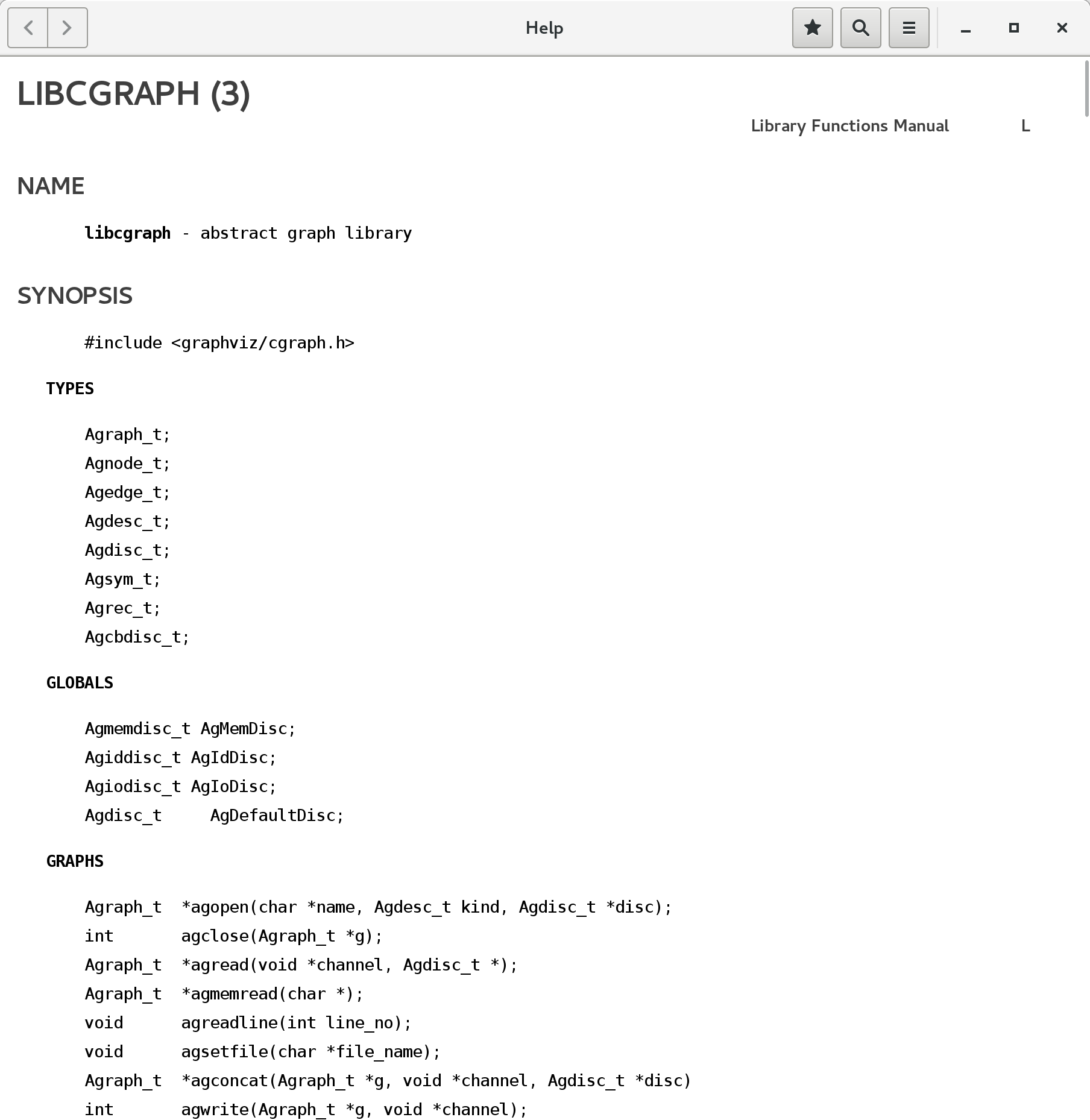
Yelp is the help viewer in GNOME.
yelp man:cgraph
Method 2
On a GNU system, the program you’re looking for is man.
BROWSER=firefox man --html man
Try that command (or substitute some other valid value for BROWSER=, such as, for example, cat with a redirect if you wish to save the result) and see what you get.
If you want it to be the default configuration, you’ll find instructions for configuring man to your specifications in the browser window that appears.
Method 3
There is xman, a graphical utility for displaying manpages.
I don’t know anyone who has ever used it though. It was old an archaic already 20 years ago. For your stated use case of having manual pages displayed all the time, you’d probably be better off just opening a new terminal window and typing man something than by using xman.
Method 4
I have no idea why you would want to do this, it seems far simpler to just keep a terminal window open, but you can create HTML versions of all your manuals like this (assuming the names of the directories where your manuals are stored contain no whitespace):
-
Install
man2htmlsudo apt-get install man2html
-
Create the directory where you will keep the HTML files
mkdir ~/htmlman
-
Find all man pages in your system and convert them to HTML:
find $(manpath | tr : ' ') -name '*.gz' | while read f; do man2html "$f" > ~/htmlman/"$(basename "$f" .gz)".html; done -
Generate an index file
cd ~/htmlman
printf "<html><head></head><body>n" > index.html
for i in *html; do
    printf '<a href="%s" rel="nofollow noreferrer noopener">%s</a><br>n' "$i" $(basename "$i" .html) >> index.html
done
printf '</body></html>' >> index.html
You can then point your browser to file:///home/vfclists/htmlman/index.html and you’ll have a list of all your man pages in HTML format.
Notes
- This is a quick and ugly hack. There will be some error messages printed.
-
This will include man pages in all languages you have installed on your system. You might want to limit it to specific target directories. Change step 3 to:
find /usr/share/man/man{1..9} -name '*.gz' |
    while read f; do
        man2html "$f" > ~/foo/"$(basename "$f" .gz)".html;
    done
Method 5
You can use man2html(this is how the package is usually called), an example.
man 1 man | man2html > man.html
And then use firefox, elinks or whatever browser you want to view it.
There are also some services that keep manpages such as http://manpages.ubuntu.com/
Method 6
On Debian systems, there is a package named dwww which provides a simple web GUI for man pages, GNU info pages, any files in /usr/share/doc hierarchy and any other installed Debian document packages. It requires Apache or any other CGI-capable web server installed and running locally, and the appropriate command-line document format converters like info2www.
Other Debian-related distributions, like the Ubuntu family, might have it too.
By default, the URL http://localhost/dwww is available for localhost only, but in a trusted network you can allow other hosts to access it too.
If you just want quick access to man pages, bookmark http://localhost/dwww/man/
Method 7
As a rather complimentary answer to the one above given about Yelp, on Debian systems, at least for GNOME desktop environment version 3.22, you may type directly what you ask for Man or Info help inside the address bar of the Mozilla Firefox browser or the GNOME Epiphany browser so that the Yelp with the asked Man or Info help page is open in Yelp‘s window (not the browser’s). E.g.:
man:chmod.2
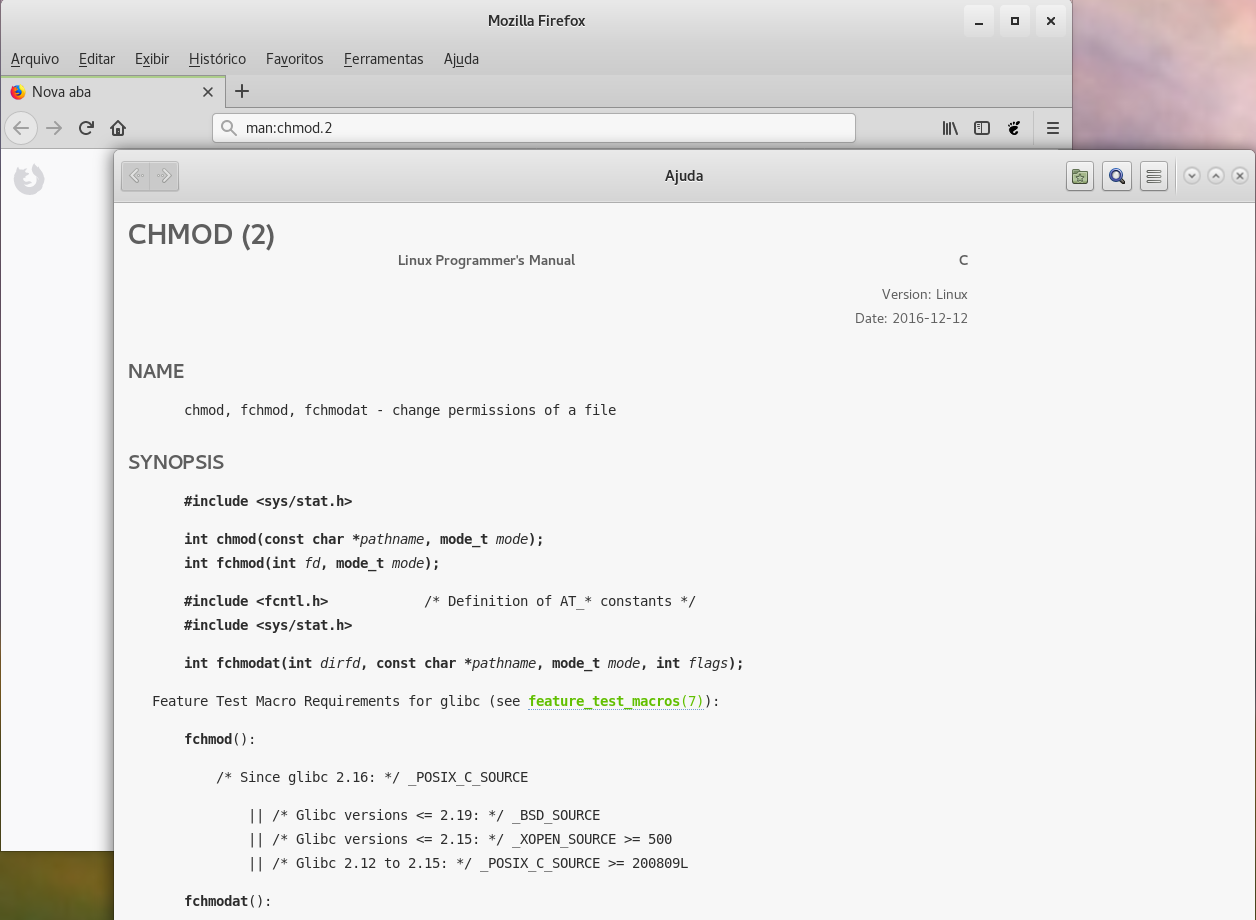
The 1st example shows the man page about ‘chmod’ from the section 2, not from the default section 1 (which can be shown by typing man:chmod or man:chmod.1), launched from Firefox.
info:coreutils
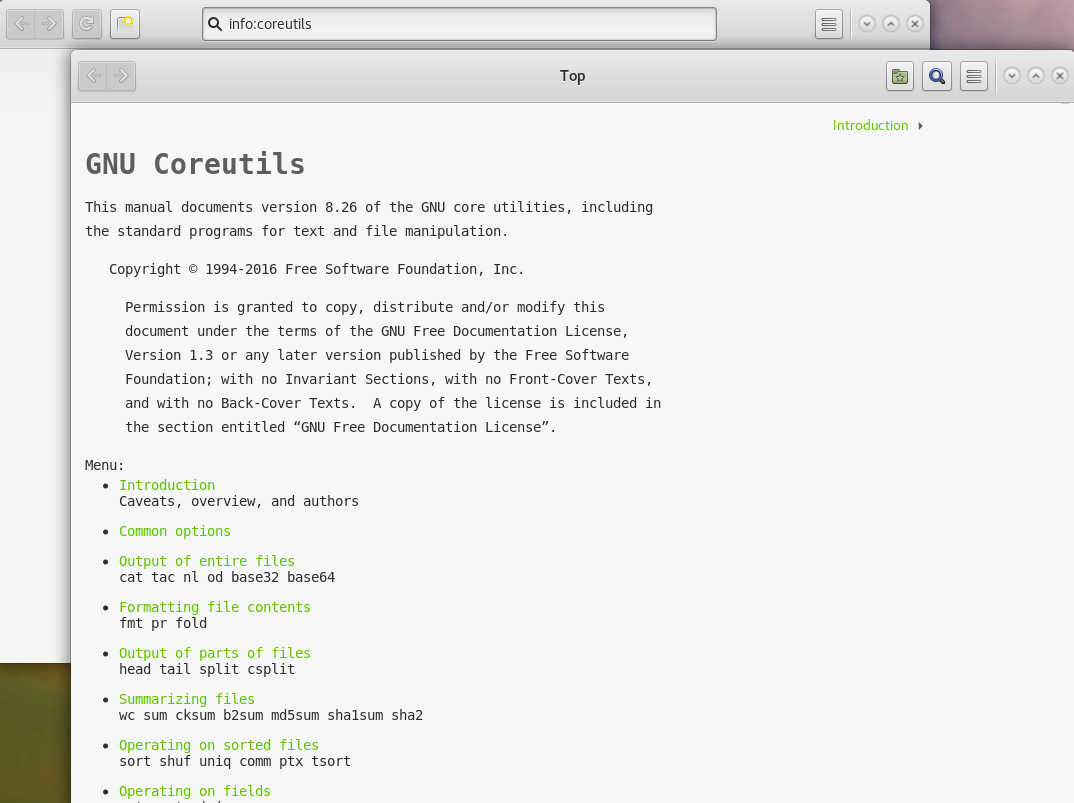
The 2nd example shows the info page about ‘GNU Coreutils’, launched from Epiphany.
Note: The answer was inspired by the web page about the graphical help from Linuxtopia. According to this page, the (KDE) Konqueror browser may provide what the OP asked if using Linux systems providing KDE software set, but I have not tried it. Also this page informs that the (GNOME) Nautilus provides a searchable index of the Man and Info pages, but I tried the recent version of this application, which does not have any feature regarding the help pages, so it seems an outdated information for any more recent GNOME applications.
Method 8
I use w3mman in an extra xterm or horizontally split screen so one program fits the terminal and the windowed scenario.
$ alias man
alias man=w3mman'
w3m‘s converter from manpage format to HTML (/usr/lib/w3m/cgi-bin/w3mman2html.cgi) can be used as CGI with a HTTPD too:
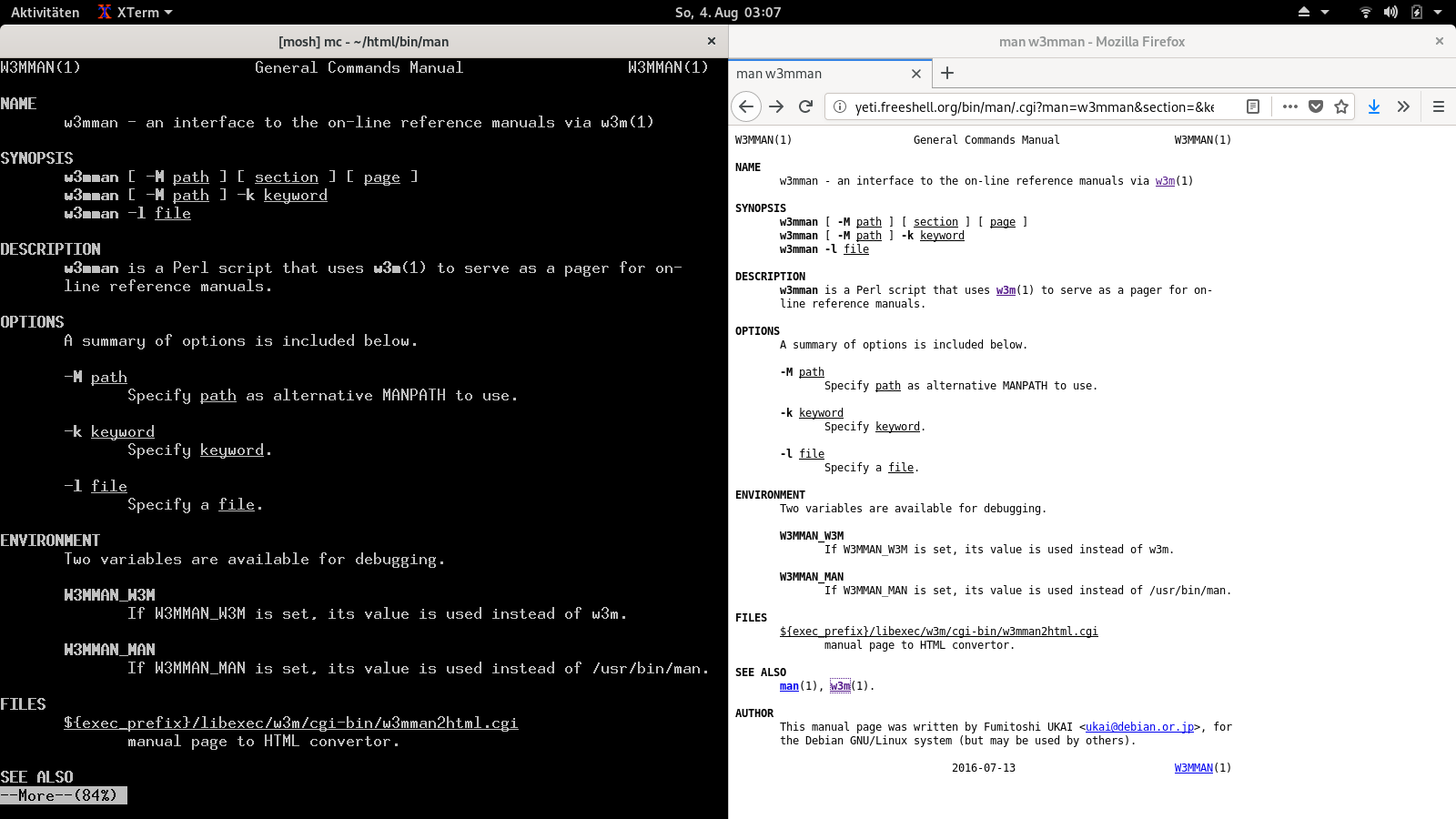
(I disabled w3mman on that server again, it only was activated for making the screenshot.)
Method 9
If you are using KDE, you can use KHelpCenter Application to show UNIX manual pages.
Man pages are in UNIX manual pages or by running khelpcenter man:.
https://userbase.kde.org/KHelpCenter || khelpcenter
Method 10
Just for the record….
I’m using this trick that works for man pages well:
man bash |yad --text-info #or |zenity --text-info
(requires yad or zenity, usually exists in your linux distro).
In this way you have GUI interface without the need of any external tool other than yad/zenity which usually exist in your system.
You can scroll with mouse, and most important for me using gtk3.0 version of yad (default today) i can scroll even with my touchscreen.
PS: You need to maximize the yad / zenity window to see all the contents correctly.
As a more permanent solution, i created a tiny script called mang (no extension) under /usr/bin and as soon as i chmod +x mang i was able to call mang (instead of man) from anywhere as simple as `mang cat’ .
For those guys who like to play, this is the content of mang script:
#!/bin/bash
# place this file under /usr/bin , and chmod +x this file in order to be able to call it
if [[ -z $1 ]];then
echo "You need to provide a manual"
else
man $1 |yad --text-info --height=500 --width=800 --center --title="Man Pages of $1" --wrap --show-uri &
fi
exit
Tips : --show-uri makes the links inside man pages clickable . Operator & sends the yad window to background , mang is terminated and terminal is free.
Method 11
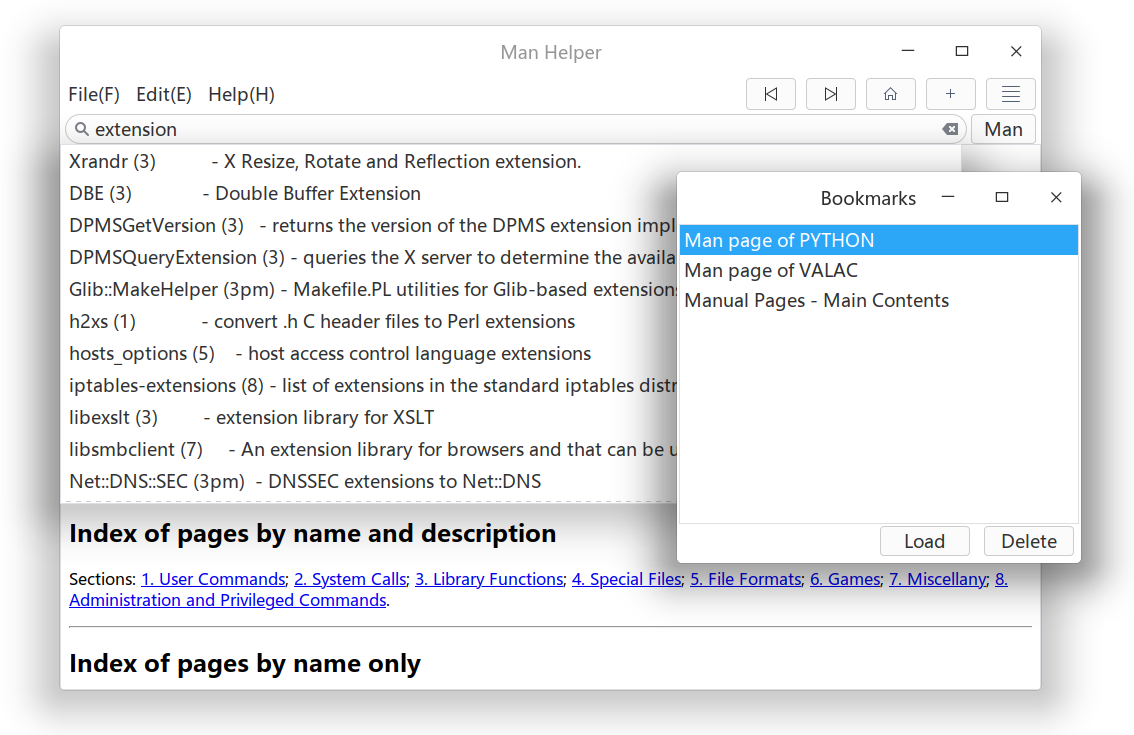
I’m currently developing a lightweight GTK front-end called “Man Helper” for man2html using Vala. Wish it could help in the future.
https://github.com/akarin123/manhelper
Method 12
Just an alternative. Run explainshell locally; it’s available at this Github repo: explainshell.
All methods was sourced from stackoverflow.com or stackexchange.com, is licensed under cc by-sa 2.5, cc by-sa 3.0 and cc by-sa 4.0