I want to monitor memory usage of a process, and I want this data to be logged. Does such a tool exist?
Answers:
Thank you for visiting the Q&A section on Magenaut. Please note that all the answers may not help you solve the issue immediately. So please treat them as advisements. If you found the post helpful (or not), leave a comment & I’ll get back to you as soon as possible.
Method 1
Occasionally when the need arises I just do:
$ top -d 1 -b |grep <process> >>somefile
It’s not an elegant solution, but gets the job done if you want the quick crude value to verify your hypothesis.
Method 2
I have written a script to do exactly this.
It basically samples ps at specific intervals, to build up a profile of a particular process. The process can be launched by the monitoring tool itself, or it can be an independent process (specified by pid or command pattern).
Method 3
sar (System Activity Reporter) from the sysstat package is your friend in case like these.
Another way would be monitoring combined with historical data, e.g. Munin, pnp4nagios, rrdtools, …
Method 4
Besides the aforementioned sar, I’d recommend atop. It saves a binary log that you can peruse afterwards, and besides memory saves a lot of other information.
Method 5
You could try Valgrind.
Valgrind is an instrumentation
framework for building dynamic
analysis tools. There are Valgrind
tools that can automatically detect
many memory management and threading
bugs, and profile your programs in
detail. You can also use Valgrind to
build new tools.The Valgrind distribution currently
includes six production-quality tools:
a memory error detector, two thread
error detectors, a cache and
branch-prediction profiler, a
call-graph generating cache and
branch-prediction profiler, and a heap
profiler.
Method 6
I like Sridhar’s simple answer but I rolled my own before I tried his:
#! /usr/bin/python3

import json, psutil, datetime, sys, time

while True:
  print(json.dumps((datetime.datetime.now().isoformat(),
                    psutil.Process(int(sys.argv[1])).memory_info()._asdict())))
  time.sleep(1)
It’s basically only useful if you want structured output. Note: _asdict() was broken in some versions of Python 3.5; it works again in Python 3.6.9 though (as well as in Python 2.7.17).
Output looks like:
["2019-03-19T11:21:53.784670", {"rss": 220389376, "vms": 538984448, "shared": 15724544, "text": 303104, "lib": 0, "data": 221364224, "dirty": 0}]
["2019-03-19T11:21:54.786136", {"rss": 220438528, "vms": 539119616, "shared": 15724544, "text": 303104, "lib": 0, "data": 221499392, "dirty": 0}]
["2019-03-19T11:21:55.787555", {"rss": 220495872, "vms": 539119616, "shared": 15724544, "text": 303104, "lib": 0, "data": 221499392, "dirty": 0}]
["2019-03-19T11:21:56.788754", {"rss": 220528640, "vms": 539119616, "shared": 15724544, "text": 303104, "lib": 0, "data": 221499392, "dirty": 0}]
For me, it was important to have structured output so that I could more easily consume it for analysis.
Method 7
I want to monitor memory usage of a process, and I want this data to be logged. Does such a tool exist?
Yes, can achieve exactly this, a bit more with Procpath (author here).
In the simplest case you point it to the PID of interest and let it record its Procfs metrics including Resident Set Size (RSS). By default it makes a recording per 10 seconds (for the target process, its ancestors and descendants).
$ procpath record -d tgt.sqlite -p $PID
When you think it has recorded enough datapoints, Ctrl+C it and this will give you the recordings.
$ sqlite3 tgt.sqlite "SELECT ts, stat_rss * 4 rss_kib FROM record WHERE stat_pid = $PID"
1635349330.11141|478460
1635349340.12125|476068
1635349350.13124|480232
1635349360.14117|483416
...
Using a SQLite GUI can be a more convenient to explore and query the database (e.g. apt install sqlitebrowser).
Procpath can also visualise RSS of the target process into an SVG out of the box like this:
$ procpath plot -d tgt.sqlite -f tgt.svg -q rss -p $PID
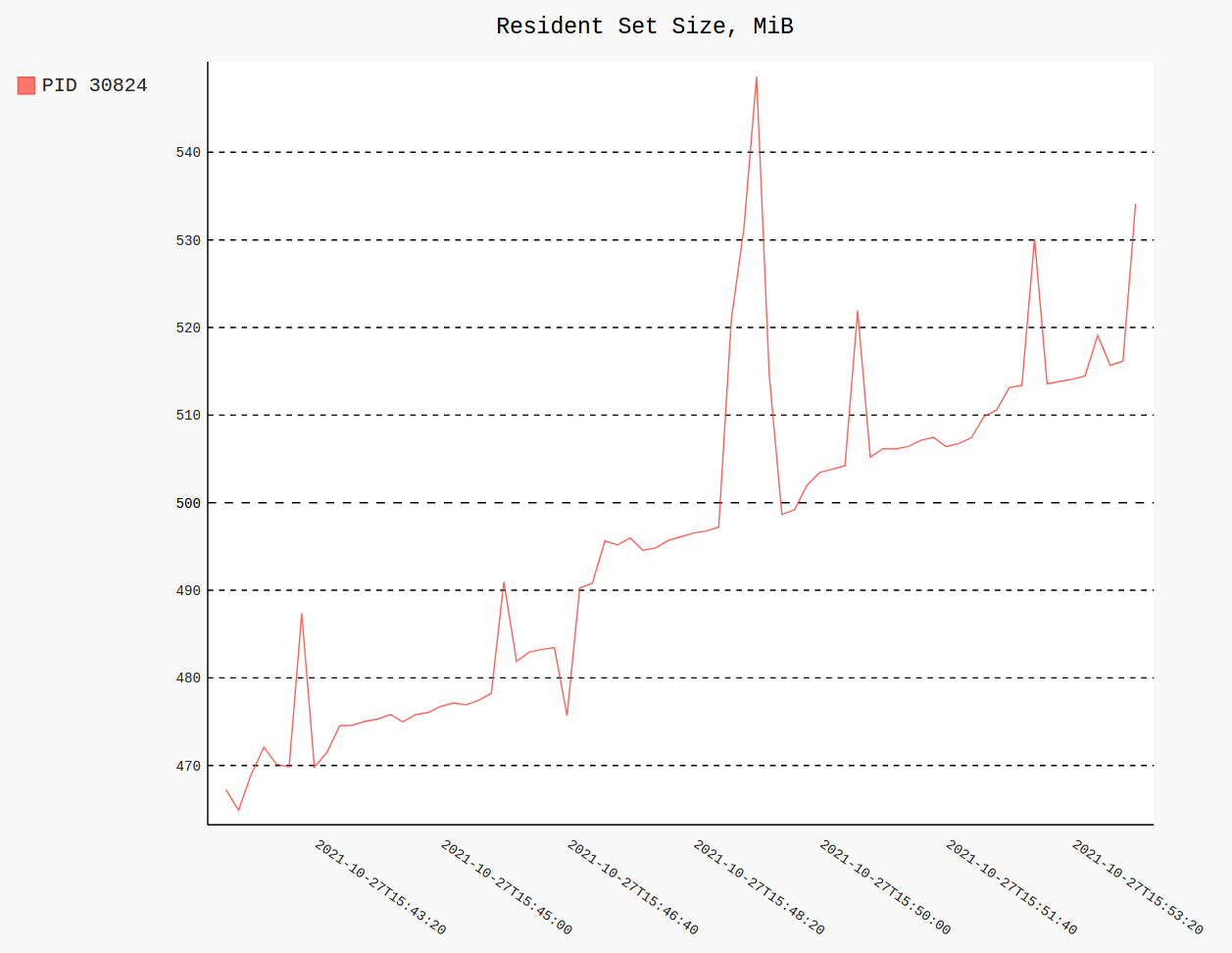
If you’re running Kernel 4.14+ you can get more advanced Linux memory usage metrics like Proportional Set Size (PSS), Unique Set Size (USS), proportional swap usage and others (see the documentation for what you can get from /proc/{pid}/smaps_rollup):
procpath record -d tgt.sqlite -p $PID -f stat,cmdline,smaps_rollup
All methods was sourced from stackoverflow.com or stackexchange.com, is licensed under cc by-sa 2.5, cc by-sa 3.0 and cc by-sa 4.0