I am using python Requests. I need to debug some OAuth activity, and for that I would like it to log all requests being performed. I could get this information with ngrep, but unfortunately it is not possible to grep https connections (which are needed for OAuth)
How can I activate logging of all URLs (+ parameters) that Requests is accessing?
Answers:
Thank you for visiting the Q&A section on Magenaut. Please note that all the answers may not help you solve the issue immediately. So please treat them as advisements. If you found the post helpful (or not), leave a comment & I’ll get back to you as soon as possible.
Method 1
You need to enable debugging at httplib level (requests → urllib3 → httplib).
Here’s some functions to both toggle (..._on() and ..._off()) or temporarily have it on:
import logging
import contextlib
try:
    from http.client import HTTPConnection # py3
except ImportError:
    from httplib import HTTPConnection # py2

def debug_requests_on():
    '''Switches on logging of the requests module.'''
    HTTPConnection.debuglevel = 1

    logging.basicConfig()
    logging.getLogger().setLevel(logging.DEBUG)
    requests_log = logging.getLogger("requests.packages.urllib3")
    requests_log.setLevel(logging.DEBUG)
    requests_log.propagate = True

def debug_requests_off():
    '''Switches off logging of the requests module, might be some side-effects'''
    HTTPConnection.debuglevel = 0

    root_logger = logging.getLogger()
    root_logger.setLevel(logging.WARNING)
    root_logger.handlers = []
    requests_log = logging.getLogger("requests.packages.urllib3")
    requests_log.setLevel(logging.WARNING)
    requests_log.propagate = False

@contextlib.contextmanager
def debug_requests():
    '''Use with 'with'!'''
    debug_requests_on()
    yield
    debug_requests_off()
Demo use:
>>> requests.get('http://httpbin.org/')
<Response [200]>

>>> debug_requests_on()
>>> requests.get('http://httpbin.org/')
INFO:requests.packages.urllib3.connectionpool:Starting new HTTP connection (1): httpbin.org
DEBUG:requests.packages.urllib3.connectionpool:"GET / HTTP/1.1" 200 12150
send: 'GET / HTTP/1.1rnHost: httpbin.orgrnConnection: keep-alivernAccept-
Encoding: gzip, deflaternAccept: */*rnUser-Agent: python-requests/2.11.1rnrn'
reply: 'HTTP/1.1 200 OKrn'
header: Server: nginx
...
<Response [200]>

>>> debug_requests_off()
>>> requests.get('http://httpbin.org/')
<Response [200]>

>>> with debug_requests():
...     requests.get('http://httpbin.org/')
INFO:requests.packages.urllib3.connectionpool:Starting new HTTP connection (1): httpbin.org
...
<Response [200]>
You will see the REQUEST, including HEADERS and DATA, and RESPONSE with HEADERS but without DATA. The only thing missing will be the response.body which is not logged.
Method 2
The underlying urllib3 library logs all new connections and URLs with the logging module, but not POST bodies. For GET requests this should be enough:
import logging

logging.basicConfig(level=logging.DEBUG)
which gives you the most verbose logging option; see the logging HOWTO for more details on how to configure logging levels and destinations.
Short demo:
>>> import requests
>>> import logging
>>> logging.basicConfig(level=logging.DEBUG)
>>> r = requests.get('http://httpbin.org/get?foo=bar&baz=python')
DEBUG:urllib3.connectionpool:Starting new HTTP connection (1): httpbin.org:80
DEBUG:urllib3.connectionpool:http://httpbin.org:80 "GET /get?foo=bar&baz=python HTTP/1.1" 200 366
Depending on the exact version of urllib3, the following messages are logged:
INFO: RedirectsWARN: Connection pool full (if this happens often increase the connection pool size)WARN: Failed to parse headers (response headers with invalid format)WARN: Retrying the connectionWARN: Certificate did not match expected hostnameWARN: Received response with both Content-Length and Transfer-Encoding, when processing a chunked responseDEBUG: New connections (HTTP or HTTPS)DEBUG: Dropped connectionsDEBUG: Connection details: method, path, HTTP version, status code and response lengthDEBUG: Retry count increments
This doesn’t include headers or bodies. urllib3 uses the http.client.HTTPConnection class to do the grunt-work, but that class doesn’t support logging, it can normally only be configured to print to stdout. However, you can rig it to send all debug information to logging instead by introducing an alternative print name into that module:
import logging
import http.client

httpclient_logger = logging.getLogger("http.client")

def httpclient_logging_patch(level=logging.DEBUG):
    """Enable HTTPConnection debug logging to the logging framework"""

    def httpclient_log(*args):
        httpclient_logger.log(level, " ".join(args))

    # mask the print() built-in in the http.client module to use
    # logging instead
    http.client.print = httpclient_log
    # enable debugging
    http.client.HTTPConnection.debuglevel = 1
Calling httpclient_logging_patch() causes http.client connections to output all debug information to a standard logger, and so are picked up by logging.basicConfig():
>>> httpclient_logging_patch()
>>> r = requests.get('http://httpbin.org/get?foo=bar&baz=python')
DEBUG:urllib3.connectionpool:Starting new HTTP connection (1): httpbin.org:80
DEBUG:http.client:send: b'GET /get?foo=bar&baz=python HTTP/1.1rnHost: httpbin.orgrnUser-Agent: python-requests/2.22.0rnAccept-Encoding: gzip, deflaternAccept: */*rnConnection: keep-alivernrn'
DEBUG:http.client:reply: 'HTTP/1.1 200 OKrn'
DEBUG:http.client:header: Date: Tue, 04 Feb 2020 13:36:53 GMT
DEBUG:http.client:header: Content-Type: application/json
DEBUG:http.client:header: Content-Length: 366
DEBUG:http.client:header: Connection: keep-alive
DEBUG:http.client:header: Server: gunicorn/19.9.0
DEBUG:http.client:header: Access-Control-Allow-Origin: *
DEBUG:http.client:header: Access-Control-Allow-Credentials: true
DEBUG:urllib3.connectionpool:http://httpbin.org:80 "GET /get?foo=bar&baz=python HTTP/1.1" 200 366
Method 3
For those using python 3+
import requests
import logging
import http.client

http.client.HTTPConnection.debuglevel = 1

logging.basicConfig()
logging.getLogger().setLevel(logging.DEBUG)
requests_log = logging.getLogger("requests.packages.urllib3")
requests_log.setLevel(logging.DEBUG)
requests_log.propagate = True
Method 4
When trying to get the Python logging system (import logging) to emit low level debug log messages, it suprised me to discover that given:
requests --> urllib3 --> http.client.HTTPConnection
that only urllib3 actually uses the Python logging system:
requestsnohttp.client.HTTPConnectionnourllib3yes
Sure, you can extract debug messages from HTTPConnection by setting:
HTTPConnection.debuglevel = 1
but these outputs are merely emitted via the print statement. To prove this, simply grep the Python 3.7 client.py source code and view the print statements yourself (thanks @Yohann):
curl https://raw.githubusercontent.com/python/cpython/3.7/Lib/http/client.py |grep -A1 debuglevel`
Presumably redirecting stdout in some way might work to shoe-horn stdout into the logging system and potentially capture to e.g. a log file.
Choose the ‘urllib3‘ logger not ‘requests.packages.urllib3‘
To capture urllib3 debug information through the Python 3 logging system, contrary to much advice on the internet, and as @MikeSmith points out, you won’t have much luck intercepting:
log = logging.getLogger('requests.packages.urllib3')
instead you need to:
log = logging.getLogger('urllib3')
Debugging urllib3 to a log file
Here is some code which logs urllib3 workings to a log file using the Python logging system:
import requests
import logging
from http.client import HTTPConnection  # py3

# log = logging.getLogger('requests.packages.urllib3')  # useless
log = logging.getLogger('urllib3')  # works

log.setLevel(logging.DEBUG)  # needed
fh = logging.FileHandler("requests.log")
log.addHandler(fh)

requests.get('http://httpbin.org/')
the result:
Starting new HTTP connection (1): httpbin.org:80
http://httpbin.org:80 "GET / HTTP/1.1" 200 3168
Enabling the HTTPConnection.debuglevel print() statements
If you set HTTPConnection.debuglevel = 1
from http.client import HTTPConnection  # py3
HTTPConnection.debuglevel = 1
requests.get('http://httpbin.org/')
you’ll get the print statement output of additional juicy low level info:
send: b'GET / HTTP/1.1rnHost: httpbin.orgrnUser-Agent: python-
requests/2.22.0rnAccept-Encoding: gzip, deflaternAccept: */*rnConnection: keep-alivernrn'
reply: 'HTTP/1.1 200 OKrn'
header: Access-Control-Allow-Credentials header: Access-Control-Allow-Origin
header: Content-Encoding header: Content-Type header: Date header: ...
Remember this output uses print and not the Python logging system, and thus cannot be captured using a traditional logging stream or file handler (though it may be possible to capture output to a file by redirecting stdout).
Combine the two above – maximise all possible logging to console
To maximise all possible logging, you must settle for console/stdout output with this:
import requests
import logging
from http.client import HTTPConnection  # py3

log = logging.getLogger('urllib3')
log.setLevel(logging.DEBUG)

# logging from urllib3 to console
ch = logging.StreamHandler()
ch.setLevel(logging.DEBUG)
log.addHandler(ch)

# print statements from `http.client.HTTPConnection` to console/stdout
HTTPConnection.debuglevel = 1

requests.get('http://httpbin.org/')
giving the full range of output:
Starting new HTTP connection (1): httpbin.org:80
send: b'GET / HTTP/1.1rnHost: httpbin.orgrnUser-Agent: python-requests/2.22.0rnAccept-Encoding: gzip, deflaternAccept: */*rnConnection: keep-alivernrn'
reply: 'HTTP/1.1 200 OKrn'
http://httpbin.org:80 "GET / HTTP/1.1" 200 3168
header: Access-Control-Allow-Credentials header: Access-Control-Allow-Origin
header: Content-Encoding header: ...
Method 5
Having a script or even a subsystem of an application for a network protocol debugging, it’s desired to see what request-response pairs are exactly, including effective URLs, headers, payloads and the status. And it’s typically impractical to instrument individual requests all over the place. At the same time there are performance considerations that suggest using single (or few specialised) requests.Session, so the following assumes that the suggestion is followed.
requests supports so called event hooks (as of 2.23 there’s actually only response hook). It’s basically an event listener, and the event is emitted before returning control from requests.request. At this moment both request and response are fully defined, hence can be logged.
import logging

import requests


logger = logging.getLogger('httplogger')

def logRoundtrip(response, *args, **kwargs):
    extra = {'req': response.request, 'res': response}
    logger.debug('HTTP roundtrip', extra=extra)

session = requests.Session()
session.hooks['response'].append(logRoundtrip)
That’s basically how to log all HTTP round-trips of a session.
Formatting HTTP round-trip log records
For the logging above to be useful there can be specialised logging formatter that understands req and res extras on logging records. It can look like this:
import textwrap

class HttpFormatter(logging.Formatter):

    def _formatHeaders(self, d):
        return 'n'.join(f'{k}: {v}' for k, v in d.items())

    def formatMessage(self, record):
        result = super().formatMessage(record)
        if record.name == 'httplogger':
            result += textwrap.dedent('''
                ---------------- request ----------------
                {req.method} {req.url}
                {reqhdrs}

                {req.body}
                ---------------- response ----------------
                {res.status_code} {res.reason} {res.url}
                {reshdrs}

                {res.text}
            ''').format(
                req=record.req,
                res=record.res,
                reqhdrs=self._formatHeaders(record.req.headers),
                reshdrs=self._formatHeaders(record.res.headers),
            )

        return result

formatter = HttpFormatter('{asctime} {levelname} {name} {message}', style='{')
handler = logging.StreamHandler()
handler.setFormatter(formatter)
logging.basicConfig(level=logging.DEBUG, handlers=[handler])
Now if you do some requests using the session, like:
session.get('https://httpbin.org/user-agent')
session.get('https://httpbin.org/status/200')
The output to stderr will look as follows.
2020-05-14 22:10:13,224 DEBUG urllib3.connectionpool Starting new HTTPS connection (1): httpbin.org:443
2020-05-14 22:10:13,695 DEBUG urllib3.connectionpool https://httpbin.org:443 "GET /user-agent HTTP/1.1" 200 45
2020-05-14 22:10:13,698 DEBUG httplogger HTTP roundtrip
---------------- request ----------------
GET https://httpbin.org/user-agent
User-Agent: python-requests/2.23.0
Accept-Encoding: gzip, deflate
Accept: */*
Connection: keep-alive

None
---------------- response ----------------
200 OK https://httpbin.org/user-agent
Date: Thu, 14 May 2020 20:10:13 GMT
Content-Type: application/json
Content-Length: 45
Connection: keep-alive
Server: gunicorn/19.9.0
Access-Control-Allow-Origin: *
Access-Control-Allow-Credentials: true

{
  "user-agent": "python-requests/2.23.0"
}


2020-05-14 22:10:13,814 DEBUG urllib3.connectionpool https://httpbin.org:443 "GET /status/200 HTTP/1.1" 200 0
2020-05-14 22:10:13,818 DEBUG httplogger HTTP roundtrip
---------------- request ----------------
GET https://httpbin.org/status/200
User-Agent: python-requests/2.23.0
Accept-Encoding: gzip, deflate
Accept: */*
Connection: keep-alive

None
---------------- response ----------------
200 OK https://httpbin.org/status/200
Date: Thu, 14 May 2020 20:10:13 GMT
Content-Type: text/html; charset=utf-8
Content-Length: 0
Connection: keep-alive
Server: gunicorn/19.9.0
Access-Control-Allow-Origin: *
Access-Control-Allow-Credentials: true
A GUI way
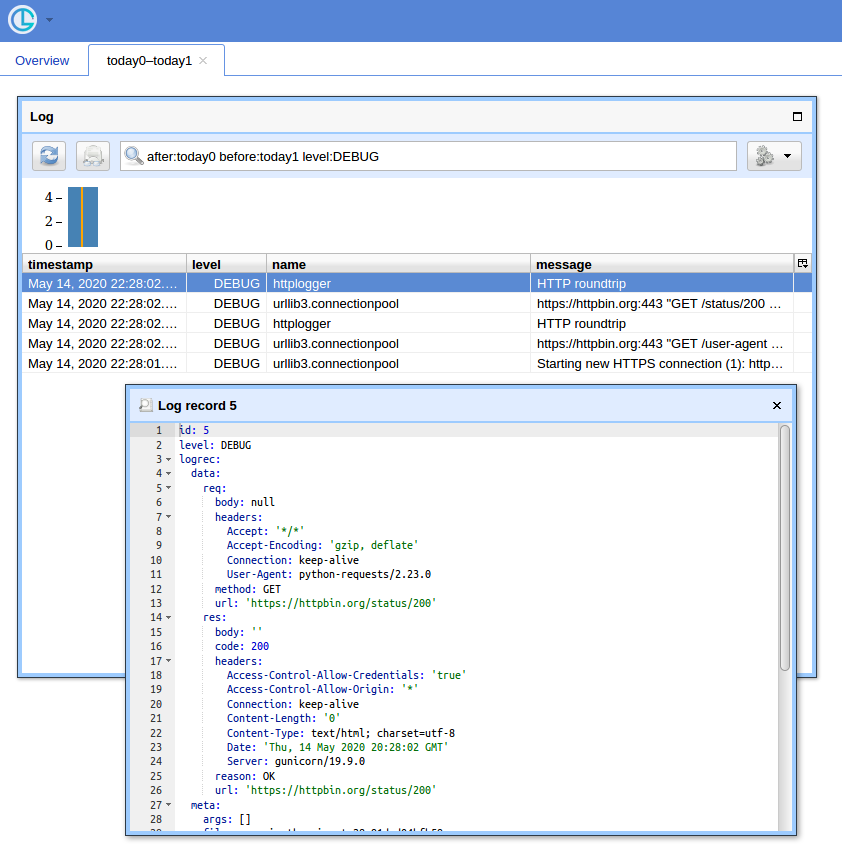
When you have a lot of queries, having a simple UI and a way to filter records comes at handy. I’ll show to use Chronologer for that (which I’m the author of).
First, the hook has be rewritten to produce records that logging can serialise when sending over the wire. It can look like this:
def logRoundtrip(response, *args, **kwargs):
    extra = {
        'req': {
            'method': response.request.method,
            'url': response.request.url,
            'headers': response.request.headers,
            'body': response.request.body,
        },
        'res': {
            'code': response.status_code,
            'reason': response.reason,
            'url': response.url,
            'headers': response.headers,
            'body': response.text
        },
    }
    logger.debug('HTTP roundtrip', extra=extra)

session = requests.Session()
session.hooks['response'].append(logRoundtrip)
Second, logging configuration has to be adapted to use logging.handlers.HTTPHandler (which Chronologer understands).
import logging.handlers

chrono = logging.handlers.HTTPHandler(
  'localhost:8080', '/api/v1/record', 'POST', credentials=('logger', ''))
handlers = [logging.StreamHandler(), chrono]
logging.basicConfig(level=logging.DEBUG, handlers=handlers)
Finally, run Chronologer instance. e.g. using Docker:
docker run --rm -it -p 8080:8080 -v /tmp/db
    -e CHRONOLOGER_STORAGE_DSN=sqlite:////tmp/db/chrono.sqlite
    -e CHRONOLOGER_SECRET=example
    -e CHRONOLOGER_ROLES="basic-reader query-reader writer"
    saaj/chronologer
    python -m chronologer -e production serve -u www-data -g www-data -m
And run the requests again:
session.get('https://httpbin.org/user-agent')
session.get('https://httpbin.org/status/200')
The stream handler will produce:
DEBUG:urllib3.connectionpool:Starting new HTTPS connection (1): httpbin.org:443
DEBUG:urllib3.connectionpool:https://httpbin.org:443 "GET /user-agent HTTP/1.1" 200 45
DEBUG:httplogger:HTTP roundtrip
DEBUG:urllib3.connectionpool:https://httpbin.org:443 "GET /status/200 HTTP/1.1" 200 0
DEBUG:httplogger:HTTP roundtrip
Now if you open http://localhost:8080/ (use “logger” for username and empty password for the basic auth popup) and click “Open” button, you should see something like:
Method 6
Just improving this answer
This is how it worked for me:
import logging
import sys
import requests
import textwrap

root = logging.getLogger('httplogger')


def logRoundtrip(response, *args, **kwargs):
    extra = {'req': response.request, 'res': response}
    root.debug('HTTP roundtrip', extra=extra)


class HttpFormatter(logging.Formatter):

    def _formatHeaders(self, d):
        return 'n'.join(f'{k}: {v}' for k, v in d.items())

    def formatMessage(self, record):
        result = super().formatMessage(record)
        if record.name == 'httplogger':
            result += textwrap.dedent('''
                ---------------- request ----------------
                {req.method} {req.url}
                {reqhdrs}

                {req.body}
                ---------------- response ----------------
                {res.status_code} {res.reason} {res.url}
                {reshdrs}

                {res.text}
            ''').format(
                req=record.req,
                res=record.res,
                reqhdrs=self._formatHeaders(record.req.headers),
                reshdrs=self._formatHeaders(record.res.headers),
            )

        return result

formatter = HttpFormatter('{asctime} {levelname} {name} {message}', style='{')
handler = logging.StreamHandler(sys.stdout)
handler.setFormatter(formatter)
root.addHandler(handler)
root.setLevel(logging.DEBUG)


session = requests.Session()
session.hooks['response'].append(logRoundtrip)
session.get('http://httpbin.org')
Method 7
I’m using python 3.4, requests 2.19.1:
‘urllib3’ is the logger to get now (no longer ‘requests.packages.urllib3’). Basic logging will still happen without setting http.client.HTTPConnection.debuglevel
Method 8
I’m using a logger_config.yaml file to configure my logging, and to get those logs to show up, all I had to do was to add a disable_existing_loggers: False to the end of it.
My logging setup is rather extensive and confusing, so I don’t even know a good way to explain it here, but if someone’s also using a YAML file to configure their logging, this might help.
https://docs.python.org/3/howto/logging.html#configuring-logging
All methods was sourced from stackoverflow.com or stackexchange.com, is licensed under cc by-sa 2.5, cc by-sa 3.0 and cc by-sa 4.0