I am trying to make the inserted images from a post (single.php) to point to (single-attachement.php) an attachment page. So far I checked a post here on stackexchange and added this code on the top, before the header of single.php, just that it’s showing me a link to the last image on the page, instead of modifying the structure of the image link.
if ( $attachments = get_children( array(
'post_type' => 'attachment',
'post_mime_type'=>'image',
'numberposts' => 1,
'post_status' => null,
'post_parent' => $post->ID
)));
foreach ($attachments as $attachment) {
echo wp_get_attachment_link( $attachment->ID, '' , true, false, 'Link to image attachment' );
}
Answers:
Thank you for visiting the Q&A section on Magenaut. Please note that all the answers may not help you solve the issue immediately. So please treat them as advisements. If you found the post helpful (or not), leave a comment & I’ll get back to you as soon as possible.
Method 1
If I understand you correctly, you need to link your images not to the file, but to the attachment template (attachment.php). If so, then try the following code in your single.php:
 <?php if( has_post_thumbnail() ) {
    $attachment_page_url = '';
    $attachment_page_url = get_attachment_link( get_post_thumbnail_id() ); ?>
    <a href="<?php echo $attachment_page_url; ?>" class="featured-image">
        <?php the_post_thumbnail(); ?>
    </a>
<?php } ?>
We are checking if there’s any post_thumbnail (Featured Image), then if found getting the attachment link using the post_thumbnail_id, and passing that to the anchor tag of the featured image.
Hope that’s clear. 🙂
EDIT
So you’re affirmative that the bit of code you mentioned actually works, but it’s fetching only one image (the last one only). So, I’m sticking with the same code with slight changes:
<?php
$attachments = get_children( array(
                        'post_type' => 'attachment',
                        'post_mime_type'=>'image',
                        'numberposts' => -1,
                        'post_status' => 'inherit',
                        'post_parent' => $post->ID
                    )
                );
if( $attachments ) {
   foreach ( $attachments as $attachment ) {
       echo wp_get_attachment_link( $attachment->ID, '' , TRUE, FALSE, 'Link to image attachment' );
   }
} else {
   echo ''; //if no attachment found
}
Please note that I’ve changed in 4 positions:
- Removed the first
if()condition and put it below - Made the
'numberposts'to ‘all’ using a-1 - Changed the ‘post_status’ to
'inherit', as attachments are in that status - And most importantly in your case, changed the number of posts (in posts_per_page) to 5, because you need 5 images.
But the code will fetch only 5 image-link, though there can be a lot. And you are actually getting showing 5 links only.
EDIT #2
You are missing a basic thing. When inserting an image into a post content, where you want to let the user go is up to you, because you have the control there.
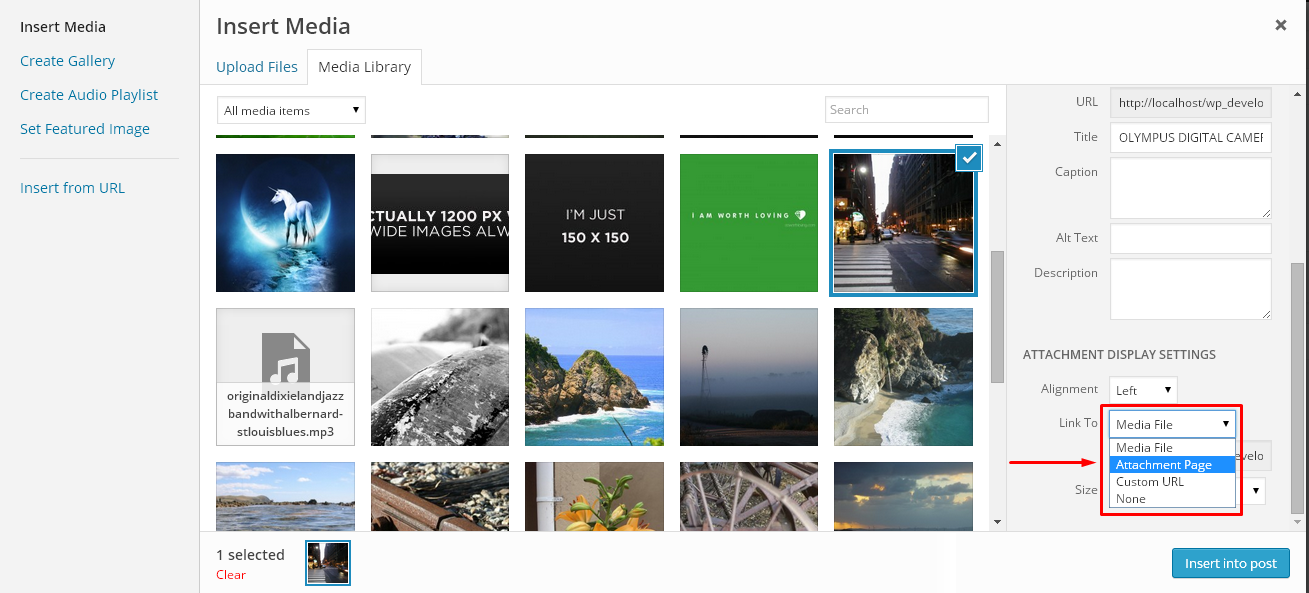
No need to do any query or linking. It’s that simple. 🙂
All methods was sourced from stackoverflow.com or stackexchange.com, is licensed under cc by-sa 2.5, cc by-sa 3.0 and cc by-sa 4.0