I’m making an arcade game using pygame and I’m trying to have a sprite change positions every few seconds.
I’ve tried using time.sleep(1) and changing the frame rate to .5 (clock.tick(.5)).
Both worked to make the object change position only after the time interval has passed, however they also make the sprite following my mouse update coordinates at the same rate.
I’ve been researching and can’t seem to find another way to make the sprite move without making my program refresh slower or ‘sleep’ every time it runs.
Answers:
Thank you for visiting the Q&A section on Magenaut. Please note that all the answers may not help you solve the issue immediately. So please treat them as advisements. If you found the post helpful (or not), leave a comment & I’ll get back to you as soon as possible.
Method 1
You can use an Event for this together with pygame.time.set_timer():
pygame.time.set_timer()
repeatedly create an event on the event queue
set_timer(eventid, milliseconds) -> NoneSet an event type to appear on the event queue every given number of milliseconds
Here’s a simple, complete example. Note how the enemies move every 1000ms sideways, every 3500ms downwards, and you can shoot every 450ms (all using events).
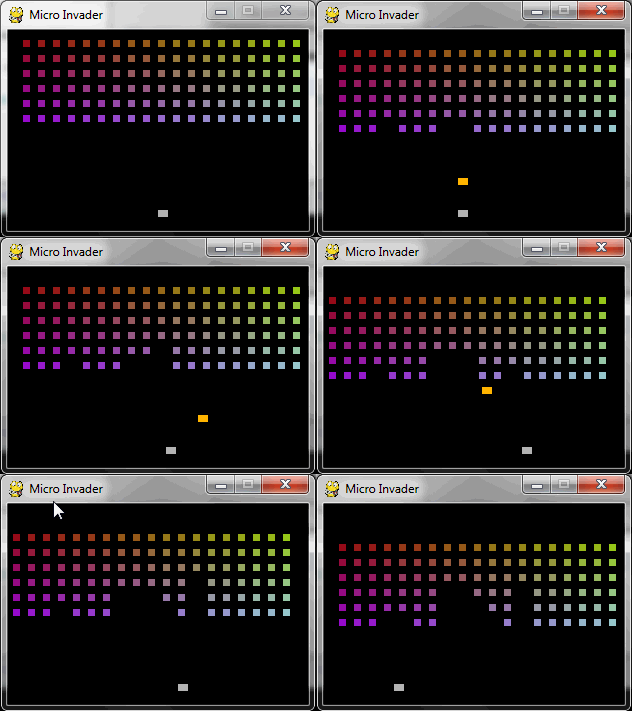
import pygame

# you'll be able to shoot every 450ms
RELOAD_SPEED = 450

# the foes move every 1000ms sideways and every 3500ms down
MOVE_SIDE = 1000
MOVE_DOWN = 3500

screen = pygame.display.set_mode((300, 200))
clock = pygame.time.Clock()

pygame.display.set_caption("Micro Invader")

# create a bunch of events
move_side_event = pygame.USEREVENT + 1
move_down_event = pygame.USEREVENT + 2
reloaded_event  = pygame.USEREVENT + 3

move_left, reloaded = True, True

invaders, colors, shots = [], [] ,[]
for x in range(15, 300, 15):
    for y in range(10, 100, 15):
        invaders.append(pygame.Rect(x, y, 7, 7))
        colors.append(((x * 0.7) % 256, (y * 2.4) % 256))

# set timer for the movement events
pygame.time.set_timer(move_side_event, MOVE_SIDE)
pygame.time.set_timer(move_down_event, MOVE_DOWN)

player = pygame.Rect(150, 180, 10, 7)

while True:
    clock.tick(40)
    if pygame.event.get(pygame.QUIT): break
    for e in pygame.event.get():
        if e.type == move_side_event:
            for invader in invaders:
                invader.move_ip((-10 if move_left else 10, 0))
            move_left = not move_left
        elif e.type == move_down_event:
            for invader in invaders:
                invader.move_ip(0, 10)
        elif e.type == reloaded_event:
            # when the reload timer runs out, reset it
            reloaded = True
            pygame.time.set_timer(reloaded_event, 0)

    for shot in shots[:]:
        shot.move_ip((0, -4))
        if not screen.get_rect().contains(shot):
            shots.remove(shot)
        else:
            hit = False
            for invader in invaders[:]:
                if invader.colliderect(shot):
                    hit = True
                    i = invaders.index(invader)
                    del colors[i]
                    del invaders[i]
            if hit:
                shots.remove(shot)

    pressed = pygame.key.get_pressed()
    if pressed[pygame.K_LEFT]: player.move_ip((-4, 0))
    if pressed[pygame.K_RIGHT]: player.move_ip((4, 0))

    if pressed[pygame.K_SPACE]:
        if reloaded:
            shots.append(player.copy())
            reloaded = False
            # when shooting, create a timeout of RELOAD_SPEED
            pygame.time.set_timer(reloaded_event, RELOAD_SPEED)

    player.clamp_ip(screen.get_rect())

    screen.fill((0, 0, 0))

    for invader, (a, b) in zip(invaders, colors):
        pygame.draw.rect(screen, (150, a, b), invader)

    for shot in shots:
        pygame.draw.rect(screen, (255, 180, 0), shot)

    pygame.draw.rect(screen, (180, 180, 180), player)
    pygame.display.flip()
Method 2
How about
var = 0

while True:
    event_handling()

    game_logic()

    if var == 5:
        sprite.update.position()
        var = 0

    pygame.display.flip()
    var += 1
Obviously, this is just pseudo code, but you get the idea.
All methods was sourced from stackoverflow.com or stackexchange.com, is licensed under cc by-sa 2.5, cc by-sa 3.0 and cc by-sa 4.0