I’m using .Net 5.0 as backend and .Net 5.0 for client-side.
I want to know how to handle exceptions that returned from web api in Client Side and show them to client.
The api result on exception is like :
{
  "Version": "1.0",
  "StatusCode": 500,
  "ErrorMessage": "User not found!"
}
How to handle this type of exception globally in the client side (using .Net Core MVC)?
Answers:
Thank you for visiting the Q&A section on Magenaut. Please note that all the answers may not help you solve the issue immediately. So please treat them as advisements. If you found the post helpful (or not), leave a comment & I’ll get back to you as soon as possible.
Method 1
According to your description, I suggest you could use try catch on the server-side to capture the exception and return as a json response.
In the client side, you could use deserlize the response and create a new view named Error to show the response message.
More details, you could refer to below codes:
Error Class:
public class APIError
{
    public string Version { get; set; }
    public string StatusCode { get; set; }
    public string ErrorMessage { get; set; }
}
API:
[HttpGet]
public IActionResult Get()
{
    try
    {
        throw new Exception("UserNotFound");
    }
    catch (Exception e)
    {

        return Ok(new APIError { Version="1.0", ErrorMessage=e.Message, StatusCode="500" });
    }


}
Application:
       var request = new HttpRequestMessage(HttpMethod.Get,
"https://localhost:44371/weatherforecast");


        var client = _clientFactory.CreateClient();

        var response = await client.SendAsync(request);

        if (response.IsSuccessStatusCode)
        {
             var responseStream = await response.Content.ReadAsStringAsync();
            APIError re = JsonSerializer.Deserialize<APIError>(responseStream, new JsonSerializerOptions
            {
                PropertyNameCaseInsensitive = true,
            });

            if (re.StatusCode == "500")
            {

                return View("Error", new ErrorViewModel { RequestId = Activity.Current?.Id ?? HttpContext.TraceIdentifier, Version = re.Version, StatusCode = re.StatusCode, ErrorMessage = re.ErrorMessage });

            }


        }
        else
        {
            // Hanlde if request failed issue
        }
Notice: I created a new Error view, you could create it by yourself or modify the default error view.
Error Viewmodel:
public class ErrorViewModel
{
    public string RequestId { get; set; }

    public bool ShowRequestId => !string.IsNullOrEmpty(RequestId);

    public string Version { get; set; }
    public string StatusCode { get; set; }
    public string ErrorMessage { get; set; }
}
Error view:
@model ErrorViewModel
@{
    ViewData["Title"] = "Error";
}

<h1 class="text-danger">Error.</h1>
<h2 class="text-danger">An error occurred while processing your request.</h2>

@if (Model.ShowRequestId)
{
    <p>
        <strong>Request ID:</strong> <code>@Model.RequestId</code>
    </p>
}

<h3>@Model.StatusCode</h3>
<p>
    @Model.ErrorMessage
</p>
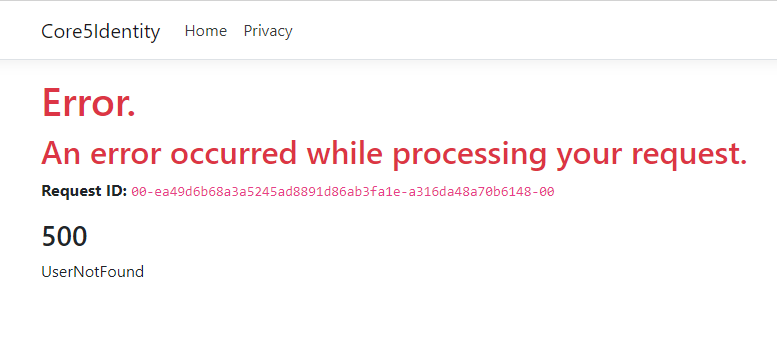
Result:
Method 2
If you don’t want to use exceptions in the backend, you could just send the http status code to the client. Here is an example of reaching out to an external api via service and returning that status to the backend controller. You would then just GET this result via client side. You could also just send over the full http response to the client, instead of solely the HttpStatusCode if needed.
A little more elaboration here: https://docs.microsoft.com/en-us/aspnet/web-api/overview/advanced/calling-a-web-api-from-a-net-client
//Backend Service..
private const string baseUrl = "https://api/somecrazyapi/";

public async Task<HttpStatusCode> GetUserStatusAsync(string userId)
{
    var httpResponse = await client.GetAsync(baseUrl + "userId");
    return httpResponse.StatusCode;
}

//Backend Controller
[ApiController]
[Route("[controller]")]
public class UserController
{
    private readonly IUserService service;
    public UserController(IUserService service)
    {
        this.service = service;
    }

    ......

    [HttpGet("{userId}")]
    public HttpStatusCode GetUserStatus(string userId)
    {
        return service.GetUserStatusAsync(userId).Result;
    }
}
All methods was sourced from stackoverflow.com or stackexchange.com, is licensed under cc by-sa 2.5, cc by-sa 3.0 and cc by-sa 4.0