I have a data frame with a hierarchical index in axis 1 (columns) (from a groupby.agg operation):
     USAF   WBAN  year  month  day  s_PC  s_CL  s_CD  s_CNT  tempf
                                     sum   sum   sum    sum   amax   amin
0  702730  26451  1993      1    1     1     0    12     13  30.92  24.98
1  702730  26451  1993      1    2     0     0    13     13  32.00  24.98
2  702730  26451  1993      1    3     1    10     2     13  23.00   6.98
3  702730  26451  1993      1    4     1     0    12     13  10.04   3.92
4  702730  26451  1993      1    5     3     0    10     13  19.94  10.94
I want to flatten it, so that it looks like this (names aren’t critical – I could rename):
     USAF   WBAN  year  month  day  s_PC  s_CL  s_CD  s_CNT  tempf_amax  tmpf_amin
0  702730  26451  1993      1    1     1     0    12     13  30.92          24.98
1  702730  26451  1993      1    2     0     0    13     13  32.00          24.98
2  702730  26451  1993      1    3     1    10     2     13  23.00          6.98
3  702730  26451  1993      1    4     1     0    12     13  10.04          3.92
4  702730  26451  1993      1    5     3     0    10     13  19.94          10.94
How do I do this? (I’ve tried a lot, to no avail.)
Per a suggestion, here is the head in dict form
{('USAF', ''): {0: '702730',
  1: '702730',
  2: '702730',
  3: '702730',
  4: '702730'},
 ('WBAN', ''): {0: '26451', 1: '26451', 2: '26451', 3: '26451', 4: '26451'},
 ('day', ''): {0: 1, 1: 2, 2: 3, 3: 4, 4: 5},
 ('month', ''): {0: 1, 1: 1, 2: 1, 3: 1, 4: 1},
 ('s_CD', 'sum'): {0: 12.0, 1: 13.0, 2: 2.0, 3: 12.0, 4: 10.0},
 ('s_CL', 'sum'): {0: 0.0, 1: 0.0, 2: 10.0, 3: 0.0, 4: 0.0},
 ('s_CNT', 'sum'): {0: 13.0, 1: 13.0, 2: 13.0, 3: 13.0, 4: 13.0},
 ('s_PC', 'sum'): {0: 1.0, 1: 0.0, 2: 1.0, 3: 1.0, 4: 3.0},
 ('tempf', 'amax'): {0: 30.920000000000002,
  1: 32.0,
  2: 23.0,
  3: 10.039999999999999,
  4: 19.939999999999998},
 ('tempf', 'amin'): {0: 24.98,
  1: 24.98,
  2: 6.9799999999999969,
  3: 3.9199999999999982,
  4: 10.940000000000001},
 ('year', ''): {0: 1993, 1: 1993, 2: 1993, 3: 1993, 4: 1993}}
Answers:
Thank you for visiting the Q&A section on Magenaut. Please note that all the answers may not help you solve the issue immediately. So please treat them as advisements. If you found the post helpful (or not), leave a comment & I’ll get back to you as soon as possible.
Method 1
I think the easiest way to do this would be to set the columns to the top level:
df.columns = df.columns.get_level_values(0)
Note: if the to level has a name you can also access it by this, rather than 0.
.
If you want to combine/join your MultiIndex into one Index (assuming you have just string entries in your columns) you could:
df.columns = [' '.join(col).strip() for col in df.columns.values]
Note: we must strip the whitespace for when there is no second index.
In [11]: [' '.join(col).strip() for col in df.columns.values]
Out[11]:
['USAF',
 'WBAN',
 'day',
 'month',
 's_CD sum',
 's_CL sum',
 's_CNT sum',
 's_PC sum',
 'tempf amax',
 'tempf amin',
 'year']
Method 2
All of the current answers on this thread must have been a bit dated. As of pandas version 0.24.0, the .to_flat_index() does what you need.
From panda’s own documentation:
MultiIndex.to_flat_index()
Convert a MultiIndex to an Index of Tuples containing the level values.
A simple example from its documentation:
import pandas as pd
print(pd.__version__) # '0.23.4'
index = pd.MultiIndex.from_product(
        [['foo', 'bar'], ['baz', 'qux']],
        names=['a', 'b'])

print(index)
# MultiIndex(levels=[['bar', 'foo'], ['baz', 'qux']],
#           codes=[[1, 1, 0, 0], [0, 1, 0, 1]],
#           names=['a', 'b'])
Applying to_flat_index():
index.to_flat_index()
# Index([('foo', 'baz'), ('foo', 'qux'), ('bar', 'baz'), ('bar', 'qux')], dtype='object')
Using it to replace existing pandas column
An example of how you’d use it on dat, which is a DataFrame with a MultiIndex column:
dat = df.loc[:,['name','workshop_period','class_size']].groupby(['name','workshop_period']).describe()
print(dat.columns)
# MultiIndex(levels=[['class_size'], ['count', 'mean', 'std', 'min', '25%', '50%', '75%', 'max']],
#            codes=[[0, 0, 0, 0, 0, 0, 0, 0], [0, 1, 2, 3, 4, 5, 6, 7]])

dat.columns = dat.columns.to_flat_index()
print(dat.columns)
# Index([('class_size', 'count'),  ('class_size', 'mean'),
#     ('class_size', 'std'),   ('class_size', 'min'),
#     ('class_size', '25%'),   ('class_size', '50%'),
#     ('class_size', '75%'),   ('class_size', 'max')],
#  dtype='object')
Flattening and Renaming in-place
May be worth noting how you can combine that with a simple list comprehension (thanks @Skippy and @mmann1123) to join the elements so your resulting column names are simple strings separated by, for example, underscores:
dat.columns = ["_".join(a) for a in dat.columns.to_flat_index()]
Method 3
pd.DataFrame(df.to_records()) # multiindex become columns and new index is integers only
Method 4
Andy Hayden’s answer is certainly the easiest way — if you want to avoid duplicate column labels you need to tweak a bit
In [34]: df
Out[34]:
     USAF   WBAN  day  month  s_CD  s_CL  s_CNT  s_PC  tempf         year
                               sum   sum    sum   sum   amax   amin
0  702730  26451    1      1    12     0     13     1  30.92  24.98  1993
1  702730  26451    2      1    13     0     13     0  32.00  24.98  1993
2  702730  26451    3      1     2    10     13     1  23.00   6.98  1993
3  702730  26451    4      1    12     0     13     1  10.04   3.92  1993
4  702730  26451    5      1    10     0     13     3  19.94  10.94  1993


In [35]: mi = df.columns

In [36]: mi
Out[36]:
MultiIndex
[(USAF, ), (WBAN, ), (day, ), (month, ), (s_CD, sum), (s_CL, sum), (s_CNT, sum), (s_PC, sum), (tempf, amax), (tempf, amin), (year, )]


In [37]: mi.tolist()
Out[37]:
[('USAF', ''),
 ('WBAN', ''),
 ('day', ''),
 ('month', ''),
 ('s_CD', 'sum'),
 ('s_CL', 'sum'),
 ('s_CNT', 'sum'),
 ('s_PC', 'sum'),
 ('tempf', 'amax'),
 ('tempf', 'amin'),
 ('year', '')]

In [38]: ind = pd.Index([e[0] + e[1] for e in mi.tolist()])

In [39]: ind
Out[39]: Index([USAF, WBAN, day, month, s_CDsum, s_CLsum, s_CNTsum, s_PCsum, tempfamax, tempfamin, year], dtype=object)

In [40]: df.columns = ind


In [46]: df
Out[46]:
     USAF   WBAN  day  month  s_CDsum  s_CLsum  s_CNTsum  s_PCsum  tempfamax  tempfamin
0  702730  26451    1      1       12        0        13        1      30.92      24.98
1  702730  26451    2      1       13        0        13        0      32.00      24.98
2  702730  26451    3      1        2       10        13        1      23.00       6.98
3  702730  26451    4      1       12        0        13        1      10.04       3.92
4  702730  26451    5      1       10        0        13        3      19.94      10.94


   year
0  1993
1  1993
2  1993
3  1993
4  1993
Method 5
df.columns = ['_'.join(tup).rstrip('_') for tup in df.columns.values]
Method 6
And if you want to retain any of the aggregation info from the second level of the multiindex you can try this:
In [1]: new_cols = [''.join(t) for t in df.columns]
Out[1]:
['USAF',
 'WBAN',
 'day',
 'month',
 's_CDsum',
 's_CLsum',
 's_CNTsum',
 's_PCsum',
 'tempfamax',
 'tempfamin',
 'year']

In [2]: df.columns = new_cols
Method 7
The most pythonic way to do this to use map function.
df.columns = df.columns.map(' '.join).str.strip()
Output print(df.columns):
Index(['USAF', 'WBAN', 'day', 'month', 's_CD sum', 's_CL sum', 's_CNT sum',
       's_PC sum', 'tempf amax', 'tempf amin', 'year'],
      dtype='object')
Update using Python 3.6+ with f string:
df.columns = [f'{f} {s}' if s != '' else f'{f}'
              for f, s in df.columns]

print(df.columns)
Output:
Index(['USAF', 'WBAN', 'day', 'month', 's_CD sum', 's_CL sum', 's_CNT sum',
       's_PC sum', 'tempf amax', 'tempf amin', 'year'],
      dtype='object')
Method 8
The easiest and most intuitive solution for me was to combine the column names using get_level_values. This prevents duplicate column names when you do more than one aggregation on the same column:
level_one = df.columns.get_level_values(0).astype(str)
level_two = df.columns.get_level_values(1).astype(str)
df.columns = level_one + level_two
If you want a separator between columns, you can do this. This will return the same thing as Seiji Armstrong’s comment on the accepted answer that only includes underscores for columns with values in both index levels:
level_one = df.columns.get_level_values(0).astype(str)
level_two = df.columns.get_level_values(1).astype(str)
column_separator = ['_' if x != '' else '' for x in level_two]
df.columns = level_one + column_separator + level_two
I know this does the same thing as Andy Hayden’s great answer above, but I think it is a bit more intuitive this way and is easier to remember (so I don’t have to keep referring to this thread), especially for novice pandas users.
This method is also more extensible in the case where you may have 3 column levels.
level_one = df.columns.get_level_values(0).astype(str)
level_two = df.columns.get_level_values(1).astype(str)
level_three = df.columns.get_level_values(2).astype(str)
df.columns = level_one + level_two + level_three
Method 9
After reading through all the answers, I came up with this:
def __my_flatten_cols(self, how="_".join, reset_index=True):
    how = (lambda iter: list(iter)[-1]) if how == "last" else how
    self.columns = [how(filter(None, map(str, levels))) for levels in self.columns.values]
                    if isinstance(self.columns, pd.MultiIndex) else self.columns
    return self.reset_index() if reset_index else self
pd.DataFrame.my_flatten_cols = __my_flatten_cols
Usage:
Given a data frame:
df = pd.DataFrame({"grouper": ["x","x","y","y"], "val1": [0,2,4,6], 2: [1,3,5,7]}, columns=["grouper", "val1", 2])

  grouper  val1  2
0       x     0  1
1       x     2  3
2       y     4  5
3       y     6  7
-
Single aggregation method: resulting variables named the same as source:
df.groupby(by="grouper").agg("min").my_flatten_cols()- Same as
df.groupby(by="grouper",as_index=False)or.agg(...).reset_index() -
----- before -----
           val1  2
  grouper

------ after -----
  grouper  val1  2
0       x     0  1
1       y     4  5
- Same as
-
Single source variable, multiple aggregations: resulting variables named after statistics:
df.groupby(by="grouper").agg({"val1": [min,max]}).my_flatten_cols("last")- Same as
a = df.groupby(..).agg(..); a.columns = a.columns.droplevel(0); a.reset_index(). -
----- before -----
            val1
           min max
  grouper

------ after -----
  grouper  min  max
0       x    0    2
1       y    4    6
- Same as
-
Multiple variables, multiple aggregations: resulting variables named (varname)_(statname):
df.groupby(by="grouper").agg({"val1": min, 2:[sum, "size"]}).my_flatten_cols() # you can combine the names in other ways too, e.g. use a different delimiter: #df.groupby(by="grouper").agg({"val1": min, 2:[sum, "size"]}).my_flatten_cols(" ".join)- Runs
a.columns = ["_".join(filter(None, map(str, levels))) for levels in a.columns.values]under the hood (since this form ofagg()results inMultiIndexon columns). - If you don’t have the
my_flatten_colshelper, it might be easier to type in the solution suggested by @Seigi:a.columns = ["_".join(t).rstrip("_") for t in a.columns.values], which works similarly in this case (but fails if you have numeric labels on columns) - To handle the numeric labels on columns, you could use the solution suggested by @jxstanford and @Nolan Conaway (
a.columns = ["_".join(tuple(map(str, t))).rstrip("_") for t in a.columns.values]), but I don’t understand why thetuple()call is needed, and I believerstrip()is only required if some columns have a descriptor like("colname", "")(which can happen if youreset_index()before trying to fix up.columns) -
----- before -----
           val1           2
           min       sum    size
  grouper

------ after -----
  grouper  val1_min  2_sum  2_size
0       x         0      4       2
1       y         4     12       2
- Runs
-
You want to name the resulting variables manually: (this is deprecated since pandas 0.20.0 with no adequate alternative as of 0.23)
df.groupby(by="grouper").agg({"val1": {"sum_of_val1": "sum", "count_of_val1": "count"}, 2: {"sum_of_2": "sum", "count_of_2": "count"}}).my_flatten_cols("last")- Other suggestions include: setting the columns manually:
res.columns = ['A_sum', 'B_sum', 'count']or.join()ing multiplegroupbystatements. -
----- before -----
                   val1                      2
          count_of_val1 sum_of_val1 count_of_2 sum_of_2
  grouper

------ after -----
  grouper  count_of_val1  sum_of_val1  count_of_2  sum_of_2
0       x              2            2           2         4
1       y              2           10           2        12
- Other suggestions include: setting the columns manually:
Cases handled by the helper function
- level names can be non-string, e.g. Index pandas DataFrame by column numbers, when column names are integers, so we have to convert with
map(str, ..) - they can also be empty, so we have to
filter(None, ..) - for single-level columns (i.e. anything except MultiIndex),
columns.valuesreturns the names (str, not tuples) - depending on how you used
.agg()you may need to keep the bottom-most label for a column or concatenate multiple labels - (since I’m new to pandas?) more often than not, I want
reset_index()to be able to work with the group-by columns in the regular way, so it does that by default
Method 10
Yet another short one, using only pandas methods:
df.columns = df.columns.to_flat_index().str.join('_')
Yields as output:
    USAF_  WBAN_  day_  month_  ...  s_PC_sum  tempf_amax  tempf_amin  year_
0  702730  26451     1       1  ...       1.0       30.92       24.98   1993
1  702730  26451     2       1  ...       0.0       32.00       24.98   1993
2  702730  26451     3       1  ...       1.0       23.00        6.98   1993
3  702730  26451     4       1  ...       1.0       10.04        3.92   1993
4  702730  26451     5       1  ...       3.0       19.94       10.94   1993
You’ll notice the trailing underscore for columns that were not part of a MultiIndex. You mentioned that you do not care about the name, so that might work for you. In my own similar use case all the columns had two levels, so this simple command created nice names.
Method 11
A general solution that handles multiple levels and mixed types:
df.columns = ['_'.join(tuple(map(str, t))) for t in df.columns.values]
Method 12
A bit late maybe, but if you are not worried about duplicate column names:
df.columns = df.columns.tolist()
Method 13
In case you want to have a separator in the name between levels, this function works well.
def flattenHierarchicalCol(col,sep = '_'):
    if not type(col) is tuple:
        return col
    else:
        new_col = ''
        for leveli,level in enumerate(col):
            if not level == '':
                if not leveli == 0:
                    new_col += sep
                new_col += level
        return new_col

df.columns = df.columns.map(flattenHierarchicalCol)
Method 14
Following @jxstanford and @tvt173, I wrote a quick function which should do the trick, regardless of string/int column names:
def flatten_cols(df):
    df.columns = [
        '_'.join(tuple(map(str, t))).rstrip('_')
        for t in df.columns.values
        ]
    return df
Method 15
I’ll share a straight-forward way that worked for me.
[" ".join([str(elem) for elem in tup]) for tup in df.columns.tolist()]
#df = df.reset_index() if needed
Method 16
To flatten a MultiIndex inside a chain of other DataFrame methods, define a function like this:
def flatten_index(df):
  df_copy = df.copy()
  df_copy.columns = ['_'.join(col).rstrip('_') for col in df_copy.columns.values]
  return df_copy.reset_index()
Then use the pipe method to apply this function in the chain of DataFrame methods, after groupby and agg but before any other methods in the chain:
my_df
  .groupby('group')
  .agg({'value': ['count']})
  .pipe(flatten_index)
  .sort_values('value_count')
Method 17
You could also do as below. Consider df to be your dataframe and assume a two level index (as is the case in your example)
df.columns = [(df.columns[i][0])+'_'+(datadf_pos4.columns[i][1]) for i in range(len(df.columns))]
Method 18
Another simple routine.
def flatten_columns(df, sep='.'):
    def _remove_empty(column_name):
        return tuple(element for element in column_name if element)
    def _join(column_name):
        return sep.join(column_name)

    new_columns = [_join(_remove_empty(column)) for column in df.columns.values]
    df.columns = new_columns
Method 19
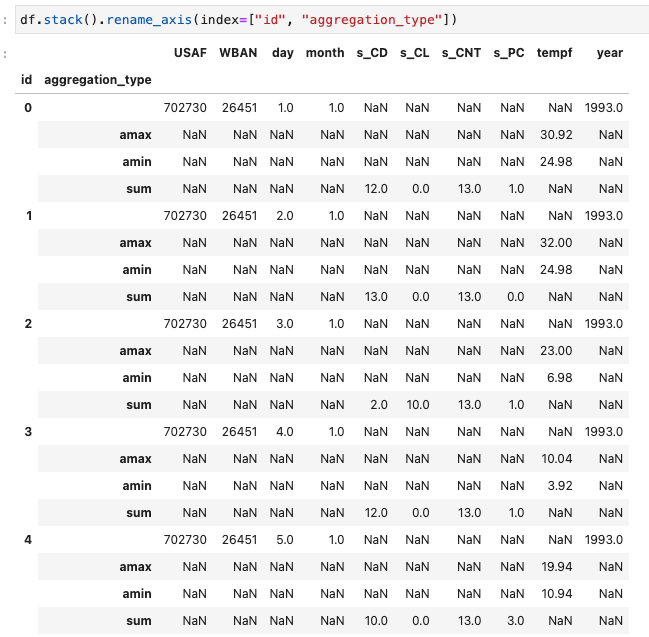
I found myself with the same question of how to flatten the column names after agg, but I also wanted to preserve the aggregation type as a row name.
To do that, you can use stack(). The result is column names that are flat but also the preservation of the aggregation type. Now you can safely export to a csv, for example.
All methods was sourced from stackoverflow.com or stackexchange.com, is licensed under cc by-sa 2.5, cc by-sa 3.0 and cc by-sa 4.0