I have a network drive hosted on a Windows10 Machine, it mounts fine to my CentOS7 machine through the command:
sudo mount -t cifs //ipaddress/sharedfoldername /mountpoint --verbose -o credentials:/credential/file/location,file_mode=0666,dir_mode=0777
The file and dir modes are for the permissions on the mount. Anyway, that mounts fine, but when I try to do an /etc/fstab mount, I get an error back.
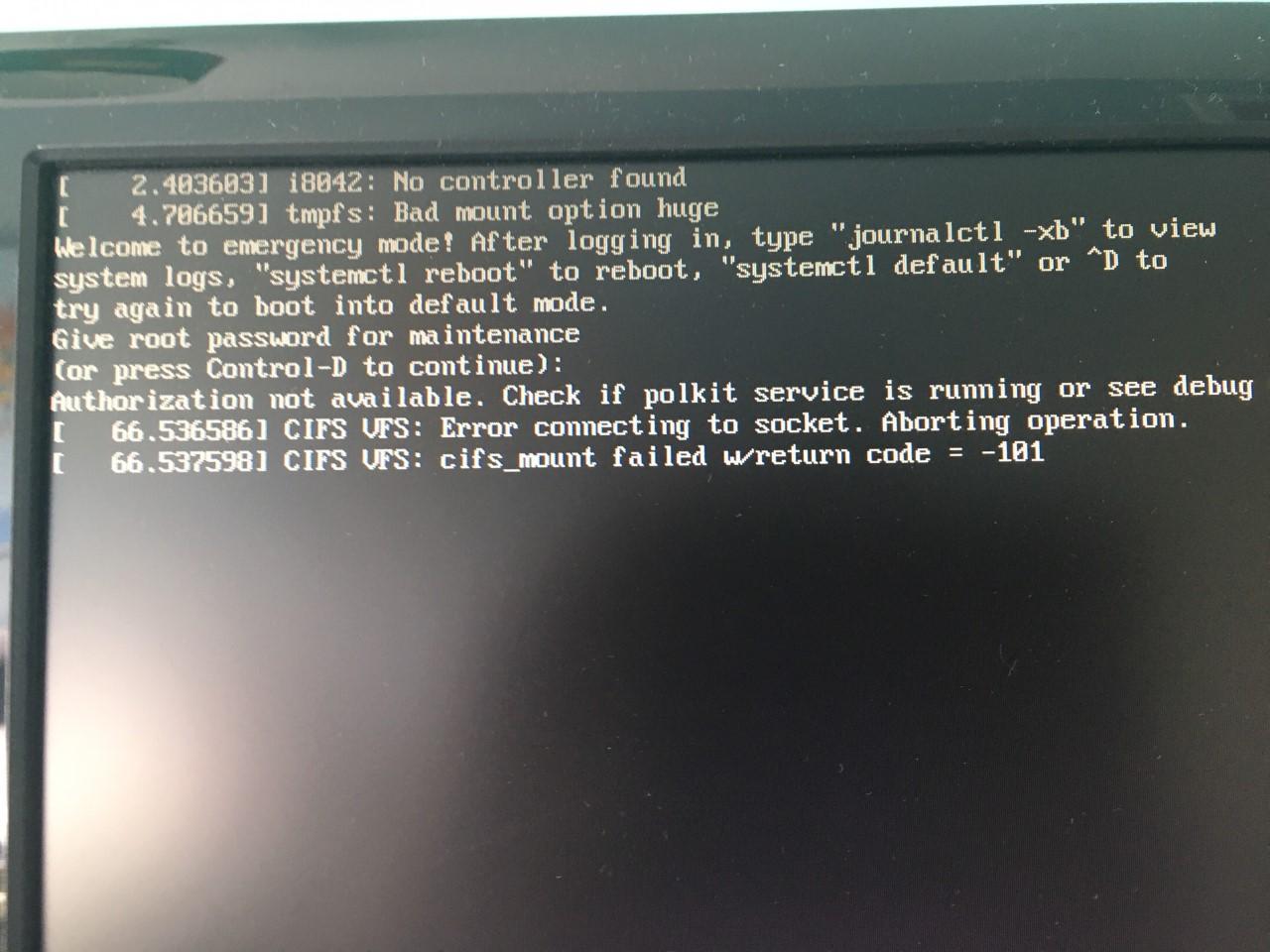
I will supply my entire fstab file contents and the exact error below. The error appears on startup, it boots to emergency mode and shows the error and gives me the option to use CTRL + D to continue.
The fstab mount I am trying to get to work is:
//ipaddress/sharedfoldername /mnt cifs credentials=/etc/smbcredentials,uid=1001,gid=1001,_netdev 0 0
My /etc/fstab contents:
#
# /etc/fstab
# Created by anaconda on Thu Dec 13 09:33:55 2018
#
# Accessible filesystems, by reference, are maintained under '/dev/disk'
# See man pages fstab(5), findfs(8), mount(8) and/or blkid(8) for more info
#
UUID=4f3871fe-a798-4d51-ad90-c40b095a2bd0 /                       ext4    defaults        1 1
UUID=1bb03b6d-3a76-4979-aa63-ff3e0eb4cc5f /boot                   ext4    defaults        1 2
UUID=f89fdb96-6dbf-4865-aa6b-1d5cc74f2d48 /home                   ext4    defaults        1 2
UUID=86f38c73-f9e0-490b-8c96-3321f9413c0d swap                    swap    defaults        0 0
//ipaddress/sharedfoldername /mnt cifs credentials=/etc/smbcredentials,uid=1001,gid=1001,_netdev 0 0
The error appears on startup and you can find it below:
You’re looking at the CIFS bit, the bad mount option huge needs sorting anyway, that was there before the fstab cifs mount. Thanks
@telcoM’s answer response
I rebooted and get the following error on startup:

Then when I login after seeing the error, I get a shortcut appear in the left of my file browser, when I click it, I get this error:
Unable to mount 'shared-folder-name', mount: only root can mount //ipaddress/sharedfoldername on /mountpoint
MY FSTAB FILE AFTER @TELCOM’S SUGGESTION
#
# /etc/fstab
# Created by anaconda on Tue Dec 11 14:28:31 2018
#
# Accessible filesystems, by reference, are maintained under '/dev/disk'
# See man pages fstab(5), findfs(8), mount(8) and/or blkid(8) for more info
#
UUID=4d48ab0d-e1ab-4d7e-9f64-8481a7690060 /                       ext4    defaults        1 1
UUID=a7fad550-81d7-4150-8b76-e89584e4cfdf /boot                   ext4    defaults        1 2
UUID=0baabbc4-2dc0-4971-9d2b-c123e5ad7355 /home                   ext4    defaults        1 2
UUID=7756eafb-382c-46b3-aae8-e44d7e2cfe06 swap                    swap    defaults        0 0
#
//ipadress/sharedfoldername /mount/location cifs x-systemd.after=network-online.target,credentials=/credentials/location,vers=3.0,file_mode=0666,dir_mode=0777,uid=1001,gid=1001 0 0
Answers:
Thank you for visiting the Q&A section on Magenaut. Please note that all the answers may not help you solve the issue immediately. So please treat them as advisements. If you found the post helpful (or not), leave a comment & I’ll get back to you as soon as possible.
Method 1
The tmpfs: Bad mount option huge turns out to be a kernel bug: see this link.
The “Error connecting to a socket” means the system is trying to mount the Windows share before network interfaces have been fully enabled. It should not be happening, but you could add a new systemd-style mount option to be explicit about it: x-systemd.after=network-online.target. The _netdev option used to be an old way to do the same, but apparently it does not work any more after CentOS moved to systemd in version 7.0.
As i wrote in my answer to your earlier question, if you want everyone to be able to access the share, you’ll need to supply the mount options file_mode=0666,dir_mode=0777. And if you do this, then the uid=1001,gid=1001 options will probably be unnecessary, but you can still use them if you want.
And to silence an ugly warning about a changed default version of the SMB protocol (since the aftermath of the WannaCry ransomware infestation back in May 2017), you’ll want to add vers=3.0 mount option too, if the share is provided by a reasonably modern version of Windows.
So, the /etc/fstab entry should probably be like this (split to multiple lines for readability):
//ipaddress/sharedfoldername /mnt cifs
x-systemd.after=network-online.target,credentials=/etc/smbcredentials,
vers=3.0,file_mode=0666,dir_mode=0777,uid=1001,gid=1001 0 0
An fstab entry should always have exactly 6 fields separated by whitespace – no more and no less.
Method 2
The working line in /etc/fstab:
//ipadress/sharedfoldername /mountpoint cifs x-systemd.after=network-online.target,noauto,x-systemd.automount,credentials=/credentials/location,vers=3.0,file_mode=0666,dir_mode=0777,uid=1001,gid=1001 0 0
@telcoM has helped loads with getting to this result.
All methods was sourced from stackoverflow.com or stackexchange.com, is licensed under cc by-sa 2.5, cc by-sa 3.0 and cc by-sa 4.0