I’ve already looked here and believe this is on the right track, though I still can’t get it to work: Port forward to VPN Client?
I have a vps, and on that vps I’m using openVPN. I have a connection with the server, and I’ve identified both my local client ip, and the server ip.
Though, when I attempt to connect, it’s still failing. I’m not really sure what I could be doing wrong at this point. I’ve tried different configurations with no luck.
My current setup:
  1. sysctl -w net.ipv4.ip_forward=1

  2. iptables -t nat -A PREROUTING -d 50.xxx.xxx.xxx -p tcp --dport 32400 -j DNAT --to-dest 172.27.232.2:32400

  3. iptables -t nat -A POSTROUTING -d 172.27.232.2 -p tcp --dport 32400 -j SNAT --to-source 172.27.224.1
The 50.xxx.xxx.xxx is my VPS’s public ip. I’ve omitted the rest, so that’s why there are x’s.
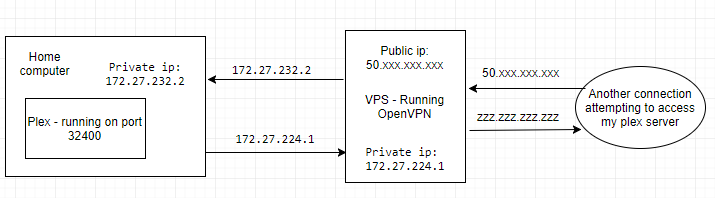
The 172.27.232.2 is client ip that is local to the VPS. I tested from the VPS, and had no problem connecting to anything that was at that local address.
172.27.224.1 is the VPS’s local ip, and I’ve tested from my client and had no problems connecting to anything on the server.
The goal is to be able to connect to the VPS’ public ip, and have it forward that connection to the client so that I can access a plex server remotely (that can’t have ports forwarded normally)
I’ve also tried
iptables -t nat -A POSTROUTING -d 172.27.232.2 -p tcp --dport 32400 -j SNAT --to-source 172.27.224.1:32400
Instead of what I listed in 3. Is there something simple I’m doing incorrectly? Thank you.
Edit: I’m also willing to try different solutions, but this seemed like the smartest choice to me. I did get an SSH tunnel to work and do what I wanted, but… tcp over tcp is incredibly slow. So that’s not really an option.
Rough diagram showing what I’m trying to do:
Answers:
Thank you for visiting the Q&A section on Magenaut. Please note that all the answers may not help you solve the issue immediately. So please treat them as advisements. If you found the post helpful (or not), leave a comment & I’ll get back to you as soon as possible.
Method 1
I was using OpenVPN access server, and not the older open source OpenVpn software. I believe my routing was being blocked by access server.
OpenVPN (access server) has their own system in the latest software to handle all of this networking stuff for you. You no longer need to port forward using iptables. User Permissions -> More settings -> DMZ settings -> put the VPS public ip, and the port. Then connect using that user account. It’ll automatically forward everything.
Method 2
First of all, you don’t need SNAT to achieve your goal.
Steps to follow to make this working are:
sysctl -w net.ipv4.ip_forward=1(VPS)iptables -t nat -A PREROUTING -d 50.xxx.xxx.xxx -p tcp --dport 32400 -j DNAT --to-dest 172.27.232.2:32400(VPS)iptables -t filter -A FORWARD -p tcp -d 172.27.232.2 --dport 32400 -j ACCEPT(VPS)- Change the default gateway (Home computer) to
172.27.224.1so the packet back throw theVPN - (If you have linux on you home computer)
iptables -t filter -A INPUT -p tcp -d 172.27.232.2 --dport 32400 -j ACCEPT(Home computer)
After that make sure that Plex service is listening for all IPs on that port not only localhost, 127.0.0.1
All methods was sourced from stackoverflow.com or stackexchange.com, is licensed under cc by-sa 2.5, cc by-sa 3.0 and cc by-sa 4.0