import pygame
import OpenGL
from pygame.locals import *
from OpenGL.GL import *
from OpenGL.GLU import *
import pywavefront


scene = pywavefront.Wavefront('Handgun_obj.obj')

vertices =(
    (1,-1,-1),
    (1,1,-1),
    (-1,1,-1),
    (-1,-1,-1),
    (1,-1,1),
    (1,1,1),
    (-1,-1,1),
    (-1,1,1),
    )

edges = (
    (0,1),
    (0,3),
    (0,4),
    (2,1),
    (2,3),
    (2,7),
    (6,3),
    (6,4),
    (6,7),
    (5,1),
    (5,4),
    (5,7)
    )

colors = (
    (1,0,0),
    (0,1,0),
    (0,0,1),
    (0,1,0),
    (1,1,1),
    (0,1,1),
    (1,0,0),
    (0,1,0),
    (0,0,1),
    (1,0,0),
    (1,1,1),
    (0,1,1),
    )

surfaces = (
    (0,1,2,3),
    (3,2,7,6),
    (6,7,5,4),
    (4,5,1,0),
    (1,5,7,2),
    (4,0,3,6)
    )


def Cube():
    glBegin(GL_QUADS)
    for surface in surfaces:
        x = 0
        for vertex in surface:
            x += 1
            glColor3fv(colors[x])
            glVertex3fv(vertices[vertex])
    glEnd()

    glBegin(GL_LINES) #tells OpenGL dass code erhalten wird der als line-drawing code benutzt wird
    for edge in edges:
        for vertex in edge:
            glVertex3fv(vertices[vertex])
    glEnd()

def main():
        pygame.init()
        display = (800, 600)
        pygame.display.set_mode(display, DOUBLEBUF | OPENGL)
        gluPerspective(45, (display[0] / display[1]), 1, 500.0)
        glTranslatef(0.0, 0.0, -10)

        while True:
            for event in pygame.event.get():
                if event.type == pygame.QUIT:
                    pygame.quit()
                    quit()

                if event.type == pygame.KEYDOWN:
                    if event.key == pygame.K_LEFT:
                        glTranslatef(-0.5,0,0)
                    if event.key == pygame.K_RIGHT:
                        glTranslatef(0.5,0,0)
                    if event.key == pygame.K_UP:
                        glTranslatef(0,1,0)
                    if event.key == pygame.K_DOWN:
                        glTranslatef(0,-1,0)


            glRotatef(1, 5, 1, 1)
            glClear(GL_COLOR_BUFFER_BIT|GL_DEPTH_BUFFER_BIT)
            Cube()
            pygame.display.flip()
            pygame.time.wait(10)

main()
Now I want to add the scene into my window with the cube or replace it whatever
Could someone tell me how to accomplish that?
Could not find much about how to use wavefront properly with opengl and pygame
New to opengl programming
So I guess I have to add new vertices from my scene right?
I want to add the obj now to learn how to import blender models into a game
Thanks
Answers:
Thank you for visiting the Q&A section on Magenaut. Please note that all the answers may not help you solve the issue immediately. So please treat them as advisements. If you found the post helpful (or not), leave a comment & I’ll get back to you as soon as possible.
Method 1
Set the keyword argument collect_faces = True, when you read the Wavefront .obj file. That causes that triangle face data are collected for every mesh.:
(See PyWavefront)
scene = pywavefront.Wavefront('Handgun_obj.obj', collect_faces=True)
Compute the scene box. The vertices are contained in scene.vertices. Each vertex is tuple with 3 components (x, y, z coordinate):
scene_box = (scene.vertices[0], scene.vertices[0])
for vertex in scene.vertices:
    min_v = [min(scene_box[0][i], vertex[i]) for i in range(3)]
    max_v = [max(scene_box[1][i], vertex[i]) for i in range(3)]
    scene_box = (min_v, max_v)
Compute a translation, that moves the center of the object to the origin and a scale, that scales the object to a defined size (scaled_size):
scene_trans    = [-(scene_box[1][i]+scene_box[0][i])/2 for i in range(3)]

scaled_size    = 5
scene_size     = [scene_box[1][i]-scene_box[0][i] for i in range(3)]
max_scene_size = max(scene_size)
scene_scale    = [scaled_size/max_scene_size for i in range(3)]
Each scene consists of meshes (scene.mesh_list) and each mesh has triangle faces (mesh.faces). Each fac is an array of 3 indies which refer to the array of vertices [scene.vertices]. Crate a function which sets the scale and translation and draw the model in nested loops:
def Model():
    glPushMatrix()
    glScalef(*scene_scale)
    glTranslatef(*scene_trans)

    for mesh in scene.mesh_list:
        glBegin(GL_TRIANGLES)
        for face in mesh.faces:
            for vertex_i in face:
                glVertex3f(*scene.vertices[vertex_i])
        glEnd()

    glPopMatrix()
See also PyGame and OpenGL immediate mode (Legacy OpenGL)
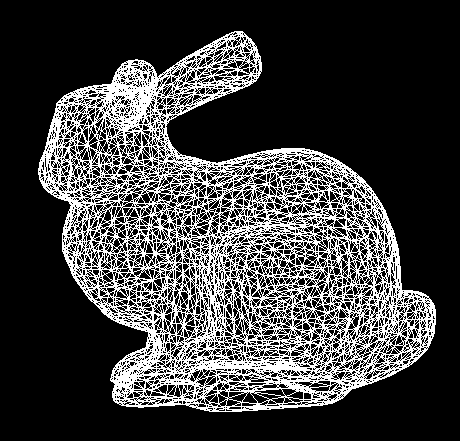
Minimal example (Stanford bunny):
 repl.it/@Rabbid76/pygame-opengl-wavefront-obj
import pygame
import OpenGL
from pygame.locals import *
from OpenGL.GL import *
from OpenGL.GLU import *
import pywavefront

scene = pywavefront.Wavefront('bunny.obj', collect_faces=True)

scene_box = (scene.vertices[0], scene.vertices[0])
for vertex in scene.vertices:
    min_v = [min(scene_box[0][i], vertex[i]) for i in range(3)]
    max_v = [max(scene_box[1][i], vertex[i]) for i in range(3)]
    scene_box = (min_v, max_v)

scene_size     = [scene_box[1][i]-scene_box[0][i] for i in range(3)]
max_scene_size = max(scene_size)
scaled_size    = 5
scene_scale    = [scaled_size/max_scene_size for i in range(3)]
scene_trans    = [-(scene_box[1][i]+scene_box[0][i])/2 for i in range(3)]

def Model():
    glPushMatrix()
    glScalef(*scene_scale)
    glTranslatef(*scene_trans)

    for mesh in scene.mesh_list:
        glBegin(GL_TRIANGLES)
        for face in mesh.faces:
            for vertex_i in face:
                glVertex3f(*scene.vertices[vertex_i])
        glEnd()

    glPopMatrix()

def main():
        pygame.init()
        display = (800, 600)
        pygame.display.set_mode(display, DOUBLEBUF | OPENGL)
        gluPerspective(45, (display[0] / display[1]), 1, 500.0)
        glTranslatef(0.0, 0.0, -10)

        while True:
            for event in pygame.event.get():
                if event.type == pygame.QUIT:
                    pygame.quit()
                    quit()

                if event.type == pygame.KEYDOWN:
                    if event.key == pygame.K_LEFT:
                        glTranslatef(-0.5,0,0)
                    if event.key == pygame.K_RIGHT:
                        glTranslatef(0.5,0,0)
                    if event.key == pygame.K_UP:
                        glTranslatef(0,1,0)
                    if event.key == pygame.K_DOWN:
                        glTranslatef(0,-1,0)

            glRotatef(1, 5, 1, 1)
            glClear(GL_COLOR_BUFFER_BIT|GL_DEPTH_BUFFER_BIT)

            glPolygonMode(GL_FRONT_AND_BACK, GL_LINE)
            Model()
            glPolygonMode(GL_FRONT_AND_BACK, GL_FILL)

            pygame.display.flip()
            pygame.time.wait(10)

main()
All methods was sourced from stackoverflow.com or stackexchange.com, is licensed under cc by-sa 2.5, cc by-sa 3.0 and cc by-sa 4.0