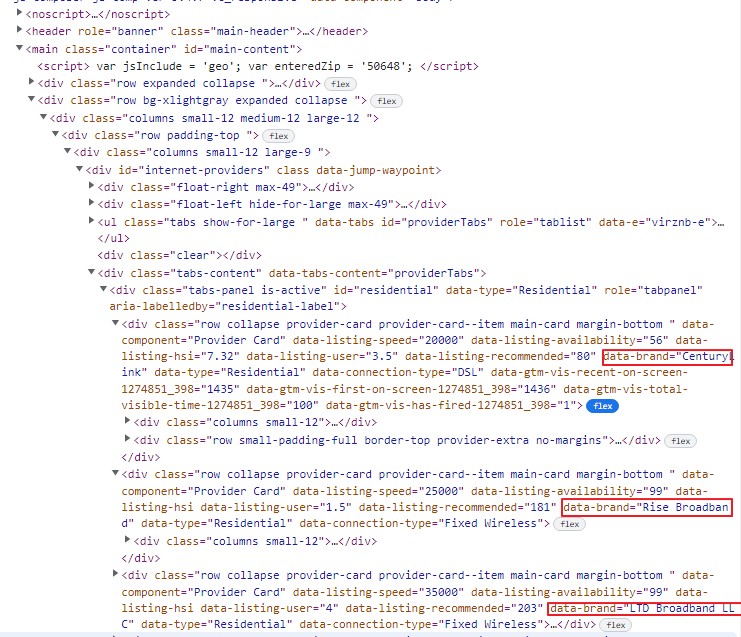
I’m trying to grab a div tag in an html page, but the result is showing an empty list. I’ve provided the code and a picture of the html. The page_text variable is an empty list.
url = 'https://www.highspeedinternet.com/in-your-area?zip=50648'

page = requests.get(url).text
doc = BeautifulSoup(page, "html.parser")
page_text = doc.find_all("div", {"data-brand"})
print(page_text)
Answers:
Thank you for visiting the Q&A section on Magenaut. Please note that all the answers may not help you solve the issue immediately. So please treat them as advisements. If you found the post helpful (or not), leave a comment & I’ll get back to you as soon as possible.
Method 1
You are close to your goal, just add True as value in your dict:
doc.find_all('div',{"data-brand":True})
As alternative you can go with css selectors and list comprehension to get all the values:
[e.get('data-brand') for e in doc.select('div[data-brand]')]
Output:
['CenturyLink', 'Rise Broadband', 'LTD Broadband LLC', 'Viasat', 'HughesNet', 'Heartland Technology', 'Ooma', 'CenturyLink', 'Rise Broadband', 'LTD Broadband LLC', 'Viasat', 'HughesNet', 'Ooma', 'Heartland Technology', 'T-Mobile', 'Verizon Wireless', 'AT&T Wireless', 'Mint', 'Visible']
All methods was sourced from stackoverflow.com or stackexchange.com, is licensed under cc by-sa 2.5, cc by-sa 3.0 and cc by-sa 4.0