I have a text file of numbered entries:
1. foo
2. bar 100%
3. kittens
4. eat cake
5. unicorns
6. rainbows
and so on up to some large number. Then after an empty line, a new block starts from 1.
I insert a new entry, replacing, say, 4. and I need to renumber all the subsequent entries in the block:
1. foo
2. bar 100%
3. kittens
4. sunshine <
5. eat cake
6. unicorns
7. rainbows
Answers:
Thank you for visiting the Q&A section on Magenaut. Please note that all the answers may not help you solve the issue immediately. So please treat them as advisements. If you found the post helpful (or not), leave a comment & I’ll get back to you as soon as possible.
Method 1
You can always add your new entry with a x. newentry syntax and renumber everything afterwards with something like:
awk -F . -v OFS=. '{if (NF) $1 = ++n; else n = 0; print}'
-F .: sets the field separator to.1-v OFS=.: same for the output field separator (-F .is short for-v FS=.).{...}: no condition so the code inside{...}is run for each lineif (NF), if the number of fields is greater than 0. WithFSbeing., that means if the current line contains at least one.. We could also make itif (length)to check for non-empty lines.$1 = ++n: set the first field to an incrementedn(initially 0, then 1, then 2…).else n = 0: else (when NF == 0) reset n to 0.print: print the (possibly modified) line.
1The syntax is -F <extended-regular-expression> but when <extended-regular-expression> is a single character, that is not taken as a regular expression (where . means any character) but as that character instead.
Method 2
Maximum overkill (and complexity! and bugs!) can be had via the Text::Autoformat perl module.
% < input
1. foo
2. bar 100%
3. kittens
4. it is getting dark. there may be a grue
4. no seriously, it's getting dark
4. really, you should find a light or something.
4. are you even paying attention? helloooo
4. eat cake
5. unicorns
6. rainbows
% perl -MText::Autoformat -0777 -ple '$_=autoformat $_, { all => 1 }' < input
 1. foo
 2. bar 100%
 3. kittens
 4. it is getting dark. there may be a grue
 5. no seriously, it's getting dark
 6. really, you should find a light or something.
 7. are you even paying attention? helloooo
 8. eat cake
 9. unicorns
10. rainbows
%
Actual results will depend on the input, desired output, options passed, etc.
Method 3
VIM solutions
There’s two solutions: one is via automating Ctrla keypress over a selection, second is via executing a pattern replacement with submatch(0)+1 over the selection. First the key automation.
Start by creating your list:
1. foo
2. bar 100%
3. kittens
4. eat cake
5. unicorns
6. rainbows
Insert an entry
1. foo
2. bar 100%
3. kittens
4. eat cake
4. sunshine
5. unicorns
6. rainbows
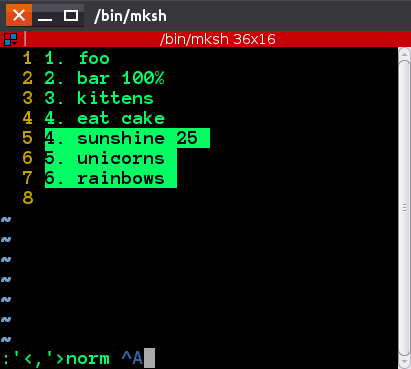
Position your cursor onto 4. sunshine and from command mode press shift + v, then shift + g . This is visual selection till the end of file. You can also move the cursor to the end of a block in the usual ways.
Press : to enter command mode, and you will see this: :'<,'> . Now type in the following:
norm Ctrl+V Ctrl+A
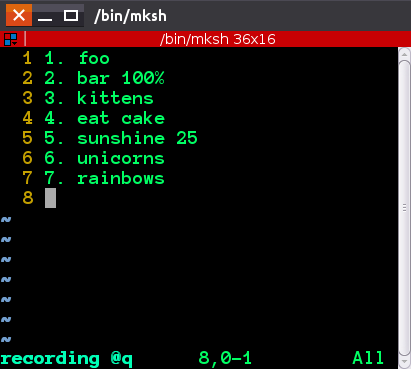
What Ctrl-v and ctrl-A do, is they allow you to enter “exact” key, so it will change into ^A , highlighted. This is basically saying for all lines selected, execute in normal mode keypress Ctrl-A , and Ctrl-A by default increments the number under cursor. You will see the numbers change
Solution in action:
Before
After
Another way would be to select everything from the first repeated number like before( Shiftv, then G ), and go into command mode to execute:
:'<,'>s/v(^d+)./=(submatch(0)+1).'.'/
Method 4
Using basic shell tools, it can be done like this – it may even be simpler:
paste -d . <(seq $(wc -l < new.list)) <(cut -d . -f 2- < new.list)
I’ll explain from out- to inside:
paste -d . file1 file2
creates output lines from the files as columns. -d . sets the separator to ., which will end up behind the new numbers.
commandA <(commandB)
starts commandB and presents the output as if it where a file to read from to commandA, which expects a filename as argument. (See command substitution.)
The second argument of paste, <(cut -d . -f 2- < new.list), outputs the second column unchanged, each line from the second field on, which means starting after the ..
The first argument of paste creates the new consecutive line numbers: it firsts counts the lines using “wordcount lines”: $(wc -l < new.list), and uses this number to create a sequence of numbers from 1 to the count, with seq 7.
Method 5
remove numbers: cut -d" " -f2- < list.txt > temp.txt
insert line to temp.txt
make numbers: cat -n temp.txt| sed -e 's/^[ ]*([0-9]*)[ t]*(.*)/1. 2/' > list.txt
All methods was sourced from stackoverflow.com or stackexchange.com, is licensed under cc by-sa 2.5, cc by-sa 3.0 and cc by-sa 4.0