How can one read passwords in bash scripts in such a way that tools do not show it on a terminal?
(Changing font to black-on-black is easily worked around by copy & paste, so it’s not solution.)
Answers:
Thank you for visiting the Q&A section on Magenaut. Please note that all the answers may not help you solve the issue immediately. So please treat them as advisements. If you found the post helpful (or not), leave a comment & I’ll get back to you as soon as possible.
Method 1
From help read:
-s do not echo input coming from a terminal
For example, to prompt the user and read an arbitrary password into the variable passwd,
IFS= read -s -p 'Password please: ' passwd
Method 2
I always used stty -echo to turn echoing off, then read and afterwards do stty echo (read more by viewing man of stty – i.e. man stty). This is more useful from a programmers perspective as you can turn echoing off and then read a password from a programming language such as Java, C(++), Python, etc. with their standard stdin “readers.”
In bash, the usage could look like this:
echo -n "USERNAME: "; IFS= read -r uname
echo -n "PASSWORD: "; stty -echo; IFS= read -r passwd; stty echo; echo
program "$uname" "$passwd"
unset -v passwd    # get rid of passwd
Python, for example, would look like:
from sys import stdout
from os import system as term

uname = raw_input("USERNAME: ") # read input from stdin until [Enter] in 2
stdout.write("PASSWORD: ")
term("stty -echo") # turn echo off
try:
    passwd = raw_input()
except KeyboardInterrupt: # ctrl+c pressed
    raise SystemExit("Password attempt interrupted")
except EOFError: # ctrl+d pressed
    raise SystemExit("Password attempt interrupted")
finally:
    term("stty echo") # turn echo on again

print "username:", uname
print "password:", "*" * len(passwd)
I had to do this a lot of times in Python, so I know it pretty well from that perspective. This isn’t very hard to translate to other languages, though.
Method 3
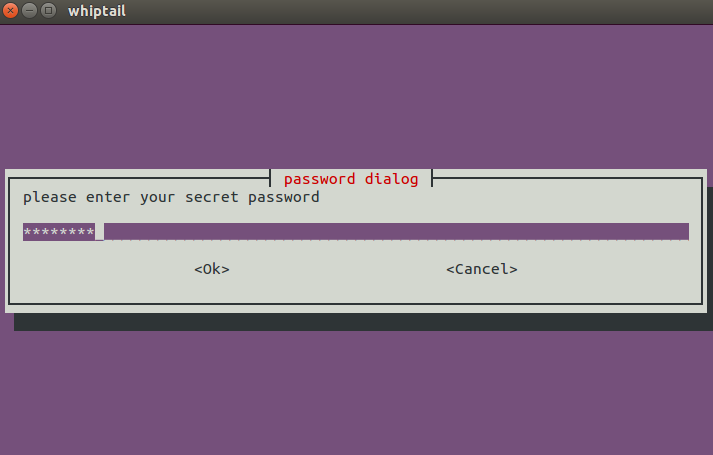
If you’re fine with adding an external dependency, you may use a password box provided by tools such as dialog or whiptail.
Method 4
Your question reads kind of different “in a way like tools???” so I don’t exactly know if this will work for you:
system1 $ passwd=abc123
system1 $ printf "%sn" "${passwd//?/*}"
******
All methods was sourced from stackoverflow.com or stackexchange.com, is licensed under cc by-sa 2.5, cc by-sa 3.0 and cc by-sa 4.0