Remove ^M character from log files.
In my script I redirect output of my program to a log file. The output of my log file contains some ^M (newline) characters. I need to remove them while running itself.
My command:
$ java -jar test.jar >> test.log
test.log has:
Starting script … ^M Starting script …Initializing
Answers:
Thank you for visiting the Q&A section on Magenaut. Please note that all the answers may not help you solve the issue immediately. So please treat them as advisements. If you found the post helpful (or not), leave a comment & I’ll get back to you as soon as possible.
Method 1
Converting a standalone file
If you run the following command:
$ dos2unix <file>
The <file> will have all the ^M characters stripped. If you want to leave <file> intact, then simply run dos2unix like this:
$ dos2unix -n <file> <newfile>
Parsing output from a command
If you need to do them as part of a chain of commands via a pipe, you can use any number of tools such as tr, sed, awk, or perl to do this.
tr
$ java -jar test.jar | tr -d '^M' >> test.log
sed
$ java -jar test.jar | sed 's/^M//g' >> test.log
awk
$ java -jar test.jar | awk 'sub(/^M/,"")' >> test.log
perl
$ java -jar test.jar | perl -p -e 's/^M//g' >> test.log
Typing ^M
When entering the ^M be sure to enter it in one of the following ways:
- As Control + v + M and not Shift + 6 + M.
- As a backslash r, i.e. (
r). - As an octal number (
15). - As a hexidecimal number (
x0D).
Why is this necessary?
The ^M is part of how end of lines are terminated on the Windows platform. Each end of line is terminated with a carriage return character followed by a linefeed character.
On Unix systems the end of line is terminated by just a linefeed character.
- linefeed character =
0x0Ain hex, also written asn. - carriage return character =
0x0Din hex, also written asr.
Examples
You can see these if you pipe the output to a tool such as od or hexdump. Here’s a sample file with the line terminating carriage returns + linefeed characters.
$ cat sample.txt
hi there
bye there
You can see them with hexdump as r + n:
$ hexdump -c sample.txt
0000000   h   i       t   h   e   r   e  r  n   b   y   e       t   h
0000010   e   r   e  r  n
0000015
Or as their hexidecimal 0d + 0a:
$ hexdump -C sample.txt
00000000  68 69 20 74 68 65 72 65  0d 0a 62 79 65 20 74 68  |hi there..bye th|
00000010  65 72 65 0d 0a                                    |ere..|
00000015
Running this through sed 's/r//g':
$ sed 's/r//g' sample.txt |hexdump -C
00000000  68 69 20 74 68 65 72 65  0a 62 79 65 20 74 68 65  |hi there.bye the|
00000010  72 65 0a                                          |re.|
00000013
You can see that sed has removed the 0d character.
Viewing files with ^M without converting?
Yes you can use vim to do this. You can either set the fileformat setting in vim, which will have the effect of converting the file like we were doing above, or you can change the fileformat in the vim view.
changing a file’s format
:set fileformat=dos
:set fileformat=unix
You can use the shorthand notation too:
:set ff=dos
:set ff=unix
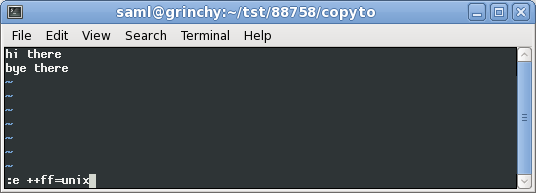
Alternatively you can just change the fileformat of the view. This approach is nondestructive:
:e ++ff=dos
:e ++ff=unix
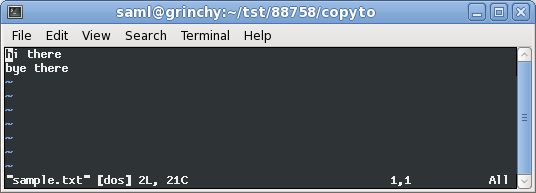
Here you can see me opening our ^M file, sample.txt in vim:
Now I’m converting the fileformat in the view:
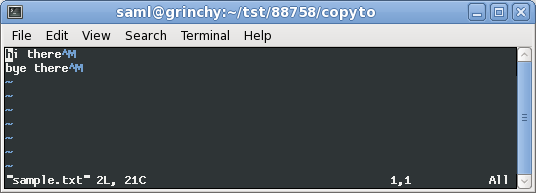
Here’s what it looks like when converted to the unix fileformat:
References
Method 2
Shove the file through dos2unix to fix the line endings.
Or, use one of these:
sed 's,r$,,'
tr -d 'r'
Method 3
You need to fix your program to call isatty() and if stdout is not a tty, then do not output the ^M.
Method 4
Removal of ^M without special signs:
$ tr -d '15' <file1 >file2

$ mv file2 file1
All methods was sourced from stackoverflow.com or stackexchange.com, is licensed under cc by-sa 2.5, cc by-sa 3.0 and cc by-sa 4.0