How can we interact with OS shell using Python ?
I want to run windows cmd commands via python. How can it be achieved ?
Answers:
Thank you for visiting the Q&A section on Magenaut. Please note that all the answers may not help you solve the issue immediately. So please treat them as advisements. If you found the post helpful (or not), leave a comment & I’ll get back to you as soon as possible.
Method 1
The newer subprocess.check_output and similar commands are supposed to replace os.system. See this page for details. While I can’t test this on Windows (because I don’t have access to any Windows machines), the following should work:
from subprocess import check_output
check_output("dir C:", shell=True)
check_output returns a string of the output from your command. Alternatively, subprocess.call just runs the command and returns the status of the command (usually 0 if everything is okay).
Also note that, in python 3, that string output is now bytes output. If you want to change this into a string, you need something like
from subprocess import check_output
check_output("dir C:", shell=True).decode()
If necessary, you can tell it the kind of encoding your program outputs. The default is utf-8, which typically works fine, but other standard options are here.
Also note that @bluescorpion says in the comments that Windows 10 needs a trailing backslash, as in check_output("dir C:\", shell=True). The double backslash is needed because is a special character in python, so it has to be escaped. (Also note that even prefixing the string with r doesn’t help if is the very last character of the string — r"dir C:" is a syntax error, though r"dir C: " is not.)
Method 2
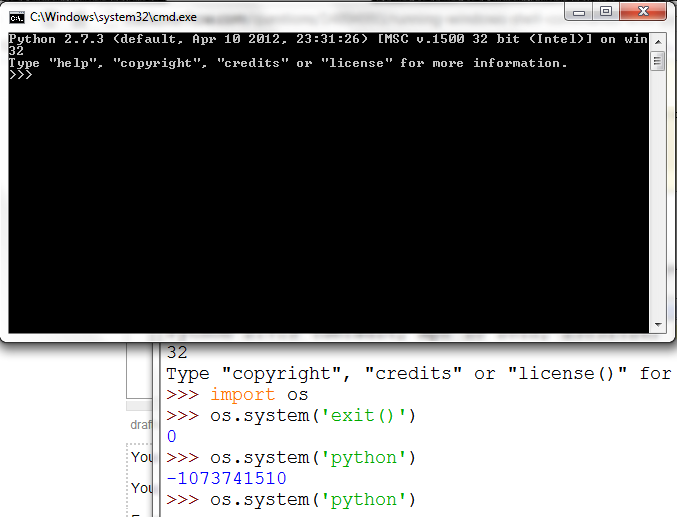
You would use the os module system method.
You just put in the string form of the command, the return value is the windows enrivonment variable COMSPEC
For example:
os.system(‘python’) opens up the windows command prompt and runs the python interpreter
Method 3
Refactoring of @srini-beerge’s answer which gets the output and the return code
import subprocess
def run_win_cmd(cmd):
    result = []
    process = subprocess.Popen(cmd,
                               shell=True,
                               stdout=subprocess.PIPE,
                               stderr=subprocess.PIPE)
    for line in process.stdout:
        result.append(line)
    errcode = process.returncode
    for line in result:
        print(line)
    if errcode is not None:
        raise Exception('cmd %s failed, see above for details', cmd)
Method 4
Simple Import os package and run below command.
import os
os.system("python test.py")
Method 5
You can use the subprocess package with the code as below:
import subprocess
cmdCommand = "python test.py"   #specify your cmd command
process = subprocess.Popen(cmdCommand.split(), stdout=subprocess.PIPE)
output, error = process.communicate()
print output
Method 6
import subprocess
result = []
win_cmd = 'ipconfig'(curr_user,filename,ip_address)
process = subprocess.Popen(win_cmd,
shell=True,
stdout=subprocess.PIPE,
stderr=subprocess.PIPE )
for line in process.stdout:
    print line
result.append(line)
errcode = process.returncode
for line in result:
    print line
All methods was sourced from stackoverflow.com or stackexchange.com, is licensed under cc by-sa 2.5, cc by-sa 3.0 and cc by-sa 4.0