I am trying to have WordPress automatically save the “credit” metadata that is stored within images I am uploading. I know this would be entered as a custom post meta field using update_post_meta().
The “credit” information is gathered by wp_read_image_metadata(), but media_handle_upload() doesn’t use it. It only uses the “caption” and “title” information gathered from the image for post_content and post_title respectively.
I’ve found several examples of how to add custom attachment metadata fields after the upload when editing the image, but since WP is already gathering this information from the image’s metadata, I’d like to find a way to have it saved as the image is uploaded.
I’m unclear of what steps to take to hook into media_handle_upload() (there doesn’t seem to be a hook) so that I can call update_post_meta to save the “credit” line for the attachment.
Answers:
Thank you for visiting the Q&A section on Magenaut. Please note that all the answers may not help you solve the issue immediately. So please treat them as advisements. If you found the post helpful (or not), leave a comment & I’ll get back to you as soon as possible.
Method 1
You can use wp_generate_attachment_metadata:
This function generates metadata for an image attachment. It also creates a thumbnail and other intermediate sizes of the image attachment based on the sizes defined on the Settings_Media_Screen.
The second argument of the filter is the attachment ID, so it shouldn’t be a problem to add the post meta:
add_filter( 'wp_generate_attachment_metadata', 'manipulate_metadata_wpse_91177', 10, 2 );

function manipulate_metadata_wpse_91177( $metadata, $attachment_id )
{
    // var_dump( $metadata['image_meta'] );
    // Credit is inside $metadata['image_meta']['credit']
    return $metadata;
}
Inspecting the contents of $metadata['image_meta'] with FirePHP, these are the results:
aperture: 4
camera: "DMC-FZ100"
caption: ""
copyright: ""
created_timestamp: 1352136868
credit: ""
focal_length: "9.2"
iso: "100"
shutter_speed: "0.003125"
title: "Double Dip"
[Update]
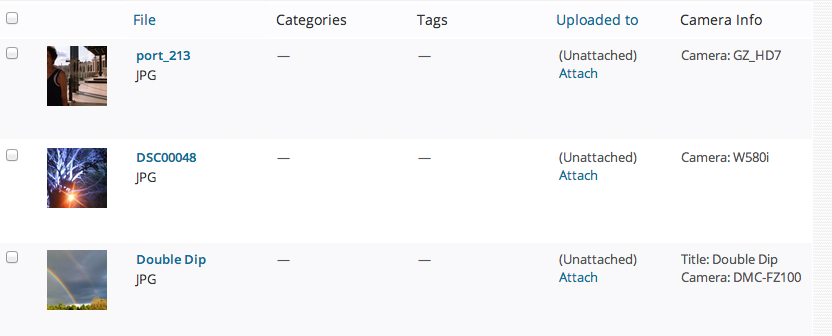
Full test adding a custom column in Media Library screen (/wp-admin/upload.php) to display the post meta info:
add_filter( 'wp_generate_attachment_metadata', 'manipulate_metadata_wpse_91177', 10, 2 );
add_filter( 'manage_upload_columns', 'camera_info_column_wpse_91177' );
add_action( 'manage_media_custom_column', 'camera_info_display_wpse_91177', 10, 2 );

function manipulate_metadata_wpse_91177( $metadata, $attachment_id )
{
    update_post_meta( $attachment_id, 'photo_title', $metadata['image_meta']['title'] );
    update_post_meta( $attachment_id, 'photo_camera', $metadata['image_meta']['camera'] );
    return $metadata;
}

function camera_info_column_wpse_91177( $columns )
{
    $columns['cam_info'] = 'Camera Info';
    return $columns;
}

function camera_info_display_wpse_91177( $column_name, $post_id )
{
    if( 'cam_info' != $column_name || !wp_attachment_is_image( $post_id ) )
        return;

    $title = get_post_meta( $post_id, 'photo_title', true );
    $camera = get_post_meta( $post_id, 'photo_camera', true );
    $echo_title = $title ? 'Title: ' . $title . '<br />' : '';
    $echo_camera = $camera ? 'Camera: ' . $camera : '';
    echo $echo_title . $echo_camera;
}
Somewhat related Q&A: Create new category upon save based on post information
All methods was sourced from stackoverflow.com or stackexchange.com, is licensed under cc by-sa 2.5, cc by-sa 3.0 and cc by-sa 4.0