I am trying to plot two displots side by side with this code
fig,(ax1,ax2) = plt.subplots(1,2)

sns.displot(x =X_train['Age'], hue=y_train, ax=ax1)
sns.displot(x =X_train['Fare'], hue=y_train, ax=ax2)
It returns the following result (two empty subplots followed by one displot each on two lines)-

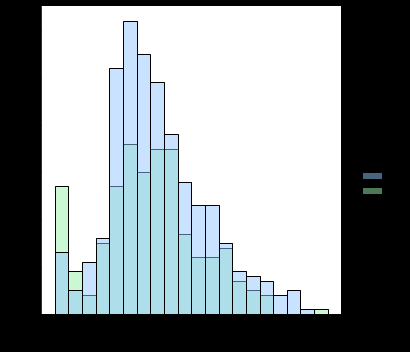
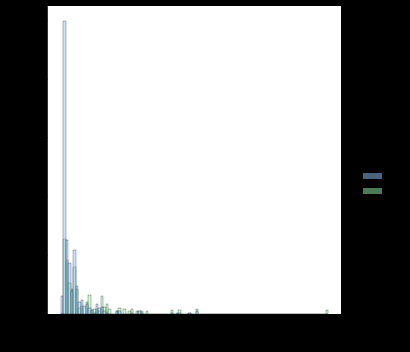
If I try the same code with violinplot, it returns result as expected
fig,(ax1,ax2) = plt.subplots(1,2)

sns.violinplot(y_train, X_train['Age'], ax=ax1)
sns.violinplot(y_train, X_train['Fare'], ax=ax2)
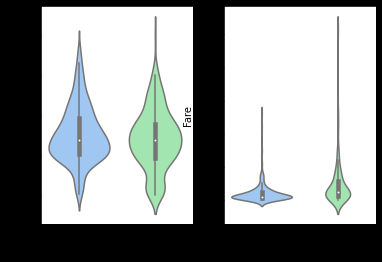
Why is displot returning a different kind of output and what can I do to output two plots on the same line?
Answers:
Thank you for visiting the Q&A section on Magenaut. Please note that all the answers may not help you solve the issue immediately. So please treat them as advisements. If you found the post helpful (or not), leave a comment & I’ll get back to you as soon as possible.
Method 1
- From the documentation for
seaborn.distplot, which has beenDEPRECATEDinseaborn 0.11. .distplotis replaced with the following:displot(), a figure-level function with a similar flexibility over the kind of plot to draw. This is aFacetGrid, and does not have theaxparameter.histplot(), an axes-level function for plotting histograms, including with kernel density smoothing. This does have theaxparameter.
- It is applicable to any of the
seabornFacetGridplots that there is noaxparameter. Use the equivalent axes-level plot.- Look at the documentation for the figure-level plot to find the appropriate axes-level plot function for your needs.
- Because the histogram of two different columns is desired, it’s easier to use
histplot. - See How to plot in multiple subplots for a number of different ways to plot into
maplotlib.pyplot.subplots - Tested in
seaborn 0.11.1&matplotlib 3.4.2
fig,(ax1,ax2) = plt.subplots(1,2)

sns.histplot(x=X_train['Age'], hue=y_train, ax=ax1)
sns.histplot(x=X_train['Fare'], hue=y_train, ax=ax2)
Imports and DataFrame Sample
import seaborn as sns
import matplotlib.pyplot as plt

# load data
penguins = sns.load_dataset("penguins", cache=False)

# display(penguins.head())
  species     island  bill_length_mm  bill_depth_mm  flipper_length_mm  body_mass_g     sex
0  Adelie  Torgersen            39.1           18.7              181.0       3750.0    MALE
1  Adelie  Torgersen            39.5           17.4              186.0       3800.0  FEMALE
2  Adelie  Torgersen            40.3           18.0              195.0       3250.0  FEMALE
3  Adelie  Torgersen             NaN            NaN                NaN          NaN     NaN
4  Adelie  Torgersen            36.7           19.3              193.0       3450.0  FEMALE
Axes Level Plot
- With the data in a wide format, use
sns.histplot
# select the columns to be plotted
cols = ['bill_length_mm', 'bill_depth_mm']

# create the figure and axes
fig, axes = plt.subplots(1, 2)
axes = axes.ravel()  # flattening the array makes indexing easier

for col, ax in zip(cols, axes):
    sns.histplot(data=penguins[col], kde=True, stat='density', ax=ax)

fig.tight_layout()
plt.show()
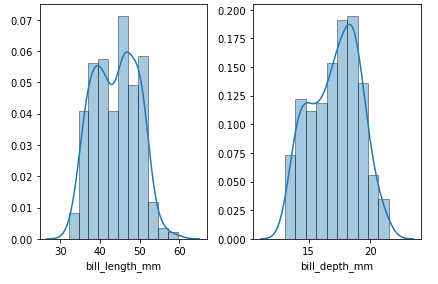
Figure Level Plot
- With the dataframe in a long format, use
displot
# create a long dataframe
dfl = penguins.melt(id_vars='species', value_vars=['bill_length_mm', 'bill_depth_mm'], var_name='bill_size', value_name='vals')

# display(dfl.head())
  species       bill_size  vals
0  Adelie  bill_length_mm  39.1
1  Adelie   bill_depth_mm  18.7
2  Adelie  bill_length_mm  39.5
3  Adelie   bill_depth_mm  17.4
4  Adelie  bill_length_mm  40.3

# plot
sns.displot(data=dfl, x='vals', col='bill_size', kde=True, stat='density', common_bins=False, common_norm=False, height=4, facet_kws={'sharey': False, 'sharex': False})
All methods was sourced from stackoverflow.com or stackexchange.com, is licensed under cc by-sa 2.5, cc by-sa 3.0 and cc by-sa 4.0