CSS
User select2 version Select2-4.0.13
and bootstrap4
   <link href="Styles/Select2-4.0.13/select2.min.css" rel="stylesheet" type="text/css" />
   <link href="Styles/Select2-4.0.13/select2-bootstrap4.min.css" rel="stylesheet" type="text/css" />
ASPX
Created Dropdown list Name with class js-data-example-ajax
<form id="form1" runat="server">
    <asp:DropDownList runat="server" class="js-data-example-ajax" style="width: 300px">
    </asp:DropDownList>
</form>
JAVA SCRIPT
loaded data to select2 dropdown using ajax web method call in document ready method
but its raising error and not working properly
    <script src="Scripts/jquery-3.4.1/jquery-3.4.1.min.css" type="text/javascript"></script>
    <script src="Scripts/Select2-4.0.13/select2.full.min.js" type="text/javascript"></script>
    <script type="text/javascript">
        $(document).ready(function () {
            $('.js-data-example-ajax').select2({
                theme: 'bootstrap4',
                minimumInputLength: 1,
                containerCssClass: ':all:',
                allowClear: true,
                ajax: {
                    url: 'WebForm1.aspx/getsource',
                    dataType: 'json',
                    //type: "POST",
                    params: {
                        contentType: 'application/json; charset=utf-8'
                    },
                    data: function (params) {
                        var query = {
                            q: params.term,
                            page: params.page
                        }
                        return query;
                    },
                    processResults: function (data, params) {
                        params.page = params.page || 1;
                        data = jQuery.map(data.results, function (obj) {
                            obj.id = obj.id;
                            obj.text = obj.text;
                            return obj;
                        });
                        return {
                            results: data,
                            pagination: {
                                more: params.page * 30 < 4//total records
                            }
                        };
                    },
                    success: function (data) {
                        console.log("SUCCESS: ", data);
                    },
                    error: function (data) {
                        console.log("ERROR: ", data);
                    },
                    cache: true
                }
            });
        });
    </script>
.CS File
Created Method as web method to load data to dropdown list with select2
  [WebMethod]
        [ScriptMethod(ResponseFormat = ResponseFormat.Json)]
        public static string getsource(string q, int page)
        {
            Select2ModelMain obj = new Select2ModelMain();
            obj.results = new List<SelectResult>();

            SelectResult objdata1 = new SelectResult();
            objdata1.id = 1;
            objdata1.text = "INDIA";
            obj.results.Add(objdata1);

            objdata1 = new SelectResult();
            objdata1.id = 2;
            objdata1.text = "AMERICA";
            obj.results.Add(objdata1);

            objdata1 = new SelectResult();
            objdata1.id = 3;
            objdata1.text = "CHINA";
            obj.results.Add(objdata1);

            objdata1 = new SelectResult();
            objdata1.id = 4;
            objdata1.text = "SRILANKA";
            obj.results.Add(objdata1);

            obj.pagination = new SelectPage();
            obj.pagination.more = "true";

            if (!(string.IsNullOrEmpty(q) || string.IsNullOrWhiteSpace(q)))
            {
                obj.results = obj.results.Where(x => x.text.ToLower().StartsWith(q.ToLower())).ToList();
            }
            JavaScriptSerializer serializer = new JavaScriptSerializer();
            string test = serializer.Serialize(obj);
            return test;
        }

        public class Select2ModelMain
        {
            public List<SelectResult> results { get; set; }
            public SelectPage pagination { get; set; }
        }

        public class SelectResult
        {
            public int id { get; set; }
            public string text { get; set; }
            public string disabled { get; set; }
        }

        public class SelectPage
        {
            public string more { get; set; }
        }
Answers:
Thank you for visiting the Q&A section on Magenaut. Please note that all the answers may not help you solve the issue immediately. So please treat them as advisements. If you found the post helpful (or not), leave a comment & I’ll get back to you as soon as possible.
Method 1
Step 1:
On Select2ModelMain change
public List<SelectResult> results { get; set; }
to (I’m having an issue on if it is name results)
public List<SelectResult> items { get; set; }
Step 2:
Try this javascript as an initial to check if it’s working.
Note: Make sure that the action method is ‘POST’ instead of ‘GET’ i’m not sure what is the issue on if GET for select2 for a normal ajax call it works.
Side Note:
When using GET on normal ajax request this should be set to UseHttpGet = true
[ScriptMethod(ResponseFormat = ResponseFormat.Json, UseHttpGet = true)]
For other options when using select2 remote query
$(document).ready(function () {
        $('.js-data-example-ajax').select2({
            ajax: {
                url: 'TestSelect2Page.aspx/getsource',
                type: "POST",
                dataType: "json",
                contentType: "application/json; charset=utf-8",
                delay: 250,
                data: function (params) {

                    var search = '';

                    if (params.term !== undefined) {
                        search = params.term;
                    }

                    return "{'q': '" + search + "'}";
                },
                processResults: function (data) {
                    var items = JSON.parse(data.d).items

                    if (items == null) {
                        return null;
                    }

                    return {
                        results: items
                    };
                }
            },
            placeholder: 'Search here',
            minimumInputLength: 1
        });
    });
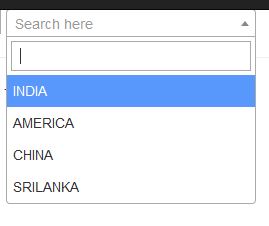
OUTPUT 1:
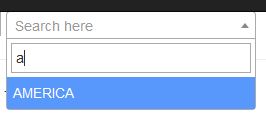
OUTPUT 2:
I hope this helps. Happy coding.
Method 2
Thank you so much its working…
enter image description here
but we are facing another issue
i.e. selected event changed OnSelectedIndexChanged is not working
so we added another line “<asp:ListItem Selected=”True”></asp:ListItem>”
after this it fires OnSelectedIndexChanged but its not showing selected Item
2
3
 <asp:Label ID="LblItemName" runat="server" Style="font-weight: bold;" Text="Product Name"></asp:Label>
                                <asp:DropDownList runat="server" ID="txtItemName" data-width="100%" CssClass="select2-single input-sm w-100"
                                    AutoPostBack="true" OnSelectedIndexChanged="txtItemName_SelectedIndexChanged">
                                    <asp:ListItem Selected="True"></asp:ListItem>
                                </asp:DropDownList>
All methods was sourced from stackoverflow.com or stackexchange.com, is licensed under cc by-sa 2.5, cc by-sa 3.0 and cc by-sa 4.0