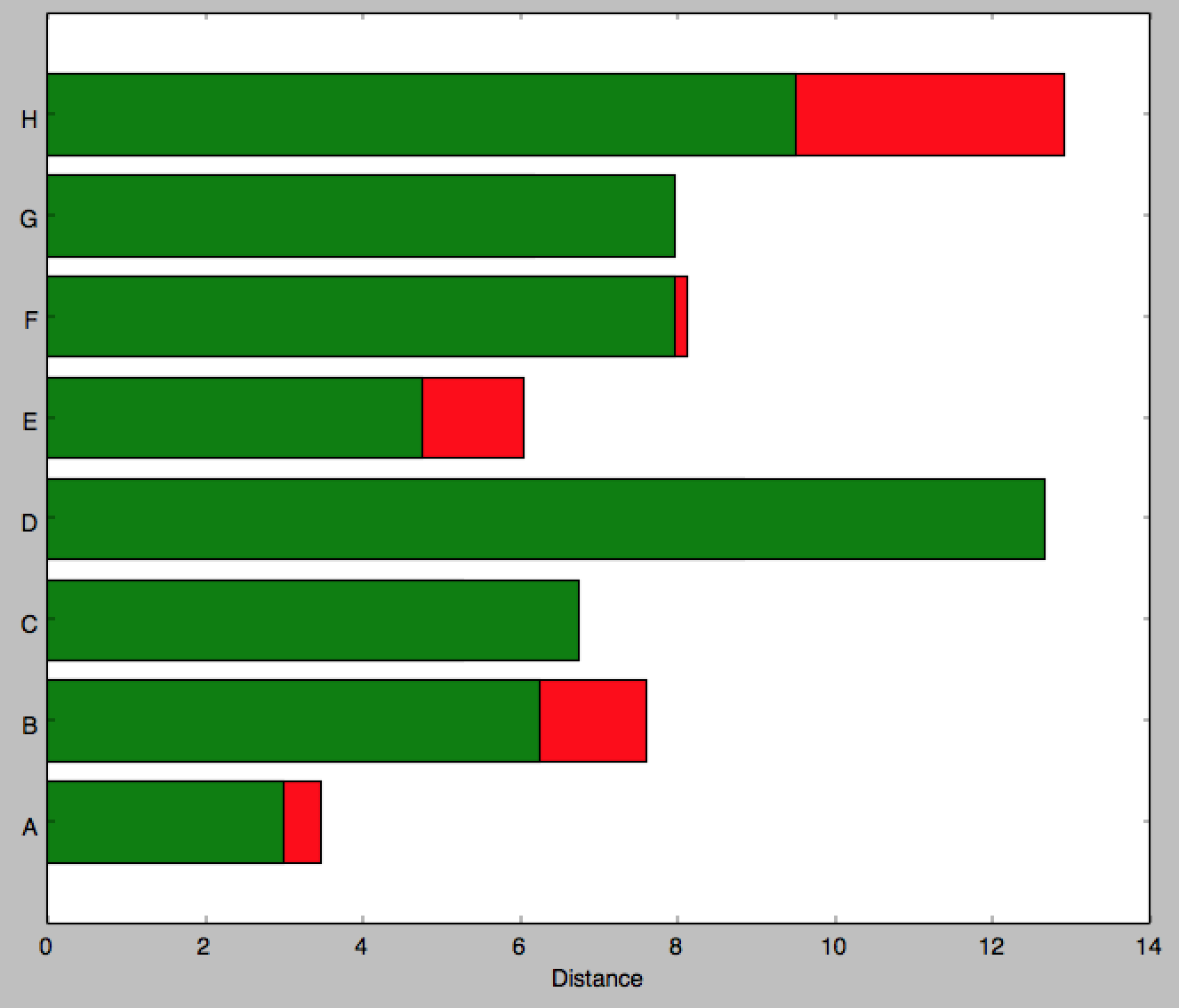
I am trying to replicate the following image in matplotlib and it seems barh is my only option. Though it appears that you can’t stack barh graphs so I don’t know what to do

If you know of a better python library to draw this kind of thing, please let me know.
This is all I could come up with as a start:
import matplotlib.pyplot as plt; plt.rcdefaults()
import numpy as np
import matplotlib.pyplot as plt

people = ('A','B','C','D','E','F','G','H')
y_pos = np.arange(len(people))
bottomdata = 3 + 10 * np.random.rand(len(people))
topdata = 3 + 10 * np.random.rand(len(people))
fig = plt.figure(figsize=(10,8))
ax = fig.add_subplot(111)
ax.barh(y_pos, bottomdata,color='r',align='center')
ax.barh(y_pos, topdata,color='g',align='center')
ax.set_yticks(y_pos)
ax.set_yticklabels(people)
ax.set_xlabel('Distance')

plt.show()
I would then have to add labels individually using ax.text which would be tedious. Ideally I would like to just specify the width of the part to be inserted then it updates the center of that section with a string of my choosing. The labels on the outside (e.g. 3800) I can add myself later, it is mainly the labeling over the bar section itself and creating this stacked method in a nice way I’m having problems with. Can you even specify a ‘distance’ i.e. span of color in any way?
Answers:
Thank you for visiting the Q&A section on Magenaut. Please note that all the answers may not help you solve the issue immediately. So please treat them as advisements. If you found the post helpful (or not), leave a comment & I’ll get back to you as soon as possible.
Method 1
Edit 2: for more heterogeneous data. (I’ve left the above method since I find it more usual to work with the same number of records per series)
Answering the two parts of the question:
a) barh returns a container of handles to all the patches that it drew. You can use the coordinates of the patches to aid the text positions.
b) Following these two answers to the question that I noted before (see Horizontal stacked bar chart in Matplotlib), you can stack bar graphs horizontally by setting the ‘left’ input.
and additionally c) handling data that is less uniform in shape.
Below is one way you could handle data that is less uniform in shape is simply to process each segment independently.
import numpy as np
import matplotlib.pyplot as plt

# some labels for each row
people = ('A','B','C','D','E','F','G','H')
r = len(people)

# how many data points overall (average of 3 per person)
n = r * 3

# which person does each segment belong to?
rows = np.random.randint(0, r, (n,))
# how wide is the segment?
widths = np.random.randint(3,12, n,)
# what label to put on the segment (xrange in py2.7, range for py3)
labels = range(n)
colors ='rgbwmc'

patch_handles = []

fig = plt.figure(figsize=(10,8))
ax = fig.add_subplot(111)


left = np.zeros(r,)
row_counts = np.zeros(r,)

for (r, w, l) in zip(rows, widths, labels):
    print r, w, l
    patch_handles.append(ax.barh(r, w, align='center', left=left[r],
        color=colors[int(row_counts[r]) % len(colors)]))
    left[r] += w
    row_counts[r] += 1
    # we know there is only one patch but could enumerate if expanded
    patch = patch_handles[-1][0]
    bl = patch.get_xy()
    x = 0.5*patch.get_width() + bl[0]
    y = 0.5*patch.get_height() + bl[1]
    ax.text(x, y, "%d%%" % (l), ha='center',va='center')

y_pos = np.arange(8)
ax.set_yticks(y_pos)
ax.set_yticklabels(people)
ax.set_xlabel('Distance')

plt.show()
Which produces a graph like this  , with a different number of segments present in each series.
Note that this is not particularly efficient since each segment used an individual call to ax.barh. There may be more efficient methods (e.g. by padding a matrix with zero-width segments or nan values) but this likely to be problem-specific and is a distinct question.
Edit: updated to answer both parts of the question.
import numpy as np
import matplotlib.pyplot as plt

people = ('A','B','C','D','E','F','G','H')
segments = 4

# generate some multi-dimensional data & arbitrary labels
data = 3 + 10* np.random.rand(segments, len(people))
percentages = (np.random.randint(5,20, (len(people), segments)))
y_pos = np.arange(len(people))

fig = plt.figure(figsize=(10,8))
ax = fig.add_subplot(111)

colors ='rgbwmc'
patch_handles = []
left = np.zeros(len(people)) # left alignment of data starts at zero
for i, d in enumerate(data):
    patch_handles.append(ax.barh(y_pos, d,
      color=colors[i%len(colors)], align='center',
      left=left))
    # accumulate the left-hand offsets
    left += d

# go through all of the bar segments and annotate
for j in range(len(patch_handles)):
    for i, patch in enumerate(patch_handles[j].get_children()):
        bl = patch.get_xy()
        x = 0.5*patch.get_width() + bl[0]
        y = 0.5*patch.get_height() + bl[1]
        ax.text(x,y, "%d%%" % (percentages[i,j]), ha='center')

ax.set_yticks(y_pos)
ax.set_yticklabels(people)
ax.set_xlabel('Distance')

plt.show()
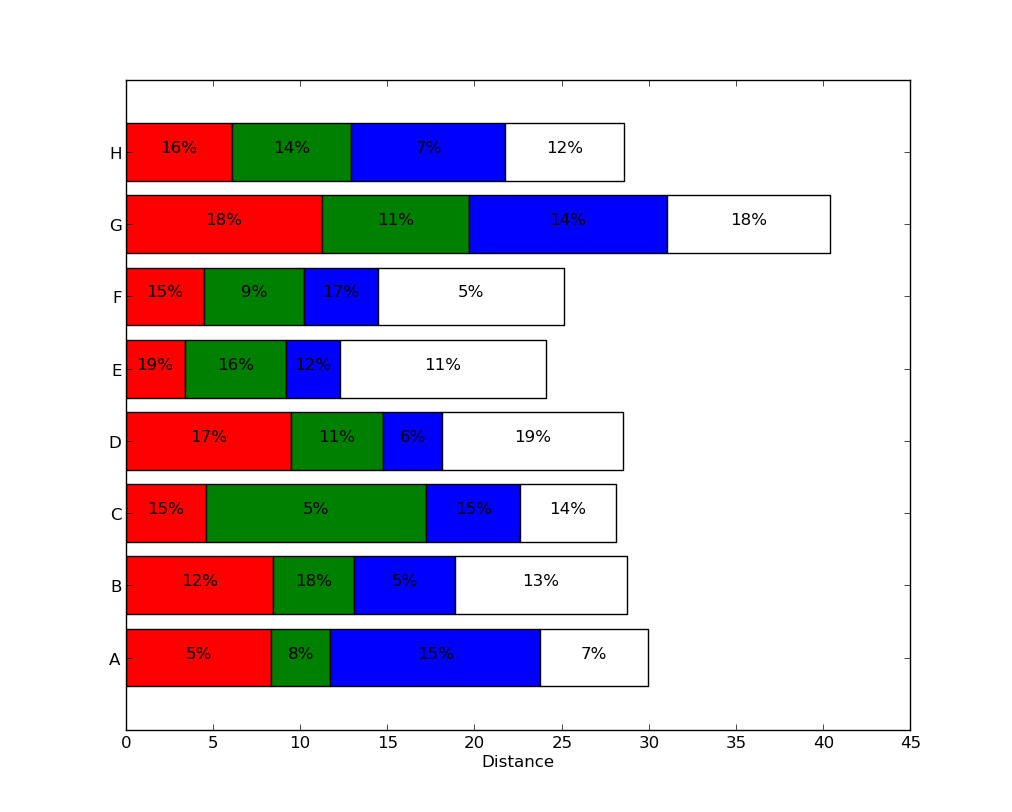
You can achieve a result along these lines (note: the percentages I used have nothing to do with the bar widths, as the relationship in the example seems unclear):
See Horizontal stacked bar chart in Matplotlib for some ideas on stacking horizontal bar plots.
Method 2
Imports and Test DataFrame
import pandas as pd
import numpy as np

# create sample data as shown in the OP
np.random.seed(365)
people = ('A','B','C','D','E','F','G','H')
bottomdata = 3 + 10 * np.random.rand(len(people))
topdata = 3 + 10 * np.random.rand(len(people))

# create the dataframe
df = pd.DataFrame({'Female': bottomdata, 'Male': topdata}, index=people)

# display(df)
   Female   Male
A   12.41   7.42
B    9.42   4.10
C    9.85   7.38
D    8.89  10.53
E    8.44   5.92
F    6.68  11.86
G   10.67  12.97
H    6.05   7.87
Updated with matplotlib v3.4.2
- Use
matplotlib.pyplot.bar_label - See the matplotlib: Bar Label Demo page for additional formatting options.
- Tested with
pandas 1.2.4, which is usingmatplotlibas the plot engine, andpython 3.8.
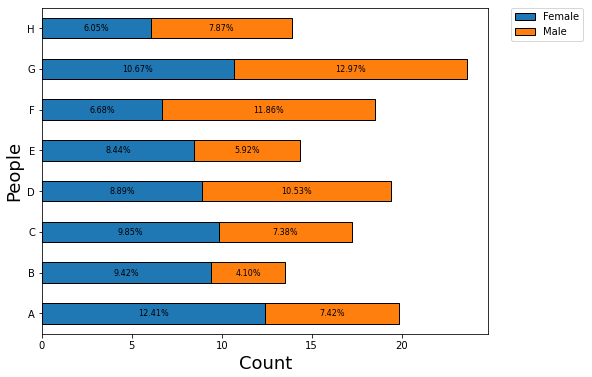
ax = df.plot(kind='barh', stacked=True, figsize=(8, 6))

for c in ax.containers:

    # customize the label to account for cases when there might not be a bar section
    labels = [f'{w:.2f}%' if (w := v.get_width()) > 0 else '' for v in c ]

    # set the bar label
    ax.bar_label(c, labels=labels, label_type='center')

    # uncomment and use the next line if there are no nan or 0 length sections; just use fmt to add a % (the previous two lines of code are not needed, in this case)
#     ax.bar_label(c, fmt='%.2f%%', label_type='center')

# move the legend
ax.legend(bbox_to_anchor=(1.025, 1), loc='upper left', borderaxespad=0.)

# add labels
ax.set_ylabel("People", fontsize=18)
ax.set_xlabel("Percent", fontsize=18)
plt.show()
- The plots are equivalent to those shown below.
Annotation Resources – from matplotlib v3.4.2
- Adding value labels on a matplotlib bar chart
- How to annotate each segment of a stacked bar chart
- Stacked Bar Chart with Centered Labels
- How to plot and annotate multiple data columns in a seaborn barplot
- How to annotate a seaborn barplot with the aggregated value
- How to add multiple annotations to a barplot
- How to plot and annotate a grouped bar chart
Original Answer – before matplotlib v3.4.2
- The easiest way to plot a horizontal or vertical stacked bar, is to load the data into a
pandas.DataFrame- This will plot, and annotate correctly, even when all categories (
'People'), don’t have all segments (e.g. some value is 0 orNaN)
- This will plot, and annotate correctly, even when all categories (
- Once the data is in the dataframe:
- It’s easier to manipulate and analyze
- It can be plotted with the
matplotlibengine, using:pandas.DataFrame.plot.barhlabel_text = f'{width}'for annotations
pandas.DataFrame.plot.barlabel_text = f'{height}'for annotations- SO: Vertical Stacked Bar Chart with Centered Labels
- These methods return a
matplotlib.axes.Axesor anumpy.ndarrayof them. - Using the
.patchesmethod unpacks a list ofmatplotlib.patches.Rectangleobjects, one for each of the sections of the stacked bar.- Each
.Rectanglehas methods for extracting the various values that define the rectangle. - Each
.Rectangleis in order from left the right, and bottom to top, so all the.Rectangleobjects, for each level, appear in order, when iterating through.patches.
- Each
- The labels are made using an f-string,
label_text = f'{width:.2f}%', so any additional text can be added as needed.
Plot and Annotate
- Plotting the bar, is 1 line, the remainder is annotating the rectangles
# plot the dataframe with 1 line
ax = df.plot.barh(stacked=True, figsize=(8, 6))

# .patches is everything inside of the chart
for rect in ax.patches:
    # Find where everything is located
    height = rect.get_height()
    width = rect.get_width()
    x = rect.get_x()
    y = rect.get_y()

    # The height of the bar is the data value and can be used as the label
    label_text = f'{width:.2f}%'  # f'{width:.2f}' to format decimal values

    # ax.text(x, y, text)
    label_x = x + width / 2
    label_y = y + height / 2

    # only plot labels greater than given width
    if width > 0:
        ax.text(label_x, label_y, label_text, ha='center', va='center', fontsize=8)

# move the legend
ax.legend(bbox_to_anchor=(1.05, 1), loc='upper left', borderaxespad=0.)

# add labels
ax.set_ylabel("People", fontsize=18)
ax.set_xlabel("Percent", fontsize=18)
plt.show()
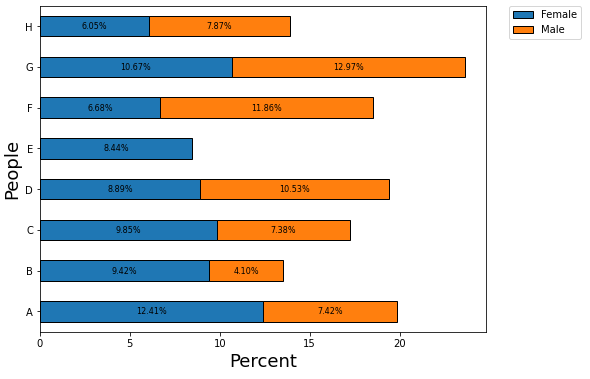
Example with Missing Segment
# set one of the dataframe values to 0
df.iloc[4, 1] = 0
- Note the annotations are all in the correct location from
df.
Method 3
For this case, the above answers work perfectly. The issue I had, and didn’t find a plug-and-play solution online, was that I often have to plot stacked bars in multi-subplot figures, with many values, which tend to have very non-homogenous amplitudes.
(Note: I work usually with pandas dataframes, and matplotlib. I couldn’t make the bar_label() method of matplotlib to work all the times.)
So, I just give a kind of ad-hoc, but easily generalizable solution. In this example, I was working with single-row dataframes (for power-exchange monitoring purposes per hour), so, my dataframe (df) had just one row.
(I provide an example figure to show how this can be useful in very densely-packed plots)
[enter image description here][1]
[1]: https://i.stack.imgur.com/9akd8.png
”’
This implementation produces a stacked, horizontal bar plot.
df –> pandas dataframe. Columns are used as the iterator, and only the firs value of each column is used.
waterfall–> bool: if True, apart from the stack-direction, also a perpendicular offset is added.
cyclic_offset_x –> list (of any length) or None: loop through these values to use as x-offset pixels.
cyclic_offset_y –> list (of any length) or None: loop through these values to use as y-offset pixels.
ax –> matplotlib Axes, or None: if None, creates a new axis and figure.
”’
    def magic_stacked_bar(df, waterfall=False, cyclic_offset_x=None, cyclic_offset_y=None, ax=None):


        if isinstance(cyclic_offset_x, type(None)):
            cyclic_offset_x = [0, 0]
        if isinstance(cyclic_offset_y, type(None)):
            cyclic_offset_y = [0, 0]

        ax0 = ax
        if isinstance(ax, type(None)):
            fig, ax = plt.subplots()
            fig.set_size_inches(19, 10)

        cycler = 0;
        prev = 0 # summation variable to make it stacked
        for c in df.columns:
            if waterfall:
                y = c ; label = "" # bidirectional stack
            else:
                y = 0; label = c # unidirectional stack
            ax.barh(y=y, width=df[c].values[0], height=1, left=prev, label = label)
            prev += df[c].values[0] # add to sum-stack

            offset_x = cyclic_offset_x[divmod(cycler, len(cyclic_offset_x))[1]]
            offset_y = cyclic_offset_y[divmod(cycler, len(cyclic_offset_y))[1]]

            ax.annotate(text="{}".format(int(df[c].values[0])), xy=(prev - df[c].values / 2, y),
                        xytext=(offset_x, offset_y), textcoords='offset pixels',
                        ha='center', va='top', fontsize=8,
                        arrowprops=dict(facecolor='black', shrink=0.01, width=0.3, headwidth=0.3),
                        bbox=dict(boxstyle='round', facecolor='grey', alpha=0.5))

            cycler += 1

        if not waterfall:
            ax.legend() # if waterfall, the index annotates the columns. If
                        # waterfall ==False, the legend annotates the columns
        if isinstance(ax0, type(None)):
            ax.set_title("Voi la")
            ax.set_xlabel("UltraWatts")
            plt.show()
        else:
            return ax
”’ (Sometimes, it is more tedious and requires some custom functions to make the labels look alright.
”’
A, B = 80,80
n_units = df.shape[1]
cyclic_offset_x = -A*np.cos(2*np.pi / (2*n_units)  *np.arange(n_units))
cyclic_offset_y = B*np.sin(2*np.pi / (2*n_units) * np.arange(n_units)) + B/2
All methods was sourced from stackoverflow.com or stackexchange.com, is licensed under cc by-sa 2.5, cc by-sa 3.0 and cc by-sa 4.0