I am trying to implement a simple mouse click event in matplotlib. I wish to plot a figure then use the mouse to select the lower and upper limits for integration.
So far I am able to print the coordinates to screen but not store them for later use in the program. I would also like to exit the connection to the figure after the second mouse click.
Below is the code which currently plots and then prints the coordinates.
My Question(s):
How can I store coordinates from the figure to list? i.e. click = [xpos, ypos]
Is it possible to get two sets of x coordinates in order to do a simple integration over that section of line?
import numpy as np
import matplotlib.pyplot as plt

x = np.arange(-10,10)
y = x**2

fig = plt.figure()
ax = fig.add_subplot(111)
ax.plot(x,y)

def onclick(event):
    global ix, iy
    ix, iy = event.xdata, event.ydata
    print 'x = %d, y = %d'%(
        ix, iy)

    global coords
    coords = [ix, iy]

    return coords


for i in xrange(0,1):

    cid = fig.canvas.mpl_connect('button_press_event', onclick)


plt.show()
Answers:
Thank you for visiting the Q&A section on Magenaut. Please note that all the answers may not help you solve the issue immediately. So please treat them as advisements. If you found the post helpful (or not), leave a comment & I’ll get back to you as soon as possible.
Method 1
mpl_connect needs to be called just once to connect the event to event handler. It will start listening to click event until you disconnect. And you can use
fig.canvas.mpl_disconnect(cid)
to disconnect the event hook.
What you want to do is something like:
import numpy as np
import matplotlib.pyplot as plt

x = np.arange(-10,10)
y = x**2

fig = plt.figure()
ax = fig.add_subplot(111)
ax.plot(x,y)

coords = []

def onclick(event):
    global ix, iy
    ix, iy = event.xdata, event.ydata
    print 'x = %d, y = %d'%(
        ix, iy)

    global coords
    coords.append((ix, iy))

    if len(coords) == 2:
        fig.canvas.mpl_disconnect(cid)

    return coords
cid = fig.canvas.mpl_connect('button_press_event', onclick)
Method 2
Thanks to otterb for providing the answer! I’ve added in a little function taken from here…
Find nearest value in numpy array
In all this code will plot, wait for selection of x points and then return the indices of the x array needed for any integration, summations etc.
Ta,
import numpy as np
import matplotlib.pyplot as plt
from scipy.integrate import trapz

def find_nearest(array,value):
    idx = (np.abs(array-value)).argmin()
    return array[idx]

# Simple mouse click function to store coordinates
def onclick(event):
    global ix, iy
    ix, iy = event.xdata, event.ydata

    # print 'x = %d, y = %d'%(
    #     ix, iy)

    # assign global variable to access outside of function
    global coords
    coords.append((ix, iy))

    # Disconnect after 2 clicks
    if len(coords) == 2:
        fig.canvas.mpl_disconnect(cid)
        plt.close(1)
    return


x = np.arange(-10,10)
y = x**2

fig = plt.figure(1)
ax = fig.add_subplot(111)
ax.plot(x,y)

coords = []

# Call click func
cid = fig.canvas.mpl_connect('button_press_event', onclick)

plt.show(1)


# limits for integration
ch1 = np.where(x == (find_nearest(x, coords[0][0])))
ch2 = np.where(x == (find_nearest(x, coords[1][0])))

# Calculate integral
y_int = trapz(y[ch1[0][0]:ch2[0][0]], x = x[ch1[0][0]:ch2[0][0]])

print ''
print 'Integral between '+str(coords[0][0])+ ' & ' +str(coords[1][0])
print y_int
Method 3
I want to provide a different answer here since I recently tried to do event handling but the soulutions here do not distinguish between zooming, paning and clicking, everything gets messed up in my case. I found an extention for matplotlib called mpl_point_clicker that works really well for me and can be installed with pip (with python 3.X). Here is the basic usage from their documentation:
import numpy as np
import matplotlib.pyplot as plt
from mpl_point_clicker import clicker

fig, ax = plt.subplots(constrained_layout=True)
ax.plot(np.sin(np.arange(200)/(5*np.pi)))
klicker = clicker(ax, ["event"], markers=["x"])

plt.show()

print(klicker.get_positions())
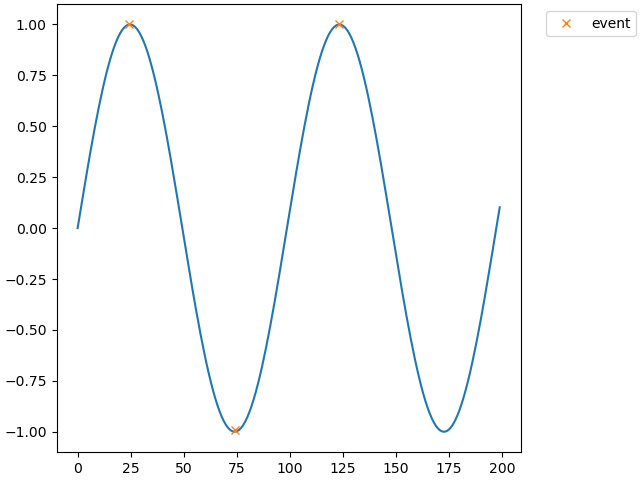
The figure with 3 clicks and the output look like this
Output:
{'event': array([[ 24.22415481,   1.00237796],
       [ 74.19892948,  -0.99140661],
       [123.23078387,   1.00237796]])}
All methods was sourced from stackoverflow.com or stackexchange.com, is licensed under cc by-sa 2.5, cc by-sa 3.0 and cc by-sa 4.0