‘Publish failed’ but build succeeded?
When using Visual Studio 2008, when I “Publish Web Site”, the application builds correctly, but then I get a “Publish failed” message:
When using Visual Studio 2008, when I “Publish Web Site”, the application builds correctly, but then I get a “Publish failed” message:
I am trying to replicate the exact functionality of this dialogue in Visual Studio 2008 in a build script:
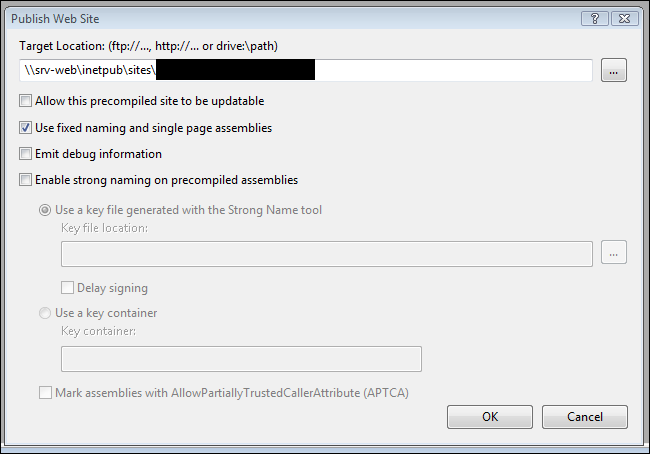
For normal (say Windows Forms) C# applications, to execute commands after a successful build I would use the Build Events->Post-build event command line in Project Properties.
I have certain folders which I want to keep in the project but not to include it in publishing.
I have added a database file (.mdf) to my application using Visual Studio built-in functionality. Database is in the App_Data folder. It is running fine. But when I publish it and upload it to server it gives this error.
I am trying to set post terms on the post, when it is puublished
I’ve been struggling to find a solution for this and I don’t know if it’s the Gutenberg editor or if it’s the hook publish_post.
The code below works perfectly When I create a new post, an email is sent out to the email included in the function. I would like to know how I can send an email when anything is published on the website, like custom post types, pages and regular posts function notifyauthor($post_id) { $post = get_post($post_id); … Read more
I am trying to set a Post’s default visibility to ‘Private’ when a user first creates the post. They should then have the ability to manually select ‘published’ from the sidebar dropdown once they are ready or the post has been reviewed.
This problem started when I wanted to create a new post. I’m using the Elementor editor, so I created a new post, set the title and featured image and then clicked on “Edit with Elementor” as usual. While Elementor was loading, I got this error.