GridView with merged cells
I need to display data in grid view with merged rows for some columns. Please help me to prepare a grid view in below defined format:
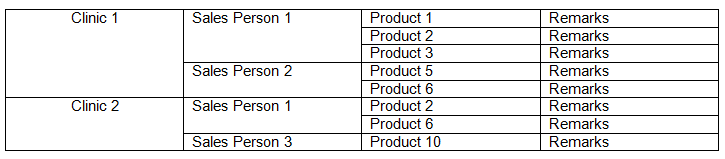
I need to display data in grid view with merged rows for some columns. Please help me to prepare a grid view in below defined format:
If a web page needs some data, why not just have a SQLDataSource call a stored procedure? Why use an ObjectDataSource to call a business object that then calls the stored procedure? I understand that other apps (lets say desktop apps) built on the .net framework can access the business objects, but what if the application will always be only a web app?
I have a GridView bound to a SqlDataSource with a default SelectCommand defined as such:
Hey I would like to display certain data with my stored procedure for the last 30 days. here is what I have done (aspx.cs file):
On my page I have a DropDownList which I populate with database values from an SqlDataSource (see code below).
I am trying to do this as asked earlier. The only difference that I found is additional List item that was included in above code.
I have really weird situation.
I’ve created new aspx page, and without using ANY custom logic objects (everything created with visual studios wizards) tried to create grid view from sqldatasource.
I’m trying to set the value of the sqldatasource‘s selectcommand parameter @ClientID as in the code below, but it’s not working out.
I’m having a problem. I want this to work, but it doesn’t:
The below works correctly and filters my gridview based on the text entered in my textbox.