How can I force SSH to request passphrases using a graphical prompt (GTK, for example) instead of the standard one that uses the terminal?
I tried setting SSH_ASKPASS=/usr/bin/ssh-askpass but it seems to have no effects.
The problem is the fact the openssh documentation says
If ssh does not have a terminal associated with it but DISPLAY and SSH_ASKPASS are set, it will execute the program specified by SSH_ASKPASS and open an X11 window to read the passphrase.
An ssh launched from the command line, in my case as the result of a git push, will have a terminal associated with it, so the SSH_ASKPASS logic seems to be ignored.
Please note that I am not referring to ssh-add, but to generic ssh invocations towards an hosts for which a key pair is present but protected by a passphrase.
Answers:
Thank you for visiting the Q&A section on Magenaut. Please note that all the answers may not help you solve the issue immediately. So please treat them as advisements. If you found the post helpful (or not), leave a comment & I’ll get back to you as soon as possible.
Method 1
#1 – Missing package?
You’re probably missing the package that contains ssh-askpass. Try installing it.
Fedora/CentOS/RHEL:
$ sudo yum install openssh-askpass
Debian/Ubuntu:
$ sudo apt-get install ssh-askpass-gnome ssh-askpass
Finding missing utilities
You can search for missing tools using these commands:
Fedora/CentOS/RHEL:
$ yum search ssh-askpass
Loaded plugins: langpacks, presto, refresh-packagekit
Adding en_US to language list
======================================================= Matched: ssh-askpass =======================================================
x11-ssh-askpass.x86_64 : A passphrase dialog for X and not only for OpenSSH
ksshaskpass.x86_64 : A KDE version of ssh-askpass with KWallet support
connect-proxy.x86_64 : SSH Proxy command helper
openssh-askpass.x86_64 : A passphrase dialog for OpenSSH and X
Debian/Ubuntu:
$ apt-file -l search ssh-askpass
app-install-data
cruft
git-cola
luckybackup-data
pssh
sdm-terminal
seahorse
ssh-askpass
ssh-askpass-fullscreen
ssh-askpass-gnome
#2 – Disconnected terminal?
I missed this initially but after further reading up I noticed this comment in the man page of ssh regarding the SSH_ASKPASS environment variable.
excerpt
SSH_ASKPASS    If ssh needs a passphrase, it will read the passphrase from the
               current terminal if it was run from a terminal.  If ssh does not
               have a terminal associated with it but DISPLAY and SSH_ASKPASS
               are set, it will execute the program specified by SSH_ASKPASS
               and open an X11 window to read the passphrase. This is particularly
               useful when calling ssh from a .xsession or related script.
               (Note that on some machines it may be necessary to redirect the
               input from /dev/null to make this work.)
If you notice in the comment, it states that ssh “doesn’t have a terminal associated” AND DISPLAY & SSH_ASKPASS are set. Noticing this is key. So to get ssh to use SSH_ASKPASS we need to get ssh to not have a terminal (aka. STDIN & STDOUT) attached to it.
One way to do this by making use of the command setsid. Don’t feel bad. I never heard of this tool either. From the man page:
setsid – run a program in a new session
So if we run ssh as the “program” to setsid we can detach ssh from our terminal meeting the criteria mentioned in ssh‘s man page. The other criteria are set as follows:
$ echo $DISPLAY; echo $SSH_ASKPASS
:0.0
/usr/libexec/openssh/ssh-askpass
So if we put this all together:
$ setsid ssh <a href="https://getridbug.com/cdn-cgi/l/email-protection" class="__cf_email__" data-cfemail="790c0a1c0b390b1c14160d1c11160a0d">[email protected]</a>
For example:
$ setsid ssh <a href="https://getridbug.com/cdn-cgi/l/email-protection" class="__cf_email__" data-cfemail="780d0b1d0a380b131116161d0a">[email protected]</a>
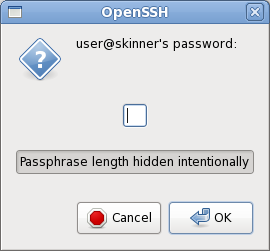
A solution
If you’d like to make it so that the setsid is “built-in” you can create an aliases like so:
$ alias ssh="setsid ssh"
Now when you ssh you’ll get the GUI popping up asking for your password:
$ ssh <a href="https://getridbug.com/cdn-cgi/l/email-protection" class="__cf_email__" data-cfemail="82f7f1e7f0c2f1e9ebecece7f0">[email protected]</a>
References
Method 2
It cannot be done in OpenSSH before version 8.4: for details read the issue in the OpenSSH Bugzilla asking for this feature since 2002 and finally fixed in 2021-01: Generalize SSH_ASKPASS.
For OpenSSH version 8.4+, see the accepted answer for a quick explanation of how to achieve this using SSH_ASKPASS_REQUIRE.
Method 3
It only took 19 years to solve this issue OpenSSH Bug 69 – generalised-askpass.
OpenSSH 8.4 will include a $SSH_ASKPASS_REQUIRE variable that accepts force|prefer|never options.
When I set SSH_ASKPASS_REQUIRE to prefer then ssh-add from the terminal will launch the ssh-askpass user interface. On my Arch Linux machine I have the following in my .xinitrc
export SSH_ASKPASS=/usr/lib/ssh/x11-ssh-askpass
export SSH_ASKPASS_REQUIRE=prefer
eval `keychain --eval --noask ~/.ssh/id_rsa`
And in my ~/.ssh/config I have
AddKeysToAgent yes
So when I run e.g. git pull in one of my projects the very first time after a reboot, then the askpass dialog will correctly popup and ask for the password only a single time.
Hope that helps.
Method 4
There is a way to close the terminal for a single command, and that is using file redirection:
ssh-add > /dev/null < /dev/null 2>&1
This will run the command ssh-add with the terminal closed. Which is fine and dandy, except for the its complexity. But now that you know the correct command, simply make it an alias and append it to ~/.bash_aliases:
alias ssh-add="/usr/bin/ssh-add > /dev/null < /dev/null 2>&1"
And you should be set. Simply typing ssh-add will now invoke the alias which will invoke the real command with all the redirection in place.
The ssh-add now correctly asks you the password with a dialog box… Provided that you have one of these packages installed (in Ubuntu or derivatives, they may have other names elsewhere):
ssh-askpassssh-askpass-fullscreenssh-askpass-gnomeksshaskpathkwalletclilxqt-openssh-askpassrazorqt-openssh-askpasss
Now, what do all those things mean?
The 2>&1 means redirect file descriptor #2 (standard error) to the same place file descriptor #1 (standard output) is directed to.
The > /dev/null means redirect standard output to /dev/null, which is a special file that discards all data written to it.
The < /dev/null means redirect standard input to /dev/null (idem).
As a side note, and an off topic but related note, if you ever want to program a service in bash, you must remember what a service actually is, a process with standard input, output, and error closed that is in the background:
service > /dev/null < /dev/null 2>&1 &
Notice that the only difference is the & added at the end (plus the fact that I changed the command ssh-add for a theoretical service. Those commands will correctly put a service on the background.
Method 5
I had the same problem when I installed seahorse (which provide seahorse-ssh-askpass) without installing the package gnome-keyring on ArchLinux.
Looking at the content of this package gnome-keyring (https://www.archlinux.org/packages/extra/i686/gnome-keyring) may help you solve your problem.
In any case, if you do not mind using seahorse, you can also install the packages seahorse and gnome-keyring (or the equivalent ones for your distribution).
If you do not use Gnome, additional steps may be required: https://wiki.archlinux.org/index.php/GNOME_Keyring.
All methods was sourced from stackoverflow.com or stackexchange.com, is licensed under cc by-sa 2.5, cc by-sa 3.0 and cc by-sa 4.0