I accidentally screw up my tmux terminal after cating a binary file. Now my tmux is messed up. Detaching and re-attaching doesn’t help, nor does a redraw (C-b r). Running reset only redraws the active pane, not the rest. Running ssty sane either in- or outside tmux doesn’t help either.
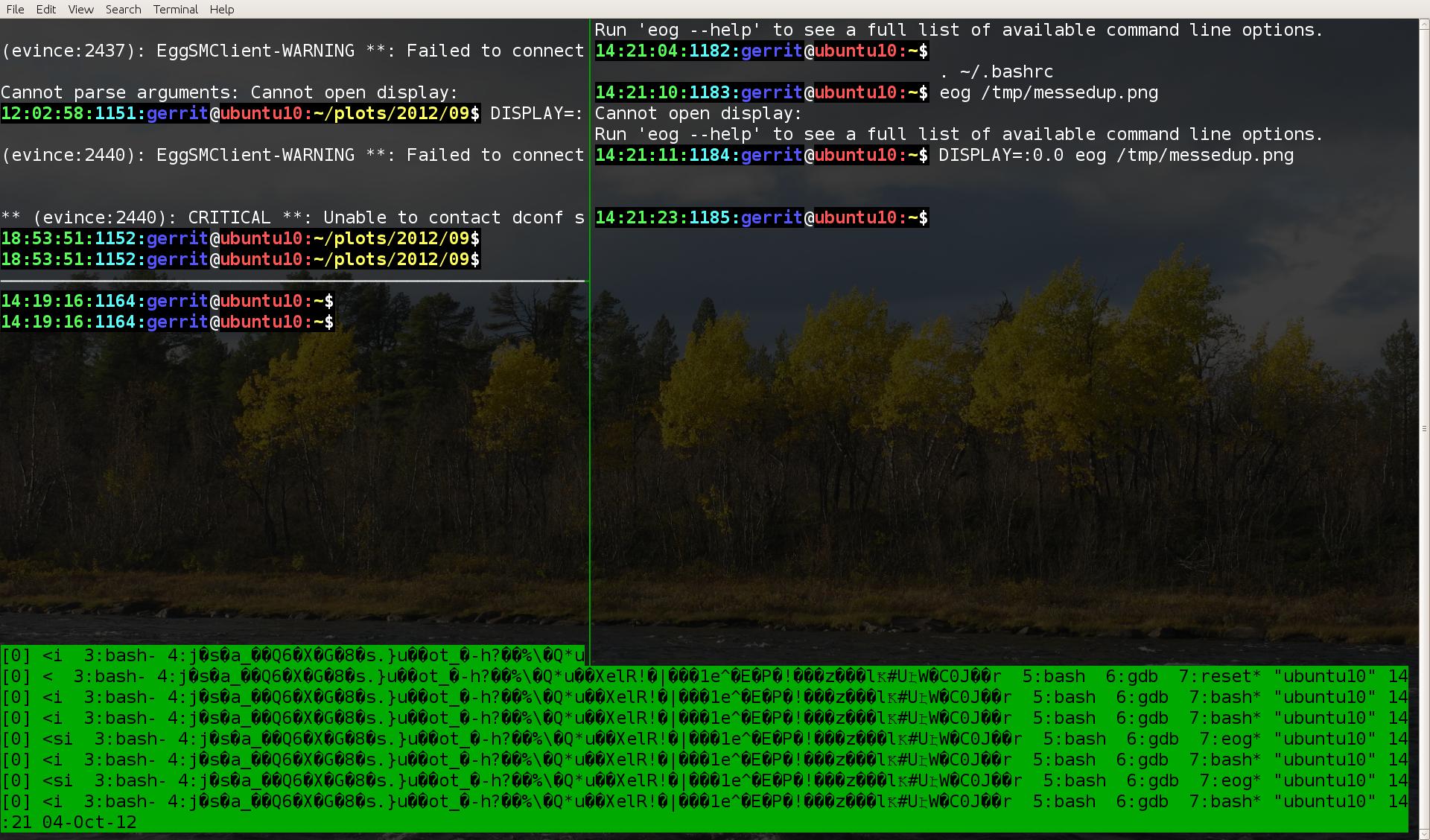
Within each pane, I have normal feedback from what I type (the initial call of reset immediately after the terminal got messed up solved this), but I can’t seem to fix the status-bar.
In gnome-terminal, every update to the status-bar leads to the status-bar to grow (see screenshot above). For example, this happens when I run a new application, when I switch panes, or when I resize a pane. Forcing a redraw (By C-b r, by running reset or via the gnome-terminal menu) shrinks back the status-bar to a single line, but it remains corrupted.
In xterm, the status-bar does remain within one line, but it remains corrupted as pictured.
I’m using tmux 1.5.
- How do I fix my
tmux-terminal?
This bug report from 2008 seems to describe the same issue, but it was marked as fixed. I don’t know in what version it was fixed, but tmux 1.5 ought to include a fix from 2008.
Answers:
Thank you for visiting the Q&A section on Magenaut. Please note that all the answers may not help you solve the issue immediately. So please treat them as advisements. If you found the post helpful (or not), leave a comment & I’ll get back to you as soon as possible.
Method 1
Try renaming window 4
- Switch to window 4: Control+b 4
- Rename window: Control+b , Control+u myNewname
(Thats a comma in the middle)
Or: Control+b :rename-window myNewname
Method 2
You need two command sequences to cleanup the mess:
First, run this in the garbled window (this works even when you are in ssh):
stty sane; printf '33k%s33\33]2;%s07' "`basename "$SHELL"`" "`uname -n`"; tput reset; tmux refresh
Then run this on the computer which runs tmux (it works inside and outside of tmux):
The following command affects all
tmuxinstances, which may change the left status of more than the current window. If you do not need that feature, leave it away.
tmux list-windows -a | while IFS=: read -r a b c; do tmux set-window-option -t "$a:$b" automatic-rename on; done
Explained in detail
This was assembled to address all the bits found in other answers and comments. There currently seems only a minor bit left with the second command. (See in the “missing bit” below).
To understand how this works, let us first kill the status line of tmux and the tty. Afterwards we correct it again, using a method which should be always available (unlike command reset).
How to make a tmux terminal (assumes UTF-8) unusable
stty -echo; printf '1633k%2000s\3333]2;35507' $'302217'
Warning: After running above command, the shell looks blind and deaf and seems only to talk bullshit in some unknown alien language. See below on how to repair this.
Explained:
-
stty -echokills the terminal type response -
printf '16'does aSO, so you are on the alternate character set -
printf '33]2;%s07' 'right status text'sets the right status, in this case$'355‘, which exposes a presentation bug -
printf '33k%2000s33\' $'302217'sets the window title name
This might be the combination you can see on the terminal after some interactive command crashed and dropped back into the shell. (With /bin/cat you cannot provoke stty -echo IMHO, but interactive commands like vim usually set this.)
Now clean up this mess
stty sane; printf '33k%s33\33]2;%s07' "$(basename "$SHELL")" "$(uname -n)"; tput reset; tmux refresh
Note: If you use copy and paste (you probably need to hold down
Shiftwhile pasting), you probably cannot see your paste if you have used the above command to mess up with yourtty. Hence, just blindly press the Enter key after pasting this.
Explained:
-
stty sanesets “sane” terminal parameters, so you get back your echo while typing -
printf '33k%s33\' "$(basename "$SHELL")"sets the window title back to normal. You can usetmux rename-window "$(basename "$SHELL")"alternatively, howevertmux rename-windowis limited totmuxwhere the escape sequence always works. -
printf '33]2;%s07' "$(uname -n)"resets the status-right to be shown as default. (Note that you should not usetmux set status-right "something", because it just outputs thepane titlewhich got corrupt, sostatus-rightjust exposes some presentation bug. Also note, that I did not find atmuxcommand to set the pane title directly.) -
tput resetresets the terminal, just in case this has been messed with -
tmux refreshrefreshes the screen to get rid of other debris which might have shown up
Missing bit
The printf '33k%s33\' "$(basename "$SHELL")" looses the standard ability of tmux to present the current command in the left status area. After printf '33k%s33\' "something" was executed this ability is lost and I did not find a good way, yet, how to bring it back as it was before.
But, as noted in the comments below, you can activate a similar feature of tmux as a replacement with following tmux setting:
set-window-option automatic-rename on
-
Either do this in the
tmuxcommand line, which can be reached in the current window with “Escape”:(where “Escape” is yourtmuxcommand key) and then enter the command. -
Or excute
tmux set-window-option automatic-rename onin your current terminal, but this fails in case you are not directly on the right shell level, for example it does not work withinsudoorssh. -
Or open another window in the current
tmuxsession and execute following command:for a in `tmux list-windows | sed 's/:.*//'; do tmux set-window-option -t "$a" automatic-rename on; done` -
Or open another shell to the computer which is running
tmuxand execute following command (this is outside of tmux):tmux list-windows -a | while IFS=: read -r a b c; do tmux set-window-option -t "$a:$b" automatic-rename on; done
PS: Thanks to all who helped to assemble this solution.
Method 3
The specific problem you are seeing has to do with the name/title of window 4. A combination of being too long (obviously) and containing strange characters which cause tmux to measure it as being shorter (so it fails to properly limit the status bar to the width of the screen) I am not sure how to reset it (on mine it tracks the name of the foreground process), you may have to close the window.
Method 4
simply do this
$ reset && tmux rename-window <new_window_name>
Method 5
tmux set-option -g status off && tmux set-option -g status on
fixed this for me when something other than the window name was corrupted and I couldn’t be bothered to figure out what it was.
Method 6
tmux might only constitute part of the problem. You may have to invoke stty sane at the command line. This resets the in-kernel TTY drivers to some set of default values that usually let you proceed. If the TTY drivers are messed up enough, you may have to type stty sane “blind”, that is, without on-screen feedback.
Method 7
Try to reload your config file?
Ctrlb, then: :source-file ~/.tmux.conf
Method 8
to fix the issue for me:
I just killed the issue pane and window, and created a new window and pane.
In the issue pane, CTRL+AX and CTRL+AC.
All methods was sourced from stackoverflow.com or stackexchange.com, is licensed under cc by-sa 2.5, cc by-sa 3.0 and cc by-sa 4.0