This is linked to this question.
When I run top I get the following result:
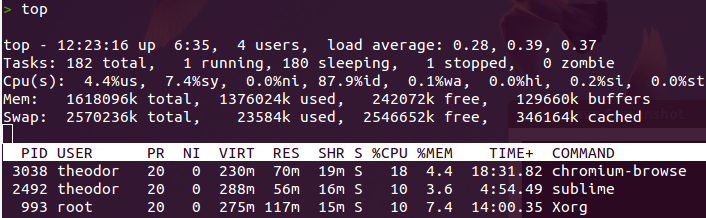
pid 3038 is using 18% cpu, however when running
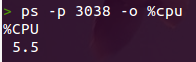
the result is 5.5%. And this number does not appear to be changing with time (i.e. when running the same command a bit later)…
Is the ps command somehow averaging the cpu usage?
Answers:
Thank you for visiting the Q&A section on Magenaut. Please note that all the answers may not help you solve the issue immediately. So please treat them as advisements. If you found the post helpful (or not), leave a comment & I’ll get back to you as soon as possible.
Method 1
man ps in NOTES section.
   CPU usage is currently expressed as the percentage of time spent running
   during the entire lifetime of a process.  This is not ideal, and it does not
   conform to the standards that ps otherwise conforms to.  CPU usage is
   unlikely to add up to exactly 100%.
And, guess you know, but you can also do:
top -p <PID>
Edit: as to your comment on other answer;
“Hmm yeah i Wonder how to get that (the instant CPU percentage) from ps“
Short answer: you can’t.
Why is it so?
It is like asking someone to calculate the speed of a car from a picture.
While top is a monitoring tool, ps is a snapshot tool. Think of it like this: At any given moment a process either uses the CPU or not. Thus you have either 0% or 100% load in that exact moment.
Giving: If ps should give instant CPU usage it would be either 0% or 100%.
top on the other hand keep polling numbers and calculate load over time.
ps could have given current usage – but that would require it to read data multiple times and sleep between each read. It doesn’t.
Calculation for ps %cpu
ps calculates CPU usage in the following manner:
uptime  = total time system has been running.
ps_time = process start time measured in seconds from boot.
pu_time = total time process has been using the CPU.

;; Seconds process has been running:
seconds   = uptime - ps_time
;; Usage:
cpu_usage = pu_time * 1000 / seconds

print: cpu_usage / 10 "." cpu_usage % 10

Example:

uptime  = 344,545
ps_time = 322,462
pu_time =   3,383

seconds   = 344,545 - 322,462 = 22,083
cpu_usage = 3,383 * 1,000 / 22,083 = 153

print: 153 / 10 "." 153 % 10 => 15.3
So the number printed is: time the process has been using the CPU during it’s lifetime. As in the example above. It has done so in 15.3% of its lifetime. In 84,7% of the time it has not been bugging on the CPU.
Data retrieval
ps, as well as top, uses data from files stored under /proc/ – or the process information pseudo-file system.
You have some files in root of /proc/ that have various information about the overall state of the system. In addition each process has its own sub folder /proc/<PID>/ where process specific data is stored. So, for example the process from your question had a folder at /proc/3038/.
When ps calculates CPU usage it uses two files:
/proc/uptime      The uptime of the system (seconds), and the amount of time spent in idle process (seconds).
/proc/[PID]/stat  Status information about the process.
- From
uptimeit uses the first value (uptime). - From
[PID]/statit uses the following:
 #  Name      Description
14  utime     CPU time spent in user code, measured in jiffies
15  stime     CPU time spent in kernel code, measured in jiffies
16  cutime    CPU time spent in user code, including time from children
17  cstime    CPU time spent in kernel code, including time from children
22  starttime Time when the process started, measured in jiffies
A jiffie is clock tick. So in addition it uses various methods, ie., sysconf(_SC_CLK_TCK), to get system’s Hertz (number of ticks per second) – ultimately using 100 as a fall-back after exhausting other options.
So if utime is 1234 and Hertz is 100 then:
seconds = utime / Hertz = 1234 / 100 = 12.34
The actual calculation is done by:
total_time = utime + stime

IF include_dead_children
    total_time = total_time + cutime + cstime
ENDIF

seconds = uptime - starttime / Hertz

pcpu = (total_time * 1000 / Hertz) / seconds

print: "%CPU" pcpu / 10 "." pcpu % 10
Example (Output from a custom Bash script):
$ ./psw2 30894
System information
           uptime : 353,512 seconds
             idle : 0
Process information
              PID : 30894
         filename : plugin-containe
            utime : 421,951 jiffies 4,219 seconds
            stime : 63,334 jiffies 633 seconds
           cutime : 0 jiffies 0 seconds
           cstime : 1 jiffies 0 seconds
        starttime : 32,246,240 jiffies 322,462 seconds

Process run time  : 31,050
Process CPU time  : 485,286 jiffies 4,852 seconds
CPU usage since birth: 15.6%
Calculating “current” load with ps
This is a (bit?) shady endeavour but OK. Lets have a go.
One could use times provided by ps and calculate CPU usage from this. When thinking about it it could actually be rather useful, with some limitations.
This could be useful to calculate CPU usage over a longer period. I.e. say you want to monitor the average CPU load of plugin-container in Firefox while doing some Firefox-related task.
By using output from:
$ ps -p -o cputime,etimes
CODE    HEADER   DESCRIPTION
cputime TIME     cumulative CPU time, "[DD-]hh:mm:ss" format.  (alias time).
etime   ELAPSED  elapsed time since the process was started, [DD-]hh:]mm:ss.
etimes  ELAPSED  elapsed time since the process was started, in seconds.
I use etime over etimes in this sample, on calculations, only to be a bit more clear. Also I add %cpu for “fun”. In i.e. a bash script one would obviously use etimes – or better read from /proc/<PID>/ etc.
Start:
$ ps -p 30894 -o %cpu,cputime,etime,etimes
%CPU     TIME     ELAPSED ELAPSED
 5.9 00:13:55    03:53:56   14036

End:
%CPU     TIME     ELAPSED ELAPSED
 6.2 00:14:45    03:56:07   14167

Calculate times:
            13 * 60 + 55 =    835   (cputime this far)
3 * 3,600 + 53 * 60 + 56 = 14,036   (time running this far)

            14 * 60 + 45 =    885   (cputime at end)
3 * 3,600 + 56 * 60 +  7 = 14,167   (time running at end)

Calculate percent load:
((885 - 835) / (14,167 - 14,036)) * 100 = 38
Process was using the CPU 38% of the time during this period.
Look at the code
If you want to know how ps does it, and know a little C, do (looks like you run Gnome Debain deriavnt) – nice attitude in the code regarding comments etc.:
apt-get source procps
cd procps*/ps
vim HACKING
Method 2
man top

%CPU  --  CPU usage
The  task's share of the elapsed CPU time since the last screen update, expressed as a percentage of total CPU time.  In a true SMP environment, if 'Irix
mode' is Off, top will operate in 'Solaris mode' where a task's cpu usage will be divided by the total number of CPUs.  You toggle  'Irix/Solaris'  modes
with the 'I' interactive command.


man ps
%cpu       %CPU    cpu utilization of the process in "##.#" format. Currently, it is the CPU time used divided by the time the process has been running                       (cputime/realtime ratio), expressed as a percentage. It will not add up to 100% unless you are lucky. (alias pcpu).
All methods was sourced from stackoverflow.com or stackexchange.com, is licensed under cc by-sa 2.5, cc by-sa 3.0 and cc by-sa 4.0