I have a pandas-Dataframe and use resample() to calculate means (e.g. daily or monthly means).
Here is a small example.
import pandas as pd
import numpy as np

dates = pd.date_range('1/1/2000', periods=100)
df = pd.DataFrame(np.random.randn(100, 1), index=dates, columns=['A'])

                   A
2000-01-01 -1.210683
2000-01-02  2.242549
2000-01-03  0.801811
2000-01-04  2.353149
2000-01-05  0.359541

monthly_mean = df.resample('M').mean()

                   A
2000-01-31 -0.048088
2000-02-29 -0.094143
2000-03-31  0.126364
2000-04-30 -0.413753
How do I plot the monthly_mean now?
How do I manage to use the index of my new created DataFrame monthly_mean as the x-axis?
Answers:
Thank you for visiting the Q&A section on Magenaut. Please note that all the answers may not help you solve the issue immediately. So please treat them as advisements. If you found the post helpful (or not), leave a comment & I’ll get back to you as soon as possible.
Method 1
Try this,
monthly_mean.plot(y='A', use_index=True)
Method 2
You can use reset_index to turn the index back into a column:
monthly_mean.reset_index().plot(x='index', y='A')
Look at monthly_mean.reset_index() by itself- the date is no longer in the index, but is a column in the dataframe, which is now just indexed by integers. If you look at the documentation for reset_index, you can get a bit more control over the process, including assigning sensible names to the index.
Method 3
Also,
monthly_mean.plot(x=df.index, y='A')
Method 4
monthly_mean.plot(y='A')
Uses index as x-axis by default.
Method 5
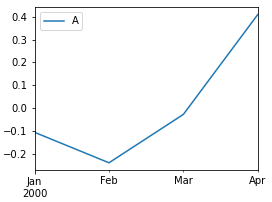
- When plotting line plots against the index, the simplest answer is to not assign any
xory. - This will plot lines for all numeric or datetime columns, without specifying
y
monthly_mean.plot()
- Only specify
y=if there are multiple columns and you want certain columns plotted - Or select the columns before plotting (e.g.
monthly_mean[[c1, c2, c5]].plot())
# sample data with multiple columns (5 x 5)
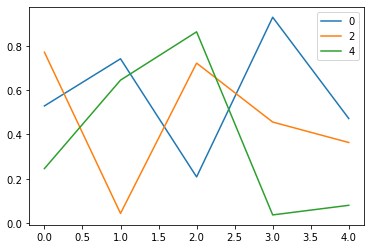
df = pd.DataFrame(np.random.random_sample((5, 5)))

# method 1: specify y
df.plot(y=[0, 2, 4])

# method 2: select columns first
df[[0, 2, 4]].plot()
Method 6
Something like this, perhaps.
import requests
import pandas as pd
from pandas import DataFrame
import matplotlib.pyplot as plt
import seaborn as sns

# Intitialise data of lists
data = [{'Month': '2020-01-01', 'Expense':1000, 'ID':'123'},
       {'Month': '2020-02-01', 'Expense':3000, 'ID':'123'},
       {'Month': '2020-03-01', 'Expense':2000, 'ID':'123'},
       {'Month': '2020-01-01', 'Expense':3000, 'ID':'456'},
       {'Month': '2020-02-01', 'Expense':5000, 'ID':'456'},
       {'Month': '2020-03-01', 'Expense':10000, 'ID':'456'},
       {'Month': '2020-03-01', 'Expense':5000, 'ID':'789'},
       {'Month': '2020-04-01', 'Expense':2000, 'ID':'789'},
       {'Month': '2020-05-01', 'Expense':3000, 'ID':'789'}]
df = pd.DataFrame(data)
df
Then…
uniques = df['ID'].unique()

for i in uniques:
    fig, ax = plt.subplots()
    fig.set_size_inches(4,3)
    df_single = df[df['ID']==i]
    sns.lineplot(data=df_single, x='Month', y='Expense')
    ax.set(xlabel='Time', ylabel='Total Expense')
    plt.xticks(rotation=45)
    plt.show()



All methods was sourced from stackoverflow.com or stackexchange.com, is licensed under cc by-sa 2.5, cc by-sa 3.0 and cc by-sa 4.0