From https://unix.stackexchange.com/a/17278/674
If you run
ssh -X localhost, you should see that$DISPLAYis
(probably)localhost:10.0. Contrast with:0.0, which is the value
when you’re not connected over SSH. (The.0part may be omitted;
it’s a screen number, but multiple screens are rarely used.) There are
two forms of X displays that you’re likely to ever encounter:
- Local displays, with nothing before the
:.- TCP displays, with a hostname before the
:.With
ssh -X localhost, you can access the X server through both
displays, but the applications will use a different method::NUMBER
accesses the server via local sockets and shared memory, whereas
HOSTNAME:NUMBERaccesses the server over TCP, which is slower and
disables some extensions.
What are the relations and differences between X server, display and
screen?
What does “the X server through both display” mean? Does a “display”
means a display server, i.e. an X server, so two “displays” means
two display servers, i.e. two X servers.
What does “multiple screens” mean? Does a “screen” mean a display
monitor?
Thanks.
Answers:
Thank you for visiting the Q&A section on Magenaut. Please note that all the answers may not help you solve the issue immediately. So please treat them as advisements. If you found the post helpful (or not), leave a comment & I’ll get back to you as soon as possible.
Method 1
I will give you a visual example to explain the basics of X11 and what is going on in the background:
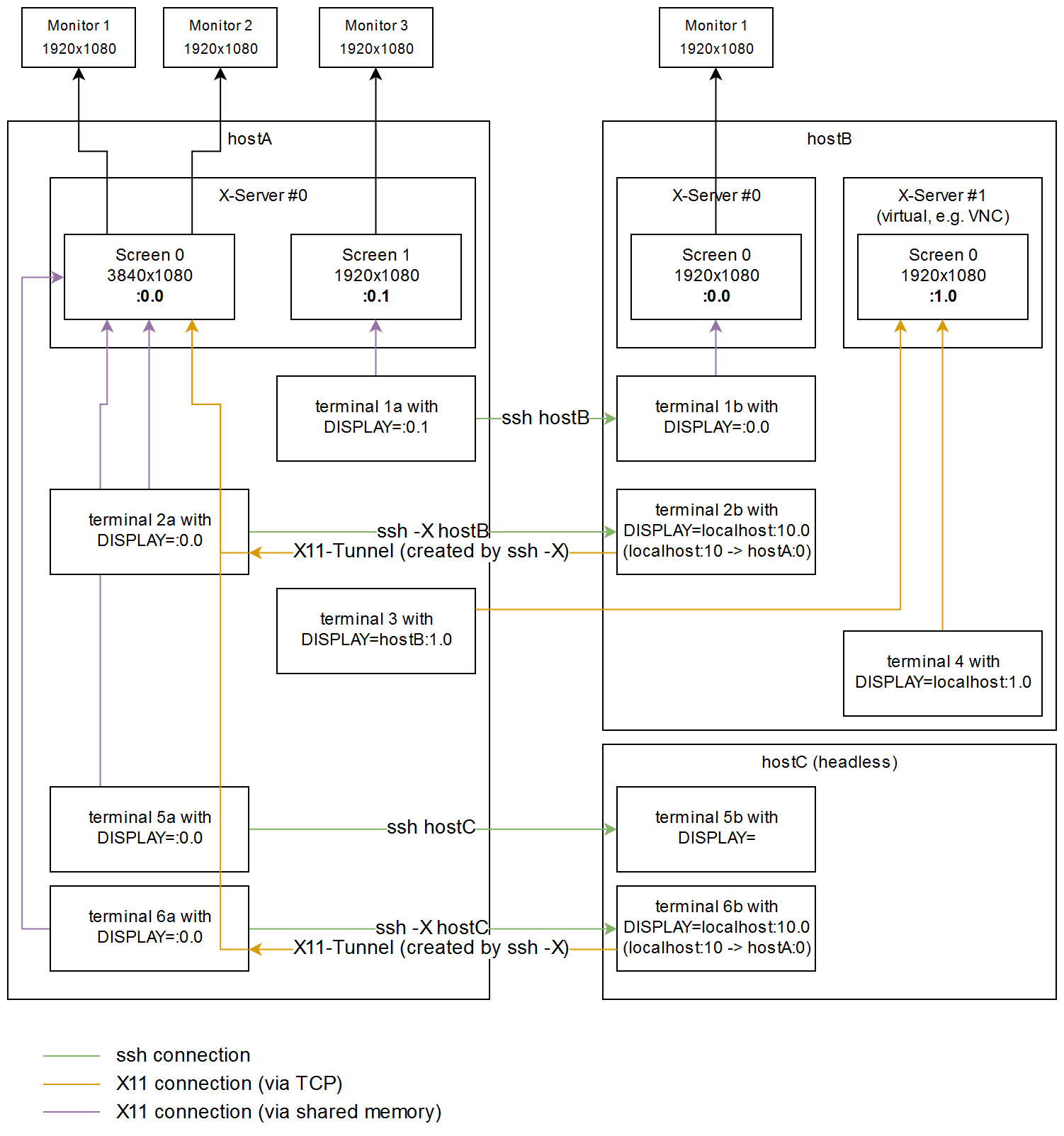
In this example you have a local X11-server with two “screens” on your hostA. Usually there would be only one server with one screen (:0.0), which spans across all your monitors (makes multi-monitor applications way easier). hostB has two X servers, where the second one has no physical display (e.g. virtual framebuffer for VNC). hostC is a headless server without any monitors.
terminal 1a, 2a, 5a, 6a:
If you open a local terminal, and set the display to :0.0 (default) or :0.1, the drawing calls for your graphical programs will be sent to the local X server directly via the memory.
terminal 1b, 5b:
If you ssh onto some server, usually the display will be set automatically to the local X server, if there is one available. Otherwise, it will not be set at all (reason see terminal 3).
terminal 2b, 6b:
If you ssh onto a server, and enable X11-forwarding via the “-X” parameter, a tunnel is automatically created through the ssh-connection. In this case, TCP Port 6010 (6000+display#) on hostB is forwarding the traffic to Port 6000 (X server #0) on hostA. Usually the first 10 displays are reserved for “real” servers, therefore ssh remaps display #10 (next user connecting with ssh -X while you’re logged in, would then get #11). There is no additional X server started, and permissions for X-server #0 on hostA are handled automatically by ssh.
terminal 4:
If you add a hostname (e.g. localhost) in front of the display/screen#, X11 will also communicate via TCP instead of the memory.
terminal 3:
You can also directly send X11 commands over the network, without setting up a ssh-tunnel first. The main problem here is, that your network/firewall/etc. needs to be configured to allow this (beware X11 is practically not encrypted), and permissions for the X server need to be granted manually (xhosts or Xauthority).
To answer your questions
What are the relations and differences between X server, display and screen?
A display just refers to some X server somewhere. The term “both displays” was referring to “:0.0” on the local computer (“local display”) being equal to “localhost:10.0” on the ssh-target (“TCP display”). “screens” is referring the different virtual monitors (framebuffers) of the X server. “localhost:10.0” is only redirecting to the local X server, there is no X server started on the ssh-target.
All methods was sourced from stackoverflow.com or stackexchange.com, is licensed under cc by-sa 2.5, cc by-sa 3.0 and cc by-sa 4.0