I run a web server (Debian Squeeze on a VPS), and the graphs provided by the hosting company show consistently that around twice as much traffic is incoming to the server compared to the outgoing traffic. I am a little confused by this, so I would like to run some kind of logging utility on the machine that will not only confirm the upload/download figures, but also split them up by the remote host involved, so I can see if a large proportion of the incoming traffic is from one particular source.
I suspect most of the outgoing traffic goes through Apache, but the incoming traffic may be mostly through Apache or could be dominated by other scripts and cron jobs, so I would prefer a tool that would monitor traffic at the interface level rather than something within Apache.
Ideally I would like a tool that I can leave running for a few days, then come back and get an output of “bytes per remote host” for both incoming and outgoing traffic.
Is this possible with a standard Linux tool and a bit of configuration (if so, how?) or with a specialist program (if so, which?)
Answers:
Thank you for visiting the Q&A section on Magenaut. Please note that all the answers may not help you solve the issue immediately. So please treat them as advisements. If you found the post helpful (or not), leave a comment & I’ll get back to you as soon as possible.
Method 1
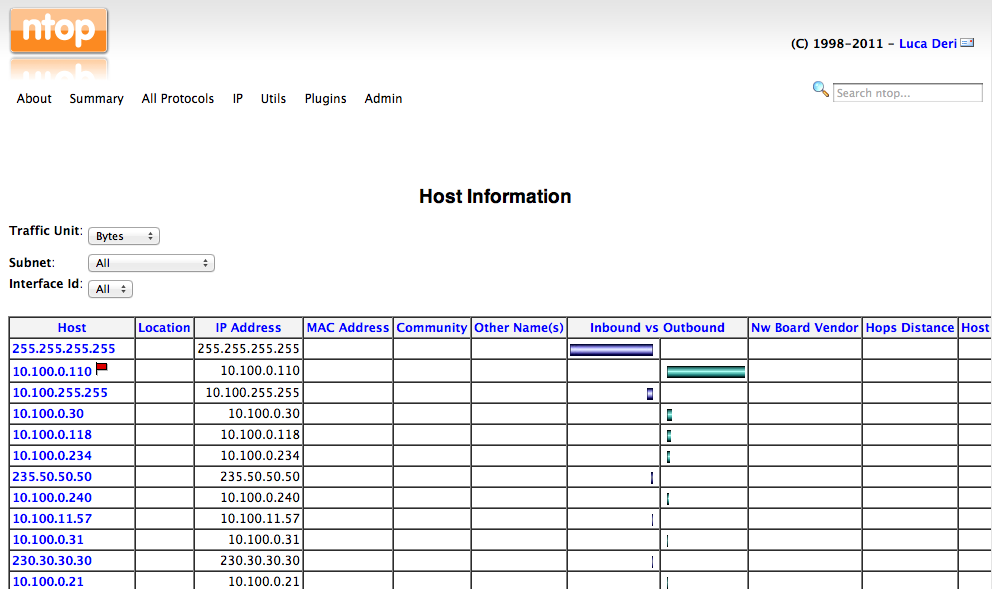
ntop is probably your best solution for doing this. It is designed to run long term and capture exactly what youre looking for.
It can show you what remote destinations are being used the most, how much traffic sent to/from, what protocols and ports were being used etc. It can do the same for the source hosts if you run it on a router so you can see the same stats on local clients as well.
It then uses a web GUI to navigate and display this information.
Method 2
If you have root, you could just use tcpdump and grab everything. You can then pull it up in Wireshark and analyze to your heart’s content.
$ sudo tcpdump -i <interface> -w mycapture.tcpdump
… and then hit ctrl-c when you’ve had enough. Run in a screen session if you need to detatch, etc.
By default, it’ll only capture the first part of each packet, but since you’re mostly interested in origin analysis that should be fine. Tons of other options to tcpdump if you’re feeling adventurous.
EDIT:
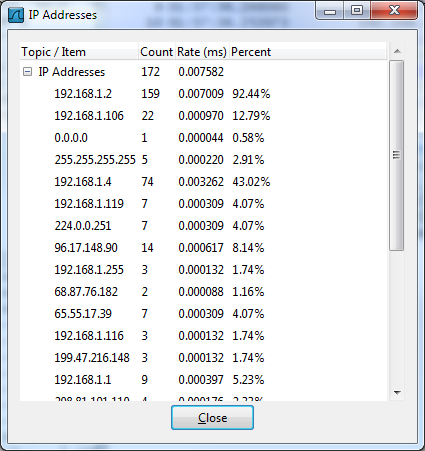
In fact, once loaded into Wireshark, you can just use the menu option Statistics | IP Addresses… and get a nice summary of traffic by count/rate/percent:
Method 3
And for a more advanced metrics you can use something like monitorix which have modules for most common services and it’s just a simple:
apt-get install monitorix
Also you have cacti an complete GUI RDDtool, but not real time.
And in the top 1 for me it’s the multi-configurable grafana. Its a little bit more difficult to install & configure but it’s just perfect, you can measure everything in detail and real-real-time.
It needs some dependencies JVM,graphite, whisper,… some knowledge about JSON, but works like a charm I really recommend it!
Maybe a good config for your case should be:
collectd + graphite + whisper + grafana
Actually grafana changed my life in the office.
Method 4
sure 😉
https://github.com/graphite-project/whisper
Also if you want a mini-howto for how to connect everything:
https://linuxboss.wordpress.com/2015/12/03/graphite-grafana/
All methods was sourced from stackoverflow.com or stackexchange.com, is licensed under cc by-sa 2.5, cc by-sa 3.0 and cc by-sa 4.0