Within the output of top, there are two fields, marked “buff/cache” and “avail Mem” in the memory and swap usage lines:
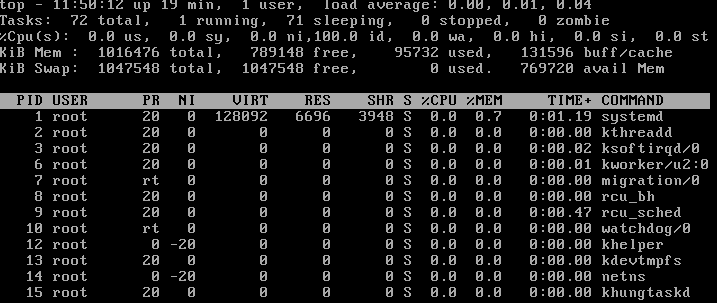
What do these two fields mean?
I’ve tried Googling them, but the results only bring up generic articles on top, and they don’t explain what these fields signify.
Answers:
Thank you for visiting the Q&A section on Magenaut. Please note that all the answers may not help you solve the issue immediately. So please treat them as advisements. If you found the post helpful (or not), leave a comment & I’ll get back to you as soon as possible.
Method 1
top’s manpage doesn’t describe the fields, but free’s does:
buffers
Memory used by kernel buffers (
Buffersin/proc/meminfo)cache
Memory used by the page cache and slabs (
Cachedand
SReclaimablein/proc/meminfo)buff/cache
Sum of buffers and cache
available
Estimation of how much memory is available for starting new
applications, without swapping. Unlike the data provided by
the cache or free fields, this field takes into account page
cache and also that not all reclaimable memory slabs will be
reclaimed due to items being in use (MemAvailablein
/proc/meminfo, available on kernels 3.14, emulated on kernels
2.6.27+, otherwise the same as free)
Basically, “buff/cache” counts memory used for data that’s on disk or should end up there soon, and as a result is potentially usable (the corresponding memory can be made available immediately, if it hasn’t been modified since it was read, or given enough time, if it has); “available” measures the amount of memory which can be allocated and used without causing more swapping (see How can I get the amount of available memory portably across distributions? for a lot more detail on that).
Method 2
Just to clarify a bit, buffers refers to data that is being written — that memory cannot be reclaimed until the write is complete.
Cache refers to data that has been read — it is kept around in case it needs to be read again, but can be immediately reclaimed since it can always be re-read from disk.
Method 3
The canonical source of this information is /usr/src/linux/Documentation/filesystems/proc.txt
Buffers: Relatively temporary storage for raw disk blocks shouldn’t
get tremendously large (20MB or so)
Cached: in-memory cache for files
read from the disk (the page cache). Doesn’t include SwapCached.
You can also find some more details here.
The Linux Page Cache (“Cached:” from meminfo ) is the largest single
consumer of RAM on most systems. Any time you do a read() from a file
on disk, that data is read into memory, and goes into the page
cache(1.).
The buffer cache (“Buffers:” in meminfo) is a close
relative to the dentry/inode caches.
Or analysis the source code like this.
The amount of buffers is the return value of function nr_blockdev_pages(void)
long nr_blockdev_pages(void)
{
        struct block_device *bdev;
        long ret = 0;
        spin_lock(&bdev_lock);
        list_for_each_entry(bdev, &all_bdevs, bd_list) {
                ret += bdev->bd_inode->i_mapping->nrpages;
        }
        spin_unlock(&bdev_lock);
        return ret;
}
The amount of cached:
global_page_state(NR_FILE_PAGES) – total_swapcache_pages – i.bufferram
All methods was sourced from stackoverflow.com or stackexchange.com, is licensed under cc by-sa 2.5, cc by-sa 3.0 and cc by-sa 4.0