I have installed pip and ez setup. I also checked the system path and I can see the module in the folder structure. Still when i try to run pip command, I get an Import error saying no module named pip. I am running 32bit python on a windows7 machine
Answers:
Thank you for visiting the Q&A section on Magenaut. Please note that all the answers may not help you solve the issue immediately. So please treat them as advisements. If you found the post helpful (or not), leave a comment & I’ll get back to you as soon as possible.
Method 1
Just be sure that you have include python to windows PATH variable, then run python -m ensurepip
Method 2
After running get_pip.py with python embed you have to modify your pythonXX._pth file. Add Libsite-packages, to get something like this:
pythonXX.zip
.
Libsite-packages
# Uncomment to run site.main() automatically
#import site
If you don’t you will get this error:
ModuleNotFoundError: No module named ‘pip’
or
python-3.8.2-embed-amd64python.exe: No module named pip
λ pip
Traceback (most recent call last):
  File "runpy.py", line 193, in _run_module_as_main
  File "runpy.py", line 86, in _run_code
  File "python-3.8.2-embed-amd64Scriptspip.exe__main__.py", line 4, in <module>
ModuleNotFoundError: No module named 'pip'

λ python -m pip
python-3.8.2-embed-amd64python.exe: No module named pip
Method 3
What solved the issue on my case was go to:
cd C:Program FilesPython37Scripts
And run below command:
easy_install.exe pip
Method 4
This issue occurs with me while I was trying to upgrade pip version.
It was resolved with the following commands:
python -m ensurepip
The above command restores the pip and below mentioned upgrades it.
python -m pip install --upgrade pip
Method 5
Follow steps given in https://michlstechblog.info/blog/python-install-python-with-pip-on-windows-by-the-embeddable-zip-file/. Replace x with version number of Python.
- Open the
pythonxx.__pthfile, located in your python folder. - Edit the contents (e.g.
D:Pythonx.x.xto the following):
 D:Pythonx.x.x
 D:Pythonx.x.xDLLs
 D:Pythonx.x.xlib
 D:Pythonx.x.xlibplat-win
 D:Pythonx.x.xlibsite-packages
Method 6
try to type pip3 instead pip.
also for upgrading pip dont use pip3 in the command
python -m pip install -U pip
maybe it helps
Method 7
turned out i had 2 versions of python on my laptop
both commands worked for me
python -m ensurepip
py -m ensurepip
both with another installation path
c:toolspythonlibsite-packages
c:program files (x86)microsoft visual studiosharedpython36_64libsite-packages
only the first path was in my %PATH% variable
Method 8
Running these 2 commands helped me:
curl https://bootstrap.pypa.io/get-pip.py -o get-pip.py
python get-pip.py
Method 9
The ensurepip module was added in version 3.4 and then backported to 2.7.9.
So make sure your Python version is at least 2.7.9 if using Python 2, and at least 3.4 if using Python 3.
Method 10
I’v solved this error by setting the correct path variables
    C:UsersnameAppDataLocalProgramsPythonPython37Scripts
    C:UsersnameAppDataLocalProgramsPythonPython37Libsite-packages
Method 11
If you wrote
pip install --upgrade pip
and you got
Installing collected packages: pip
  Attempting uninstall: pip
    Found existing installation: pip 20.2.1
    Uninstalling pip-20.2.1:
ERROR: Could not install packages due to an EnvironmentError...
then you have uninstalled pip instead install pip.
This could be the reason of your problem.
The Gorodeckij Dimitrij’s answer works for me.
python -m ensurepip
Method 12
I found this post while looking for a solution for the same problem. I was using an embedded python distribution. In this case, the solution is to uncomment import site in the file python<version>._pth.
Method 13
I was facing same issue and resolved using following steps
1) Go to your paython package and rename “python37._pth” to python37._pth.save
2) curl https://bootstrap.pypa.io/get-pip.py -o get-pip.py
3) then run python get-pip.py
4) pip install django
Hope this help
Method 14
First make sure that python is added in environment variable.
Try checking the version of pip or pip3. Use these commands to check.
For pip:
pip --version
For pip3:
pip3 --version
If you can see any version of pip and still not able to use it, then run the following command.
python -m ensurepip
This ensures the pip in your system.
Method 15
I’ve solved this error downloading the executable file for python 3.7.
I’ve had downloaded the embeddeable version and got that error.
Now it works! 😀
Method 16
The method I’m going to tell might not be the correct way to do it. But this method solved my issue. I tried every solution on youtube and StackOverflow methods.
- If you have two python versions installed. Delete one. I have the python 3.8.1 and 3.9.0 versions installed. I deleted version 3.9.0 from the C directory.
- Now go to the control panel > System and security > System > Advanced system settings.
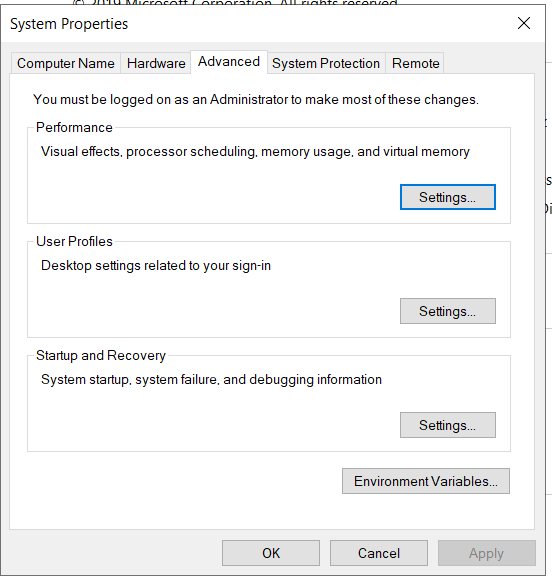
Click on ‘environment variables’.
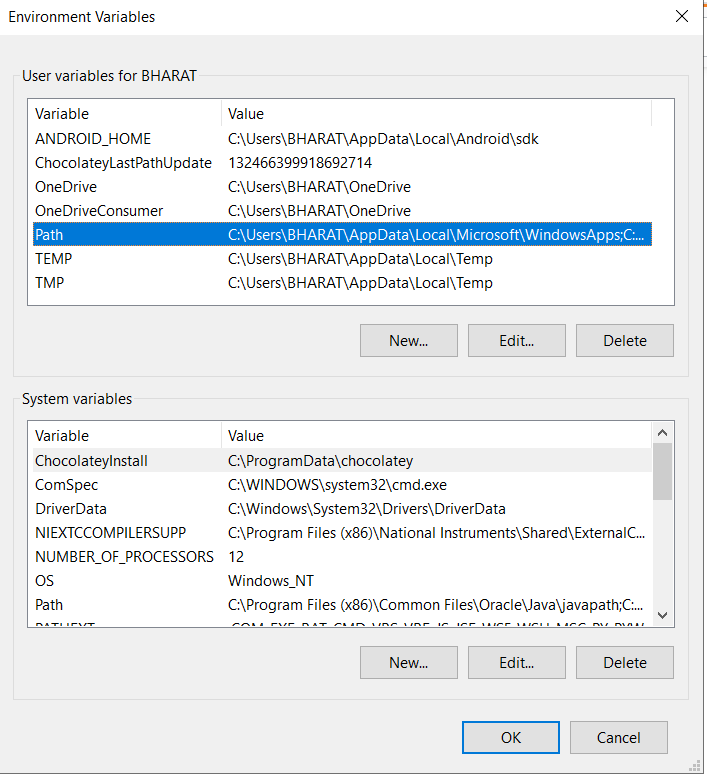
Select the path and click on ‘edit’
Now, add the path of the python and also the path of pip module. In my case it was c:python38 and c:python38scripts
This method solved my issue.
All methods was sourced from stackoverflow.com or stackexchange.com, is licensed under cc by-sa 2.5, cc by-sa 3.0 and cc by-sa 4.0