I am using Ubuntu 14.04 and 16.04. On 14.04 I additionally installed Terminology.
On 16.04 Terminal and Terminology the characters in the bash are not displayed correctly:
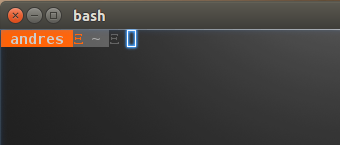
Look with Ubuntu 14.04 Terminal
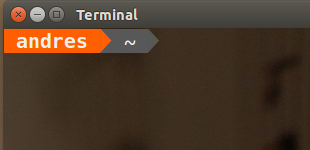
I first assumed that there are some environment variables that differ. I have not found which cause this. After I installed Terminology on 14.04 and it shows the characters the wrong way on 14.04 I assume it has nothing to do with the environment.
What do I have to configure to get the same result as with Terminal from Ubuntu 14.04 in the other options?
Value of PS1:
[e[37;1m][] u [e[0m][][e[0m][] w [e[0m][]
Variables in Ubuntu 14.04 Terminal:
LANG=en_US.UTF-8
LANGUAGE=en_US
LC_ADDRESS=de_DE.UTF-8
LC_IDENTIFICATION=de_DE.UTF-8
LC_MEASUREMENT=de_DE.UTF-8
LC_MONETARY=de_DE.UTF-8
LC_NAME=de_DE.UTF-8
LC_NUMERIC=de_DE.UTF-8
LC_PAPER=de_DE.UTF-8
LC_TELEPHONE=de_DE.UTF-8
LC_TIME=de_DE.UTF-8
And in Terminology on 14.04:
LANG=en_US.UTF-8
LANGUAGE=en_US
LC_ADDRESS=de_DE.UTF-8
LC_IDENTIFICATION=de_DE.UTF-8
LC_MEASUREMENT=de_DE.UTF-8
LC_MONETARY=de_DE.UTF-8
LC_NAME=de_DE.UTF-8
LC_NUMERIC=de_DE.UTF-8
LC_PAPER=de_DE.UTF-8
LC_TELEPHONE=de_DE.UTF-8
LC_TIME=de_DE.UTF-8
Answers:
Thank you for visiting the Q&A section on Magenaut. Please note that all the answers may not help you solve the issue immediately. So please treat them as advisements. If you found the post helpful (or not), leave a comment & I’ll get back to you as soon as possible.
Method 1
That character (U+E0B0) is not a valid Unicode character. Or more exactly, it’s in the private use section in Unicode, so you can use it for your own use.
In the example usage section, that Wikipedia article mentions:
Powerline, a status line plugin for vim, use U+E0A0–U+E0A2 and U+E0B0–U+E0B3 for extra box-drawing characters.
Which leads us to https://github.com/powerline/powerline
Which gives instructions on how to install fonts for those Unicode point codes.
All methods was sourced from stackoverflow.com or stackexchange.com, is licensed under cc by-sa 2.5, cc by-sa 3.0 and cc by-sa 4.0