now i am user “lawrence.li” ,I can see directory “lijunda” with “read” privilege
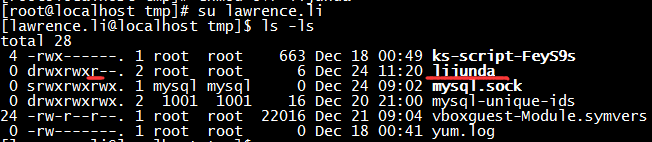
but now i have no “read” privilege,why can i still see this directory?

I am confused that what is the difference between “r” and “-“(no read privilege),can anybody tell me why? thank you very much
Answers:
Thank you for visiting the Q&A section on Magenaut. Please note that all the answers may not help you solve the issue immediately. So please treat them as advisements. If you found the post helpful (or not), leave a comment & I’ll get back to you as soon as possible.
Method 1
Try ls -l /tmp/lijunda and all you will see is the names of the files within—you won’t be able to open the files, or even see the file size, permissions, etc. about the files within that directory.
This is because the directory itself only contains filenames and inode numbers—that’s all.
Read access to the filenames is controlled by the read permission.
Access to the inodes pointed to by the directory is controlled by the execute permission—not the read permission. The inodes contain all the actual details about the file, such as filesize, owner, permissions, time last modified, and the physical location (on your physical hard disk) of the binary data which comprises the file’s contents.
To view the names of the files in the directory—you need read permission on the directory. You don’t need execute or write permissions for this.
To view the details of the files in the directory i.e. to view the inode contents—you need execute permissions on the directory. Read permissions on the directory makes no difference for viewing details of a file if you already know the file’s name.
To view the details of files that you don’t already know the names of, you need read and execute permissions.
And finally, to view the contents of a file—you need:
- read permissions on the file itself,
- execute permissions on the directory that contains the file*, and
- at least one of: read permissions on the directory containing the file OR the knowledge of the name of the file through some other means.
See below for example.
$ whoami
vagrant
$ ls -l
total 12
drwxrwx--x 2 pete pete 4096 Dec 24 08:51 execute_only
drwxrwxr-x 2 pete pete 4096 Dec 24 08:52 read_and_execute
drwxrwxr-- 2 pete pete 4096 Dec 24 08:52 read_only
$ ls -l read_only/
ls: cannot access read_only/mysterious_file: Permission denied
total 0
-????????? ? ? ? ?            ? mysterious_file
$ cat read_only/mysterious_file
cat: read_only/mysterious_file: Permission denied
$ ls -l execute_only/
ls: cannot open directory execute_only/: Permission denied
$ ls -l execute_only/unicorn_file
-rw-rw-r-- 1 pete pete 55 Dec 24 08:51 execute_only/unicorn_file
$ cat execute_only/unicorn_file
This file only exists for you if you know it's here ;)
$ ls -l read_and_execute/
total 4
-rw-rw-r-- 1 pete pete 83 Dec 24 08:52 jack_sparrow
$ cat read_and_execute/jack_sparrow
"After the reading, you will be executed."
"That's *Captain* Jack Sparrow to you!"
$
*You also need execute permissions on all the parent directories all the way up to root, by the way.
Method 2
The read permission refers to the ability to read the contents of the file. The ability to see what files/directory, you have to remove the users execute permission on the directory itself. This would, of course, mean that the user could no longer see any files/directories within that directory.
See this link for example:
Directory permissions
The chmod command can also be used to control the access permissions for directories. In most ways, the permissions scheme for directories works the same way as they do with files. However, the execution permission is used in a different way. It provides control for access to file listing and other things.
Edit: It would seem I did a poor job of explaining this, as I was meaning to reference the parent directory (tmp) and not the lijunda directory. @Wildcard does a much better (and more in-depth) job in answering this in their answer here
All methods was sourced from stackoverflow.com or stackexchange.com, is licensed under cc by-sa 2.5, cc by-sa 3.0 and cc by-sa 4.0