To restart or shut off Linux from the terminal, one can use reboot and poweroff, respectively. However, both of these commands require root privileges. Why is this so? What security risk is posed by not requiring this to have root privileges? The GUI provides a way for any user to shut off or restart, so why do the terminal commands need to be run as root?
Speaking of the options from the GUI, if the terminal requires root privileges to shut off or restart the Linux computer, how is the GUI able to present an option that does the same without requiring the entering of a password?
Answers:
Thank you for visiting the Q&A section on Magenaut. Please note that all the answers may not help you solve the issue immediately. So please treat them as advisements. If you found the post helpful (or not), leave a comment & I’ll get back to you as soon as possible.
Method 1
Warning: by the end of this answer you’ll probably know more about linux than you wanted to
Why reboot and poweroff require root privileges
GNU/Linux operating systems are multi-user, as were its UNIX predecessors. The system is a shared resource, and multiple users can use it simultaneously.
In the past this usually happened on computer terminals connected to a minicomputer or a mainframe.
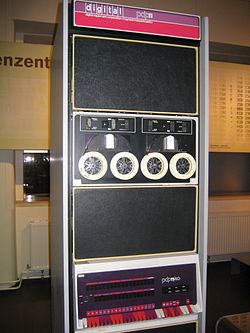
The popular PDP-11 minicomputer. A bit large, by today’s standards 🙂
In modern days, this can happen either remotely over the network (usually via SSH), on thin clients or on a multiseat configuration, where there are several local users with hardware attached to the same computer.
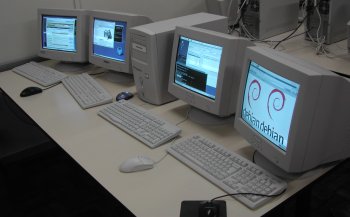
A multi-seat configuration. Photo by Tiago Vignatti
In practice, there can be hundreds or thousands of users using the same computer simultaneously. It wouldn’t make much sense if any user could power off the computer, and prevent everyone else from using it.
What security risk is posed by not requiring this to have root privileges?
On a multi-user system, this prevents what is effectively a denial-of-service attack
The GUI provides a way for any user to shut off or restart, so why do the terminal commands need to be run as root?
Many Linux distributions do not provide a GUI. The desktop Linux distributions that do are usually oriented to a single user pattern, so it makes sense to allow this from the GUI.
Possible reasons why the commands still require root privileges:
- Most users of a desktop-oriented distro will use the GUI, not the command line, so it’s not worth the trouble
- Consistency with accepted UNIX conventions
- (Arguably misguided) security, as it prevents naive programs or scripts from powering off the system
How is the GUI able to present shutdown without root privileges?
The actual mechanism will vary depending on the specific desktop manager (GUI). Generally speaking, there are several mechanisms available for this type of task:
- Running the GUI itself as root (hopefully that shouldn’t happen on any proper implementation…)
- setuid
- sudo with NOPASSWD
- Communicating the command to another process that has those privileges, usually done with D-Bus. On popular GUIs, this is usually managed by polkit.
In summary
Linux is used in very diverse environments – from mainframes, servers and desktops to supercomputers, mobile phones, and microwave ovens. It’s hard to keep everyone happy all the time! 🙂
Method 2
Linux has its origins in Unix and Unix was initially developed as a multi-user operating system. You could have one user disrupt other users by wanting to reboot the system. Only the administrator with root privileges could do that.
Method 3
Its quite natural and a policy matter and convenience, it had been allowed from GUI because you are physically logged in to the machine. ( Some Linux distributions will still ask you for password if the GUI is not running as root , I am using Centos 6 and there is even no GUI shutdown/reboot option for my user , there is only log out and lock option)
From a pseudo-terminal you need to be root or have the sudo privilege because you might not want any user to ssh into your server or machine and shut it down or reboot it.
Method 4
Shutdown (of any kind) affects all users, up to and including killing their processes. This is not something that you would normally want J. Random User to be able to do, simply because they are logged in.
Normally, only authorised operators should be allowed to reboot, and in some cases, those with physical access – many Linux systems can be shut down from a power button on the case. I know this, because I have accidentally done so! Nowadays, I normally leave the button disconnected when assembling a system…
Method 5
For the 1st question:
What security risk is posed by not requiring this to have root privileges? The GUI provides a way for any user to shut off or restart, so why do the terminal commands need to be run as root?
Yes, as said in this answer, Linux is inherently designed as multiuser system. Consider more than one user are working on a system, then it would be bad if any one normal user is allowed to turn-off the system while others are working. Imagine what happens if your web-server taken down by a user at a distance! So, Only system administrator aka root-user is allowed to poweroff or reboot the system.
You can also figure-out:
$ which poweroff reboot
/sbin/poweroff
/sbin/reboot
So, poweroff and reboot are located under /sbin directory which holds the utilities and root-only commands, essential binaries for booting, restoring, recovering, and/or repairing the system.
So, these commands are expected to be run by system-administrator/root user, visit the manpage:
DESCRIPTION
       These programs allow a system administrator to reboot, halt or poweroff the system.
Also visit related question: Why do we need to be root in terminal for shutdown and restart?
For the 2nd question:
Speaking of the options from the GUI, if the terminal requires root privileges to shut off or restart the Linux computer, how is the GUI able to present an option that does the same without requiring the entering of a password?
GUI is a matter of convenience and obviously user logged into GUI, knows what’s going on and what s/he is doing. So, it doesn’t expect password prompt/requirement from user i.e allowed to be shut-down or reboot through some mechanism like policy-kit. But in case of command-line the things are quit different…
Of course, you can use equivalent command provided by Desktop-Environment. Example, for gnome, you can use: gnome-session-quit with appropriate option which doesn’t require root privileges.
Also visit related question: How does the power button shut the computer down without root permission?
Method 6
as the others already wrote, a “normal” user should not be able to end other users processes or shut down a service (web server, mail server, …) and that’s why super user rights are needed.
The GUI is able to shut down or reboot via the setuid mechanism https://en.wikipedia.org/wiki/Setuid. In simple words: the reboot command itself has root priviliges and you as normal user are allowed to execute reboot. Since you’re not allowed to manipulate the reboot executable (you have execution rights but no write permission) this does not provide a way to gain root rights over the machine.
And (again as the others wrote already) the GUI is assumed to be run physically at the machine, so it is a user computer and not a server, and you could (by unplugging the power) anyhow power down the computer, so why bother about root rights 😉
I’ve also seen GUIs, which check if other users are logged in (e.g. a root shell somewhere) and do not allow to shut down if other users are logged in.
EDIT: As corrected by Pandya, it’s policy-kit allowing you as normal user to reboot/shut down
All methods was sourced from stackoverflow.com or stackexchange.com, is licensed under cc by-sa 2.5, cc by-sa 3.0 and cc by-sa 4.0